
I only changed the instance type on wrangler config which didn't work for a while then suddenly work
I only changed the instance type on wrangler config which didn't work for a while then suddenly worked hours later when I tried again

 1
1 FF
FF T
T PP
PP S
S GS
GS H
H ✅SSSSF
 S
S TTSTS
TTSTS S
SsleepAfter J
J J
J S
S 面
面
 T
T つ
つfetch()Container port not foundthis.ctx.container!.start()startAndWaitForPorts() D
D R
RError checking 8000: The container is not listening in the TCP address 10.0.0.1:8000 K
K M
M !
! . If you redeploy your container, it should be fixed. But we've got more to do here. If you spin up a bunch of containers, you'll fall back to other regions faster than we want. So working on making this better. And then also, if you launch a container via Workers CI ("Deploy to Cloudflare" button), it's not pre-warming properly.
dev KKG
KKG
 Y
Y G
G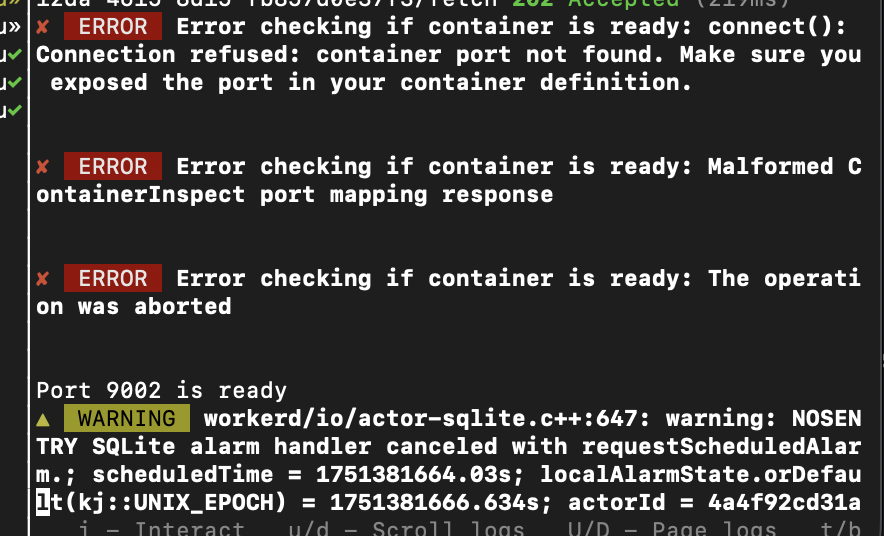
 TT
TTsleepAfterA call to blockConcurrencyWhile() in a Durable Object waited for too long. The call was canceled and the Durable Object was reset. J
Jdocker run -p 8000:8000 motherduck-sse-mcp-amd64
WARNING: The requested image's platform (linux/amd64) does not match the detected host platform (linux/arm64/v8) and no specific platform was requested
[motherduck] INFO - 🦆 MotherDuck MCP Server v0.6.2
[motherduck] INFO - Ready to execute SQL queries via DuckDB/MotherDuck
[motherduck] INFO - Starting MotherDuck MCP Server
[motherduck] INFO - Using MotherDuck token to connect to database `md:`
[motherduck] INFO - Connecting to MotherDuck in SaaS mode
[motherduck] INFO - Database client initialized in `motherduck` mode
[motherduck] INFO - 🔌 Connecting to motherduck database
[motherduck] INFO - ✅ Successfully connected to motherduck database
[motherduck] INFO - Registering handlers
[motherduck] INFO - MCP server initialized in sse mode
[motherduck] INFO - 🦆 Connect to MotherDuck MCP Server at http://0.0.0.0:8000/sse
[uvicorn] INFO - Started server process [18]
[uvicorn] INFO - Waiting for application startup.
[uvicorn] INFO - Application startup complete.
[uvicorn] INFO - Uvicorn running on http://0.0.0.0:8000 (Press CTRL+C to quit)# Containers
[[containers]]
name="transcription-containers"
class_name="TranscriptionContainer"
image="./Dockerfile"
[[durable_objects.bindings]]
name="TRANSCRIPTION_CONTAINER"
class_name="TranscriptionContainer"
# Containers
[[env.development.containers]]
class_name="TranscriptionContainer"
image="./Dockerfile"
name="transcription-containers"
[[env.development.durable_objects.bindings]]
class_name="TranscriptionContainer"
name="TRANSCRIPTION_CONTAINER"import { Container } from "@cloudflare/containers";
export class TranscriptionContainer extends Container {
// Port the container listens on (default: 8080)
defaultPort = 8080;
// Time before container sleeps due to inactivity (default: 30s)
sleepAfter = "2m";
// Environment variables passed to the container
envVars = {
MESSAGE: "I was passed in via the container class!",
};
}There is no Container instance available at this time.
This is likely because you have reached your max concurrent instance count (set in wrangler config) or are you currently provisioning the Container.
If you are deploying your Container for the first time, check your dashboard to see provisioning status, this may take a few minutes.


