
Is hyperdrive accessible from cloudflare container?
Is hyperdrive accessible from cloudflare container?

 C
C つ
つswitchPort, rather than downgrading or using containerFetch(). However, it does seem like a design inconsistency that the port must always be specified in local environments but not in production.fetch()@cloudflare/containers, like this: FF
FF EE
EE Fつ
Fつ
 H
H Y
Y C
C XF
XF P
PEXPOSE working for multiple ports? A
A
 M
M 1M
1M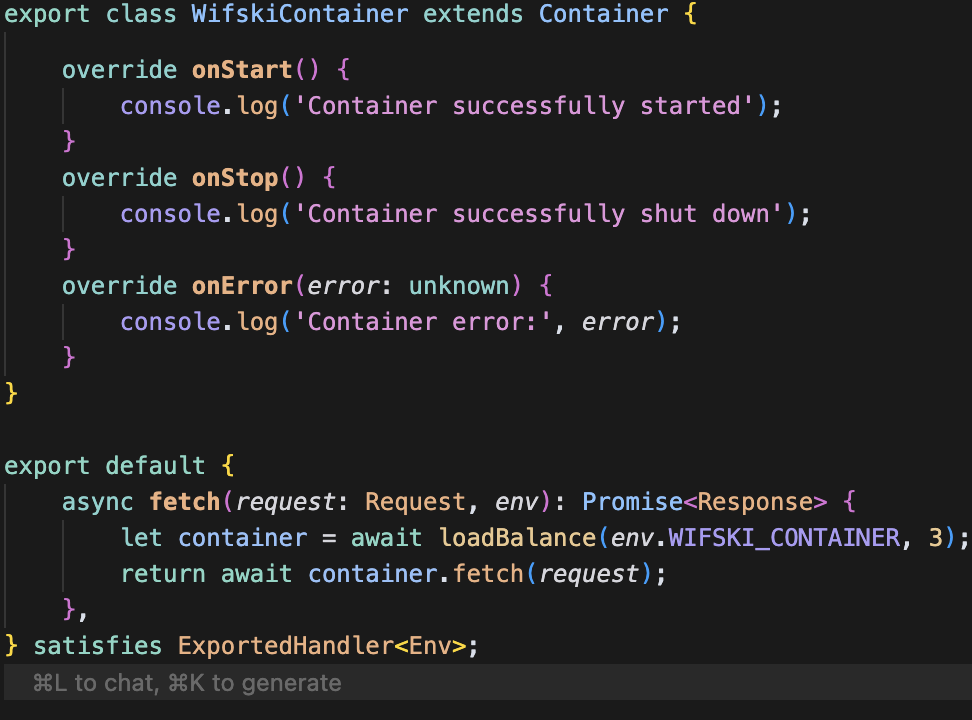 M
M
 M
M M
M U
Uthis.env.HYPERDRIVE.connectionString from my worker to container. But my Python code inside the container is not able to reach the host. Works fine if I use my origin database connection string inside Python. Also worker can connect to db with hyperdrive connection string. Only container can't. Any ideas?U BBMB
BBMB M
M
 RBB
RBB R
R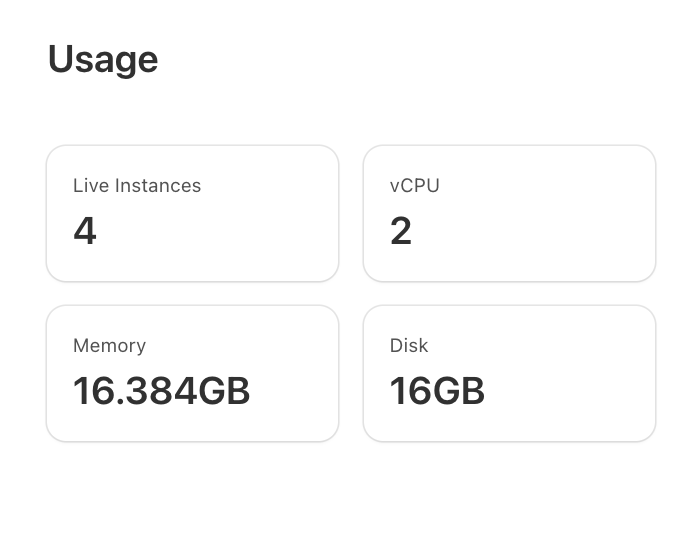
 LCLC
LCLC SHSFCF
switchPortcontainerFetch()@cloudflare/containersEXPOSE⎔ Container image(s) ready
⎔ Starting local server...
✘ [ERROR] Error checking if container is ready: connect(): Connection refused: container port not found. Make sure you exposed the port in your container definition.
✘ [ERROR] Error checking if container is ready: internal error; reference = r48029i07cer86vit2h90t6i
✘ [ERROR] Error checking if container is ready: internal error; reference = df2ceaqdffenqqhpp6ka9igg
✘ [ERROR] Error checking if container is ready: internal error; reference = gist59tegar22c3tp1iaj7ac
✘ [ERROR] Error checking if container is ready: connect(): Connection refused: container port not found. Make sure you exposed the port in your container definition.
Container error: [Error: Container exited with unexpected exit code: 1] { exitCode: 1 }
▲ [WARNING] workerd/io/actor-sqlite.c++:647: warning: NOSENTRY SQLite alarm handler canceled with requestScheduledAlarm.; scheduledTime = 1753139731.815s; localAlarmState.orDefault(kj::UNIX_EPOCH) = 1753139733.074s; actorId = b60d370ee54d17e273624ceb809e666d47bc8cb445b274c648f7e06520b5a613
[wrangler:info] GET /readyz 500 Internal Server Errorthis.env.HYPERDRIVE.connectionStringcould not translate host name "3d9c675c6d0235ddd9a54021ff8d1c14.hyperdrive.local" to address: Name or service not knownThere is no Container instance available at this time. This is likely because you have reached your max concurrent instance count (set in wrangler config) or are you currently provisioning the Container. If you are deploying your Container for the first time, check your dashboard to see provisioning status, this may take a few minutes. {"error":"SURPASSED_TOTAL_LIMITS","details":{"reason":"This application requires more than the allocated quota of disk in this account to run its requested instances of count 5.","used_disk_mb":90000,"requested_disk_mb":20000,"remaining_disk_mb":10000}}import { extractPort } from '@cloudflare/containers';
override async fetch(request: Request): Promise<Response> {
return this.containerFetch(request, extractPort(request));
}# syntax=docker/dockerfile:1
FROM rancher/k3s:latest
# Expose the required ports for K3s
EXPOSE 6443
EXPOSE 443
EXPOSE 80
# Set the default command to run K3s server
CMD ["server", "--disable", "traefik"]export class MyContainer extends Container {
defaultPort = 6443;
requiredPorts = [6443, 443, 80];
// ...
}
app.get("/readyz", async (c) => {
const container = getContainer(c.env.MY_CONTAINER);
return await container.fetch(c.req.raw);
});
// ...this.container.start({
// Need egress
enableInternet: true,
// Set env vars for R2 access in the container
env: {
R2_ENDPOINT_URL: `https://${this.env.CLOUDFLARE_ACCOUNT_ID}.r2.cloudflarestorage.com`,
R2_ACCESS_KEY_ID: this.env.R2_ACCESS_KEY_ID,
R2_SECRET_ACCESS_KEY: this.env.R2_SECRET_ACCESS_KEY,
R2_BUCKET_NAME: this.env.BUNDLE_R2_BUCKET_NAME,
},
}); CDCloudflare Developers / general-helpCDCloudflare Developers / general-helpCDCloudflare Developers / general-helpCDCloudflare Developers / pages-help


