
 M
Mcan you go and upload vanguard logs ?

 B
Bsure
 M
Mtry this pls
MOpen Control Panel
Press Windows + R, type control, and hit Enter.
Go to Power Options
Navigate to:
Hardware and Sound → Power Options.
Edit your active power plan
Click “Change plan settings” next to your selected plan.
Open advanced settings
Click “Change advanced power settings.”
Find USB settings
Expand USB settings → USB selective suspend setting.
Disable it
Set both On battery and Plugged in to Disabled.
Apply
Click Apply → OK.
Press Windows + R, type control, and hit Enter.
Go to Power Options
Navigate to:
Hardware and Sound → Power Options.
Edit your active power plan
Click “Change plan settings” next to your selected plan.
Open advanced settings
Click “Change advanced power settings.”
Find USB settings
Expand USB settings → USB selective suspend setting.
Disable it
Set both On battery and Plugged in to Disabled.
Apply
Click Apply → OK.
Bim not on laptop by the way
Mdosent matter if laptop or pc
Bthats it?
Myea just try what i sent above
Band then restart?
Myes
Bok brb
Bsame problem
Mcan you make video of it ?
Bi dont have app for clip
Bjust 900 ping
Band i cant move
Mstays for while ?
B3 to 4 rounds then van 185
Mah say you have 185
Bmy bad
Mits okay
Bforgot to tell u
Myou gotta wait a bit till they will take look for you
Bdo i have to send my valorant logs too?
Mno no
Monly vanguard enough
Bok thanks
 Y
Y@meowwwoqow dms xo
 J
J@blue I need the vgk logs as well please
 B
Bsure
B.
Bit was my vgk?
 M
Mwait
Jnot the binaries... I need the logs
J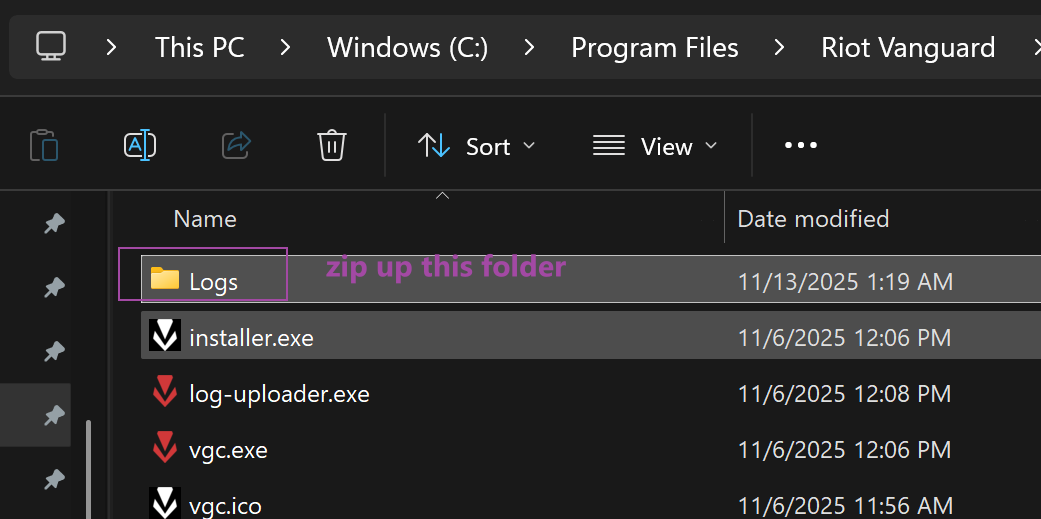 M
Mhe did
Mthis one
Bi dont have log for vgk only vangaurd
Jthat's not what was in the zip file
MMMthis they send me before
Mworks or need new one ?
MMMThats his new logs
Jyeah I dont see anything weird in the logs
MVGC starts uploading
