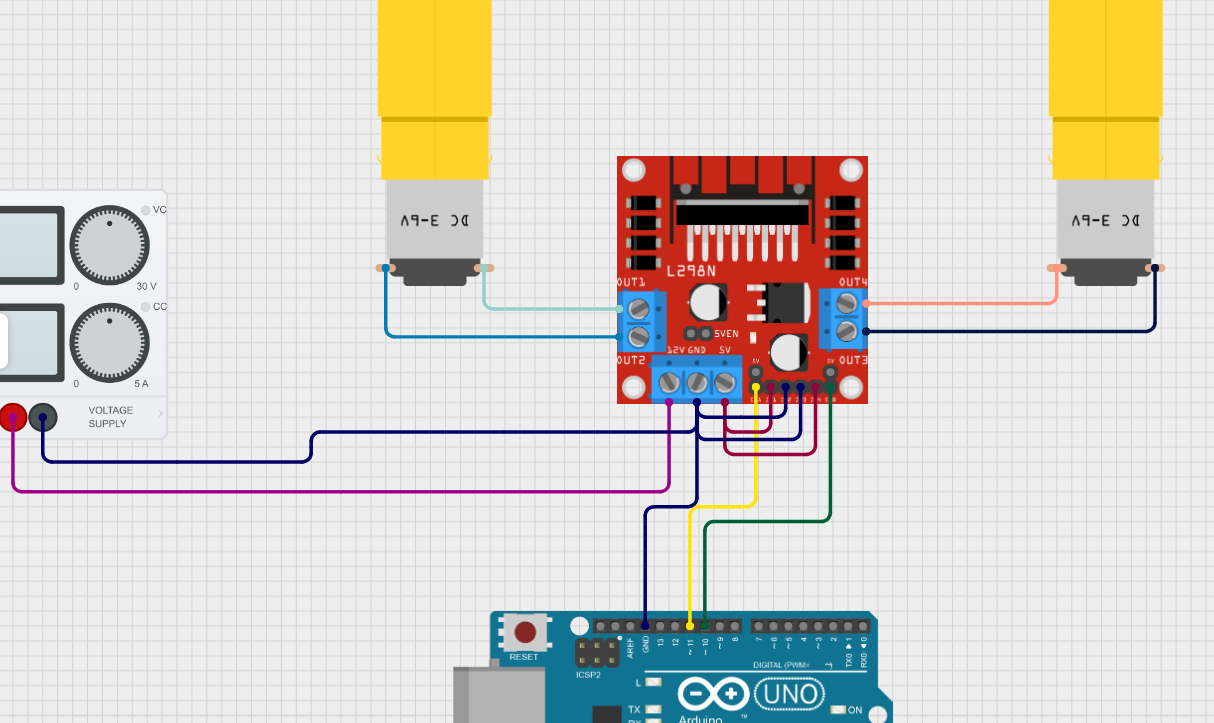
Then to turn on and off, I'd just set EN to zero with pwm. Would using PWM to turn them on and off cause any problems compared to using the IN pins, or am I overthinking that portion of it?
And then just a generic question, if I want to swap the motor directions after I have everything setup, is there any difference between moving the 5v high over to IN2 instead of IN1 vs just reversing the OUT1 and OUT2 that goes to the motor?
For future reference, what would cause the motor driver to get burned up in this scenario? If there is a safer wiring setup to prevent it I'd love to start with that version lol
Instead put the jumpers back on the enable pins. And just move the wires you have to the enable pis to the corect directional high pins leave the grounds tied together
Oh okay. Didnt realize the EN pin worked like that. I figured it was the opposite. If that is the case it probably is worth having some form of input pin control.
Since the direction wont change, and I just need to control on/off with the INs, I wonder then if I can merge them together and have say GPIO pin 10 split and feed both IN1 and IN 4. Then with a single pin I can turn on/off both motors.
It'll be measuring current output of our Battery for an electric go-cart. I need to be able to measure reverse current as well because of motor breaking. Im not sure how itll work because even if an Op Amp can do reverse voltage I dont think ADCs can.
well motor breaking will be passing through another path also, you can not just feed it back through the same wire. so thats fine, you will still ahve two circuts. IF you did want to use a sensor to read in both directions, you would float the refrence of the device mesureing it, half way from the ground and positive on a isolated power sorce, then you would be able to read the "reverse" current flow. as you want.
anyone happen to know how exactly teco's AC remote communication protocol works? i've managed to figure out most of it but i find it odd that apparently only a single bit is dedicated to encoding swing and there's no distinction between horizontal and vertical swing so i wonder how the AC unit even knows what type or angle of swing to apply from that?
Hey all, I just got the new UNO Q but I'm having some issues I hope someone can help me, with Arduino App Lab asked me to update firmware, which I did to latest, BUT, now when I try to enter via Arduino APP Lab, it says update failed: Error checking for updates: Board update error Error checking for updates: Board update error
The box was damaged, not a big deal but kind of annoying. Board worked. Plugged it in and it complained the board software was too old. There are reports of the automatic updater not working. It did not work for me. Had to download the flasher. There seems to be status lights on the board when the program is running. They are the QRB and STM lights near pin 0.
I had downloaded the Arduino App Lab previously before getting the board (about 2 weeks). The old version did not work, there were a few issues with it. Loading software takes a bit. I would say make sure to go through the password setup and configuration before doing anything else (like updating it).
The Uno headers when you apply a little bit of tension make a not so great creaking sound. I thought I had broken it.
Other than that, the device is up and running (Windows 11) plugged into a high power USB C port. My guess is there will be issues with people's USB ports not providing enough power.
Also from the website (Apple’s USB-C dongle has been tested and found to be incompatible with the UNO Q. Please select an alternative part number.)
Because @Mineyoucraftube has issues with this, I am using Windows 11 Pro, 24H2, 26100.6899
I thought the same about the cracking sounds haha and I did try to password setup and config, however it didn't let me advance before updating firmware, which is not very cool to be honest haha
thank you so much, I did try to close and reopen arduino app lab to check again, and it communicated now... right now it's downloading updates, that's strange haha