Cloudflare's billing system is undergoing some changes/migration. During this period, there have been recurring cases of extra bills, incorrect bills, or other issues.
To resolve these issues, create a Support ticket by using the following link (you must be logged into your Cloudflare account): https://dash.cloudflare.com/?to=/:account/support. There is a backlog of tickets so it might take a while to get a response.
Note that all accounts, even Free plan accounts, can create billing tickets. Tickets are the only way to resolve billing issues; we cannot help you in this Discord.
no channel for cloudflare images? Is this the closest thing? Wondering why cloudflare images is not setup like other services like kv, d1, r2 where I create multiple instances and seperate per project.
under Media > Images > Hosted Images : it shows all my images for all my projects. Where as for KV example I can isolate my data by creating multiple KV instances each with their own ID. I wish I could do that for images.
hey - does anyone else also run into the issue of stream starting to get problems when you add around ~15 viewers when streaming? basically we're running into the issue of video getting stuck and needing to refresh the page whenever that happens, and it seems to only happen when we go above a certain load limit - and if so, anyone have any advice here? unfortunately since its in beta we cant see any metrics
and its not an issue with streaming out as that is fine with OBS, nothing dropped on that side
if you mean from end user side, then yep - could be reprod both from one device (where we put several streams running when trying to debug this - after adding more than 5, some of the streams started to get stuck) as well as from around 20-30 end-users who were in different networks (and ISPs) in the same country - who were all running just a single instance of the stream to their own device
near as i can tell from documentation and publicly available info, it shouldnt be a p2p sharing issue as well even though webrtc is generally meant to be that sort of thing, but it looks like for cloudflare stream product, cf network and servers do the heavy lifting, so to speak, and given the beefy hardware and network (and extremely small amount of people being streamed to) involved, this shouldnt be a product limitation - especially since we even tried pulling the resolution down to 720p, but that didnt make much of.a difference either
though since everyone is in the same country, most probably everyone is using the cf datacentre in tallinn, estonia, both for ingress and egress - but id like to imagine that shouldnt make much of a difference
so im trying to understand what might be happening, and if we can get around this issue - is there any way to enable metrics and logging? by default theyre disabled and couldnt find a way to enable them - figured its because its technically in beta as a product, but perhaps theres away regardless
in browser inspector we occasionally get 404 for get request to stream url/key, but that happens even when stream is running fine, so it probably handles occasional cuts just fine, but at some point it gets stuck and page needs to be reloaded
I'm in the web environment and I need to upload a video as I record it. I first tried TUS, but Cloudflare doesn't support Upload-Defer-Length: 1Upload-Defer-Length: 1 like the official TUS does.
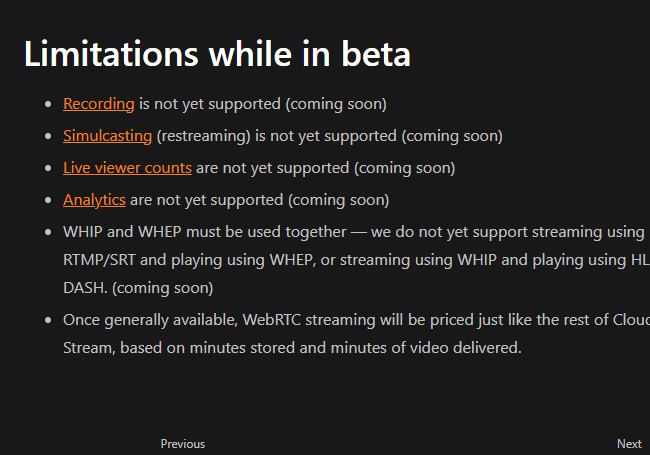
Then I tried live streams, but the issue is, Cloudflare doesn't create recordings for those made with WebRTC.
So, the only option left seems to be uploading multipart to R2 and using a service to create the stream later.
I want to double-check: Is there no way to use streams or TUS for this?
I see that simulcasting is not yet supported with web-rtc. What would be the most practical way to deploy a feature for my application that allows users to multistreaming to different social platforms from their browser ?
thank you @1984 Ford Laser one other question. the "5,000 minutes of video delivered per month" is that the minutes I stream to the server or is that watched, like say 10 viewers watch for 10 minutes each live, is that 100 minutes spent towards the 5,000?
oh i do have one other question.. If I am streaming, but have 0 views, does that still count as delivered minutes for the minutes with 0 views but i'm still live?
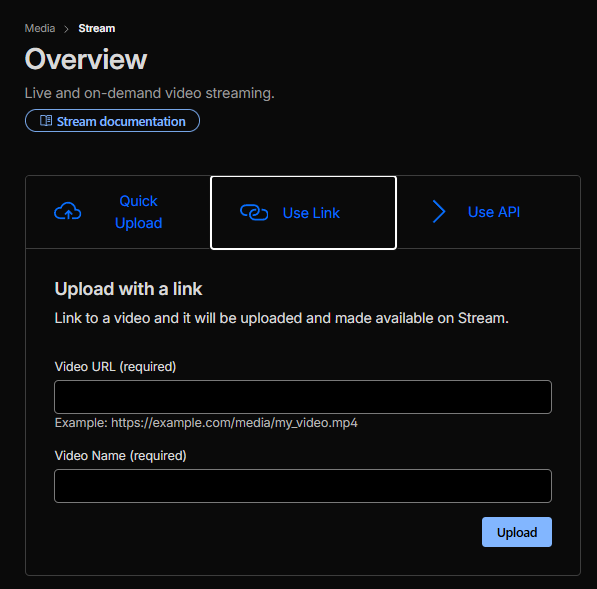
Hello guys, I’m planning to use Cloudflare Stream’s API to upload videos and let them transcode to H.264/AAC/1080p. I then want to download that encoded MP4 from Stream and store it in R2. I’ll serve that MP4 via a Worker, not via Stream’s player or HLS/DASH. I’m only using Stream as an encoder, then serving the MP4 from R2. Is this “Stream as encoder → download MP4 → serve from R2” pattern allowed to use or will it be risky as per cloudflare policies. Thank you.
Please do not ping community members for non-moderation reasons. Doing so will not solve your issue faster and will make people less likely to want to help you.
I observe this from ToS "Customers can serve video and other large files using the CDN so long as that content is hosted by a Cloudflare service like Stream, Images, or R2." . Also I noticed that streams have an api for downloading content. This makes me think about using it as a transcoder service.
I can't find any exact docs/tos reference to support what I'm saying, but I swear I remember reading something from CF that using Stream basically as a transcode/download service only is not allowed. But I personally use the service in a similar way, I guess your mileage may vary
Subject: How to force Cloudflare Stream Iframe to fill container (Object-fit: cover) without losing quality? Body: Hi everyone,
I'm building a mobile video feed (TikTok style) using Cloudflare Stream embedded via iframe. My container is responsive (100vw / 100vh), but I'm struggling with two main issues:
Aspect Ratio & Letterboxing: Even with fit=cover in the URL and object-fit: cover in my CSS, the video often shows black bars (letterboxing) or refuses to fill the entire height of the viewport on different mobile devices.
Quality Degradation: When I try to force the iframe to stretch using transform: scale() or by setting large dimensions, Cloudflare's adaptive bitrate seems to downscale the resolution, resulting in a blurry video.
Adding &stretch=true and &fit=cover to the iframe URL.
Using object-fit: cover on the iframe and the container.
Attempting to use the Cloudflare Stream SDK (<stream> tag), but had issues with initialization in a dynamic AJAX feed.
Question: Is there a reliable way to make the Cloudflare Stream player fill the entire screen (cropping the sides if necessary) while forcing it to maintain high resolution? Is there a specific CSS trick or SDK configuration I'm missing to achieve a true "Vertical Fullscreen" effect?