https://www.shernet.com/kde/japanese-text-input-on-the-fedora-linux-kde-spin/
adam (@adam@www.shernet.com)
Japanese Text Input on the Fedora Linux KDE Spin
I’ve been learning Japanese for the last couple of years. One thing I’ve always wanted to get working is Japanese text input on the Fedora Linux KDE Spin. It turns out, there’s a great Romaji/Hiragana/Kanji keyboard for KDE on Linux, it just takes a little configuring.
Open Konsole and run:
Log out then back in
Open System Settings
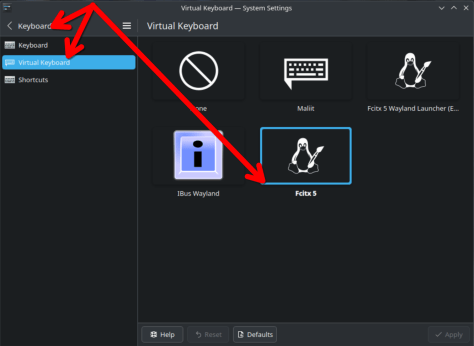
Browse to Keyboard->Virtual Keyboard
Choose “Fcitx 5” and click Apply
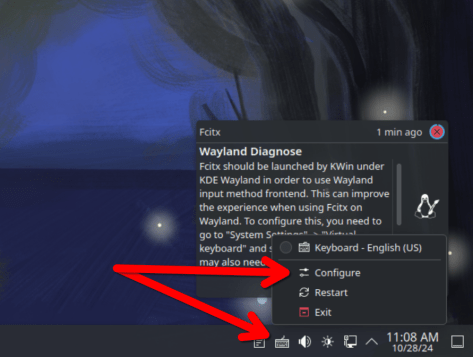
Right click the Keyboard icon in system tray
Click “Configure”
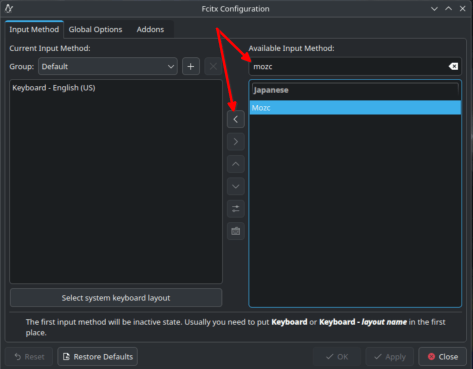
Under Available Input Method search for:…
I’ve been learning Japanese for the last couple of years. One thing I’ve always wanted to get working is Japanese text input on the Fedora Linux KDE Spin. It turns out, there’s a great Romaji/Hiragana/Kanji keyboard for KDE on Linux, it just takes a little configuring.
Open Konsole and run:
sudo dnf -y install fcitx5-mozc fcitx5-kkc kcm-fcitx5 fcitx5-autostartLog out then back in
Open System Settings
Browse to Keyboard->Virtual Keyboard
Choose “Fcitx 5” and click Apply
Right click the Keyboard icon in system tray
Click “Configure”
Under Available Input Method search for:…
Shernet
•10/28/24, 4:08 PM