
So weird. Are you seeing this behavior only in the deployed app as well?
So weird. Are you seeing this behavior only in the deployed app as well?
 D
Dwrangler pages deploy instead of uploading via the dashboard. It's only an issue with D1 bindings as far as I know. I believe the KV binding works as expected in both cases HDH
HDH unless they added that recently, they shouldn’t be workingHDHDHHHDHHD
__D1_BETA__DB which would sometimes be a D1 binding and sometimes an empty objectHH A
A K
KJSON.stringify a FormData objectK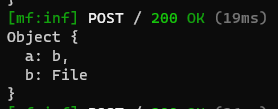
 B
B/functions) but I am getting the error: DD
DD J
J<p> for now. The end goal is to mimic a "site generator" (you can sorta think about it in terms of includes, I suppose - I'm aware there's stuff like Jekyll but this is more of a learning than using the "correct" resources) but I'll just go with replacing elements for now./functions/index.js, for example, automatically invoked when I visit index.html
 II
II IJ
IJ thank you so much!J
/functions/index.js/ `export async function onRequestGet(context, env) {
const OLD_URL = "developer.mozilla.org";
const NEW_URL = "mynewdomain.com";
class AttributeRewriter {
constructor(attributeName) {
this.attributeName = attributeName;
}
element(element) {
const attribute = element.getAttribute(this.attributeName);
if (attribute) {
element.setAttribute(
this.attributeName,
attribute.replace(OLD_URL, NEW_URL)
);
}
}
}
const rewriter = new HTMLRewriter()
.on("a", new AttributeRewriter("href"))
.on("img", new AttributeRewriter("src"));
const res = await fetch(context, env);
const contentType = res.headers.get("Content-Type");
// If the response is HTML, it can be transformed with
// HTMLRewriter -- otherwise, it should pass through
if (contentType.startsWith("text/html")) {
return rewriter.transform(res);
} else {
return res;
}
}```
and of course my index.html` at the root: C
Cimporting JSON doesn't seem to workCC R
R D
D EEC
EEC
 D
D JJJ
JJJtry...catch next() wrapper: https://github.com/cloudflare/pages-plugins/blob/main/packages/sentry/functions/_middleware.tsC T
Twrangler pages deploy__D1_BETA__DBJSON.stringify/functionsError: Failed to publish your Function. Got error: Uncaught TypeError: Cannot convert object to primitive value<p>/functions/index.js/functions/index.js/`export async function onRequestGet(context, env) {
const OLD_URL = "developer.mozilla.org";
const NEW_URL = "mynewdomain.com";
class AttributeRewriter {
constructor(attributeName) {
this.attributeName = attributeName;
}
element(element) {
const attribute = element.getAttribute(this.attributeName);
if (attribute) {
element.setAttribute(
this.attributeName,
attribute.replace(OLD_URL, NEW_URL)
);
}
}
}
const rewriter = new HTMLRewriter()
.on("a", new AttributeRewriter("href"))
.on("img", new AttributeRewriter("src"));
const res = await fetch(context, env);
const contentType = res.headers.get("Content-Type");
// If the response is HTML, it can be transformed with
// HTMLRewriter -- otherwise, it should pass through
if (contentType.startsWith("text/html")) {
return rewriter.transform(res);
} else {
return res;
}
}```
and of course my <!DOCTYPE html>
<html lang="en">
<head>
<meta charset="UTF-8">
<meta name="viewport" content="width=device-width, initial-scale=1.0">
<title>Document</title>
</head>
<body>
<a href="developer.mozilla.org">link</a>
</body>
</html>import14:28:36.759 ✨ Upload complete!
14:28:40.138 Could not generate the asset manifest. Please try again. If this continues to fail, please consider posting in our Discord (https://discord.gg/cloudflaredev) or create a ticket and reference the deployment ID.
14:28:41.289 Failed: an internal error occurred
14:28:41.289 Error: Failed to publish assets. For support, join our Discord (https://discord.gg/cloudflaredev) or create a ticket and reference the deployment ID: 4c6a572e-849d-4616-a765-622978e75584try...catchnext()export function onRequest(context) {
return new Response(Object.keys(context.request)) // return Empty output
return new Response(Object.keys(context.request.cf)) // Return a lot of properties
}const formData = await request.formData();
console.log(Object.fromEntries(formData))


