Search
Setup for Free
UB
Universal Blue
•
3y ago
Kyle Gospo
add the repo and rpm-ostree install, or use distrobox
add the repo and rpm
-ostree install
, or use distrobox
Universal Blue
Join
Universal Blue is a manufacturing process that focuses on community-driven desktop and server operating systems.
26,911
Members
View on Discord
Resources
ModelContextProtocol
MCP Server
Similar Threads
Was this page helpful?
Yes
No
© 2026 Hedgehog Software, LLC
Twitter
GitHub
Discord
System
Light
Dark
More
Communities
Docs
About
Terms
Privacy
K
Kyle Gospo
add the repo and rpm-ostree install, or use distrobox
M
Mentallydeactivated
•
11/13/23, 8:16 PM
Thank you
M
Mentallydeactivated
•
11/13/23, 8:17 PM
So wait you mean do them both at the same time
?
K
Kyle Gospo
OP
•
11/13/23, 8:17 PM
one or the other
M
Mentallydeactivated
•
11/13/23, 8:18 PM
[normand64
@Normand64 normand64
]
$ rpm
-
-import
https://packages.wazuh.com/key/GPG-KEY-WAZUH
error
: can
't create transaction lock on
/usr
/share
/rpm
/
.rpm
.lock
(Read
-only file system
)
error
:
https://packages.wazuh.com/key/GPG-KEY-WAZUH
: key 1 import failed
.
[normand64
@Normand64 normand64
]
$
This happened by trying to add the key on my first attempt
K
Kyle Gospo
OP
•
11/13/23, 8:19 PM
you can add the repo only
K
Kyle Gospo
OP
•
11/13/23, 8:19 PM
and disable gpgcheck
K
Kyle Gospo
OP
•
11/13/23, 8:19 PM
or add that key file to
/etc
/pki
/rpm
-gpg
M
Mentallydeactivated
•
11/13/23, 8:20 PM
How do i disable gpgcheck
?
M
Mentallydeactivated
How do i disable gpgcheck?
K
Kyle Gospo
OP
•
11/13/23, 8:20 PM
gpgcheck
=1
-
> gpgcheck
=0
K
Kyle Gospo
OP
•
11/13/23, 8:20 PM
in the repo definition
M
Mentallydeactivated
•
11/13/23, 8:20 PM
I don
't know what repo definition is
K
Kyle Gospo
OP
•
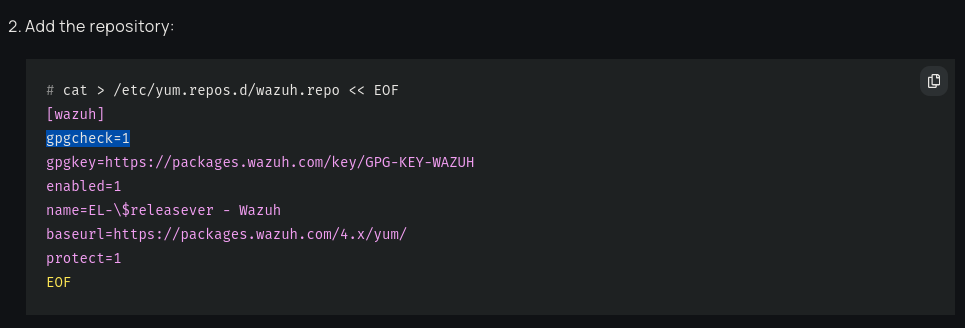
11/13/23, 8:21 PM
M
Mentallydeactivated
•
11/13/23, 8:21 PM
Oh ok
. That clarifies that
.
M
Mentallydeactivated
•
11/13/23, 8:22 PM
Could I hit copy and paste the rpm line for the key then type this
:
/etc
/pki
/rpm
-gpg
after it
?
M
Mentallydeactivated
•
11/13/23, 8:26 PM
It keeps giving me a hard time
.
M
Mentallydeactivated
Could I hit copy and paste the rpm line for the key then type this: /etc/pki/rpm...
K
Kyle Gospo
OP
•
11/13/23, 8:26 PM
you don
't need to do that at all if you
🎮bazzite
M
Mentallydeactivated
•
11/13/23, 8:28 PM
Alright let me take it slow step by step
. I
'm adding the repository in the terminal
.
M
Mentallydeactivated
•
11/13/23, 8:28 PM
cat
>
/etc
/yum
.repos
.d
/wazuh
.repo
<
< EOF
[wazuh
]
gpgcheck
=1
gpgkey
=
https://packages.wazuh.com/key/GPG-KEY-WAZUH
enabled
=1
name
=EL
-
$
releasever
- Wazuh
baseurl
=
https://packages.wazuh.com/4.x/yum/
protect
=1
EOF
M
Mentallydeactivated
•
11/13/23, 8:28 PM
^This
K
Kyle Gospo
OP
•
11/13/23, 8:28 PM
gpgcheck
=0
M
Mentallydeactivated
•
11/13/23, 8:29 PM
kay hold on a minute
M
Mentallydeactivated
•
11/13/23, 8:30 PM
bash
:
/etc
/yum
.repos
.d
/wazuh
.repo
: Permission denied
M
Mentallydeactivated
bash: /etc/yum.repos.d/wazuh.repo: Permission denied
K
Kyle Gospo
OP
•
11/13/23, 8:30 PM
sudo
K
Kyle Gospo
sudo
M
Mentallydeactivated
•
11/13/23, 8:30 PM
Ok I
'll be right back
.
K
Kyle Gospo
sudo
M
Mentallydeactivated
•
11/13/23, 8:39 PM
ah yes I can forget the sudo sometimes so they should have included that in their prompt instead of expecting us to know
.
M
Mentallydeactivated
•
11/13/23, 8:41 PM
[normand64
@Normand64 normand64
]
$ sudo cat
>
/etc
/yum
.repos
.d
/wazuh
.repo
<
< EOF
[wazuh
]
gpgcheck
=0
gpgkey
=
https://packages.wazuh.com/key/GPG-KEY-WAZUH
enabled
=1
name
=EL
-
$
releasever
- Wazuh
baseurl
=
https://packages.wazuh.com/4.x/yum/
protect
=1
EOF
bash
:
/etc
/yum
.repos
.d
/wazuh
.repo
: Permission denied
[normand64
@Normand64 normand64
]
$ sudo
usage
: sudo
-h
|
-K
|
-k
|
-V
usage
: sudo
-v
[
-ABkNnS
]
[
-g group
]
[
-h host
]
[
-p prompt
]
[
-u user
]
usage
: sudo
-l
[
-ABkNnS
]
[
-g group
]
[
-h host
]
[
-p prompt
]
[
-U user
]
[
-u user
]
[command
[arg
.
.
.
]
]
usage
: sudo
[
-ABbEHkNnPS
]
[
-r role
]
[
-t type
]
[
-C num
]
[
-D directory
]
[
-g group
]
[
-h host
]
[
-p prompt
]
[
-R
directory
]
[
-T timeout
]
[
-u user
]
[VAR
=value
]
[
-i
|
-s
]
[command
[arg
.
.
.
]
]
usage
: sudo
-e
[
-ABkNnS
]
[
-r role
]
[
-t type
]
[
-C num
]
[
-D directory
]
[
-g group
]
[
-h host
]
[
-p prompt
]
[
-R
directory
]
[
-T timeout
]
[
-u user
] file
.
.
.
[normand64
@Normand64 normand64
]
$
now what
?
K
Kyle Gospo
OP
•
11/13/23, 8:41 PM
run the command with sudo
K
Kyle Gospo
OP
•
11/13/23, 8:42 PM
then install with rpm
-ostree
J
j0rge
•
11/13/23, 8:42 PM
you need to
sudo -s
sudo -s
then run that command
M
Mentallydeactivated
•
11/13/23, 8:45 PM
ok thanks so I did it wrong
.
M
Mentallydeactivated
•
11/13/23, 8:45 PM
I can
't remember these commands but taking note of the others have helped
.
J
j0rge
•
11/13/23, 8:45 PM
yeah you can
't sudo cat that way
, the first command will have sudo but the rest won
't have write access
, there
's a word for that I can
't remember
M
Mentallydeactivated
•
11/13/23, 8:46 PM
kay
. I
'm making a new tab
M
Mentallydeactivated
•
11/13/23, 8:46 PM
[normand64
@Normand64 normand64
]
$ sudo
-s
bash
-5
.2
#
is this correct
?
M
Mentallydeactivated
•
11/13/23, 8:48 PM
[normand64
@Normand64 normand64
]
$ sudo
-s
bash
-5
.2
#
[normand64
@Normand64 normand64
]
$ sudo cat
>
/etc
/yum
.repos
.d
/wazuh
.repo
<
< EOF
[wazuh
]
gpgcheck
=0
gpgkey
=
https://packages.wazuh.com/key/GPG-KEY-WAZUH
enabled
=1
name
=EL
-
$releasever
- Wazuh
baseurl
=
https://packages.wazuh.com/4.x/yum/
protect
=1
EOF
bash
:
[normand64
@Normand64
: command not found
bash
-5
.2
#
it
's still not working
K
Kyle Gospo
OP
•
11/13/23, 8:48 PM
you pasted
[normand64@Normand64 normand64]$
[normand64@Normand64 normand64]$
K
Kyle Gospo
OP
•
11/13/23, 8:49 PM
and you don
't need sudo
, you
're already sudo
M
Mentallydeactivated
•
11/13/23, 8:49 PM
i went copy and paste stupid without reading
M
Mentallydeactivated
•
11/13/23, 8:50 PM
I
'm guessing it worked this time
?
M
Mentallydeactivated
•
11/13/23, 8:50 PM
bash
-5
.2
# cat
>
/etc
/yum
.repos
.d
/wazuh
.repo
<
< EOF
[wazuh
]
gpgcheck
=0
gpgkey
=
https://packages.wazuh.com/key/GPG-KEY-WAZUH
enabled
=1
name
=EL
-
$releasever
- Wazuh
baseurl
=
https://packages.wazuh.com/4.x/yum/
protect
=1
EOF
bash
-5
.2
#
M
Mentallydeactivated
•
11/13/23, 8:51 PM
Now what
?
J
j0rge
•
11/13/23, 8:52 PM
now it should install via rpm
-ostree
M
Mentallydeactivated
•
11/13/23, 8:53 PM
bash
:
[normand64
@Normand64
: command not found
bash
-5
.2
# cat
>
/etc
/yum
.repos
.d
/wazuh
.repo
<
< EOF
[wazuh
]
gpgcheck
=0
gpgkey
=
https://packages.wazuh.com/key/GPG-KEY-WAZUH
enabled
=1
name
=EL
-
$releasever
- Wazuh
baseurl
=
https://packages.wazuh.com/4.x/yum/
protect
=1
EOF
bash
-5
.2
# rpm
-
-import
https://packages.wazuh.com/key/GPG-KEY-WAZUH
error
: can
't create transaction lock on
/usr
/share
/rpm
/
.rpm
.lock
(Read
-only file system
)
error
:
https://packages.wazuh.com/key/GPG-KEY-WAZUH
: key 1 import failed
.
bash
-5
.2
# sudo
usage
: sudo
-h
|
-K
|
-k
|
-V
usage
: sudo
-v
[
-ABkNnS
]
[
-g group
]
[
-h host
]
[
-p prompt
]
[
-u user
]
usage
: sudo
-l
[
-ABkNnS
]
[
-g group
]
[
-h host
]
[
-p prompt
]
[
-U user
]
[
-u user
]
[command
[arg
.
.
.
]
]
usage
: sudo
[
-ABbEHkNnPS
]
[
-r role
]
[
-t type
]
[
-C num
]
[
-D directory
]
[
-g group
]
[
-h host
]
[
-p prompt
]
[
-R
directory
]
[
-T timeout
]
[
-u user
]
[VAR
=value
]
[
-i
|
-s
]
[command
[arg
.
.
.
]
]
usage
: sudo
-e
[
-ABkNnS
]
[
-r role
]
[
-t type
]
[
-C num
]
[
-D directory
]
[
-g group
]
[
-h host
]
[
-p prompt
]
[
-R
directory
]
[
-T timeout
]
[
-u user
] file
.
.
.
bash
-5
.2
# sudo
-s
bash
-5
.2
# rpm
-
-import
https://packages.wazuh.com/key/GPG-KEY-WAZUH
error
: can
't create transaction lock on
/usr
/share
/rpm
/
.rpm
.lock
(Read
-only file system
)
error
:
https://packages.wazuh.com/key/GPG-KEY-WAZUH
: key 1 import failed
.
bash
-5
.2
#
I did stupid things again cuz I
'm impatient
M
Mentallydeactivated
•
11/13/23, 8:53 PM
M
Mentallydeactivated
•
11/13/23, 8:54 PM
should I proceed to enable the agent service next
?
M
Mentallydeactivated
•
11/13/23, 9:00 PM
bash
-5
.2
# systemctl daemon
-reload
systemctl enable wazuh
-agent
systemctl start wazuh
-agent
Failed to enable unit
: Unit file wazuh
-agent
.service does not exist
.
Failed to start wazuh
-agent
.service
: Unit wazuh
-agent
.service not found
.
bash
-5
.2
#
M
Mentallydeactivated
•
11/13/23, 9:00 PM
I
'm gonna have to great a thread
M
Mentallydeactivated
•
11/13/23, 9:03 PM
When you
're free you can continue here
:
Need help breaking through the read file only system for installing WAZZZAAAAAAH!!!!
K
Kyle Gospo
OP
•
11/13/23, 9:05 PM
You have to reboot after Installing
K
Kyle Gospo
OP
•
11/13/23, 9:06 PM
Then you
'll have the services
Next page
Similar Threads
rpm-ostree errors
UB
Universal Blue / 🛟bazzite-help
9mo ago
rpm-ostree problem
UB
Universal Blue / 🛟bazzite-help
2y ago
rpm-ostree upgrade failing
UB
Universal Blue / 🛟bazzite-help
7mo ago