What is the original issue, KDE settings doesn't show your real resolution? I've seen your screenshot above, that is truly bizarre, if you can't access KDE settings to try to change it or log-in with X just to troubleshoot, then ye I think it's probably better to reset.
Sorted now, managed to drag the screen over and apply og settings..... Just! I wanted the desktop bigger and when I applied I only had a tiny screen and the rest was all garbled up,
yes on portable devices better to leave it at the native resolution, if you have a spare screen maybe you can connect it for some extra space temporarily?
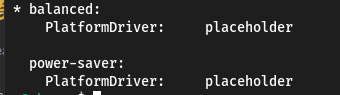
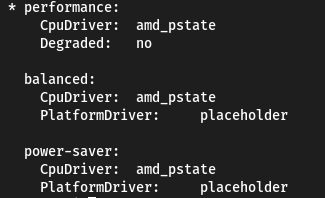
I've found the option and enabled it but it doesn't seem to have effect powerprofilesctl continues to say "placeholder", you wouldn't happen to have any other ideas? Maybe the motherboard doesn't support it....
@fiftydinar weird that the other power options still say "placeholder" but I'm happy as I'm only going to use performance. Now are we sure that "PSS support is necessary?
I've run the ujust to make all p-states work but it was before I got the "performance" option should I run it again? or is there a way to check everything is good?
platform driver controls the temperature limit, fan speed & CPU frequency limit but this one highly depends on specific configurations like laptops
while on desktops, you can change basically everything, including the chasis/case, which makes it not reliable to implement platform driver on desktops