
 P
Pon a desktop, could I have a dual GPU situation using the amd one for desktop and nvidia one for launching games?

 K
KiGPU no, two dGPU yes
 K
KOLED is almost there, installer is the main thing remaining

 A
AOh cool! Is there anything I can do to help test it?

 P
P==> Auto-updating Homebrew...
Adjust how often this is run with HOMEBREW_AUTO_UPDATE_SECS or disable with
HOMEBREW_NO_AUTO_UPDATE. Hide these hints with HOMEBREW_NO_ENV_HINTS (see
==> Fetching jandedobbeleer/oh-my-posh/oh-my-posh
==> Downloading https://github.com/JanDeDobbeleer/oh-my-posh/archive/v21.16.2.ta
Already downloaded: /home/pizzav/.cache/Homebrew/downloads/733d4916e75f4febe7e66ae4793888146098afae98345258bcc39816b1737c75--oh-my-posh-21.16.2.tar.gz
==> Installing oh-my-posh from jandedobbeleer/oh-my-posh
==> go build -o=oh-my-posh -ldflags="-s -w -X 'github.com/jandedobbeleer/oh-my-p
Last 15 lines from /home/pizzav/.cache/Homebrew/Logs/oh-my-posh/01.build.Date=2024-06-24T19:10:48Z'":
2024-06-25 15:52:39 +0000
go build -o=oh-my-posh -ldflags="-s -w -X 'github.com/jandedobbeleer/oh-my-posh/src/build.Version=21.16.2' -X 'github.com/jandedobbeleer/oh-my-posh/src/build.Date=2024-06-24T19:10:48Z'"
collect2: fatal error: cannot find ‘ld’
compilation terminated.
If reporting this issue please do so at (not Homebrew/brew or Homebrew/homebrew-core):
https://github.com/jandedobbeleer/homebrew-oh-my-posh/issues
Adjust how often this is run with HOMEBREW_AUTO_UPDATE_SECS or disable with
HOMEBREW_NO_AUTO_UPDATE. Hide these hints with HOMEBREW_NO_ENV_HINTS (see
man brew==> Fetching jandedobbeleer/oh-my-posh/oh-my-posh
==> Downloading https://github.com/JanDeDobbeleer/oh-my-posh/archive/v21.16.2.ta
Already downloaded: /home/pizzav/.cache/Homebrew/downloads/733d4916e75f4febe7e66ae4793888146098afae98345258bcc39816b1737c75--oh-my-posh-21.16.2.tar.gz
==> Installing oh-my-posh from jandedobbeleer/oh-my-posh
==> go build -o=oh-my-posh -ldflags="-s -w -X 'github.com/jandedobbeleer/oh-my-p
Last 15 lines from /home/pizzav/.cache/Homebrew/Logs/oh-my-posh/01.build.Date=2024-06-24T19:10:48Z'":
2024-06-25 15:52:39 +0000
go build -o=oh-my-posh -ldflags="-s -w -X 'github.com/jandedobbeleer/oh-my-posh/src/build.Version=21.16.2' -X 'github.com/jandedobbeleer/oh-my-posh/src/build.Date=2024-06-24T19:10:48Z'"
github.com/jandedobbeleer/oh-my-posh/src
/home/linuxbrew/.linuxbrew/Cellar/go/1.22.4/libexec/pkg/tool/linux_amd64/link: running gcc failed: exit status 1collect2: fatal error: cannot find ‘ld’
compilation terminated.
If reporting this issue please do so at (not Homebrew/brew or Homebrew/homebrew-core):
https://github.com/jandedobbeleer/homebrew-oh-my-posh/issues
GitHub
Homebrew formula for Oh my Posh. Contribute to JanDeDobbeleer/homebrew-oh-my-posh development by creating an account on GitHub.
 M
MHi, Is it okay to ask questions in here too? I already posted on the help thing but since I am currently trying to get it working it thought I might ask here?
Pyep, 2 dgpus. Gonna try to see how that works jsut for fun
 M
MI am getting an error when trying to create a bootable usb
 M
Mcan i use GE proton on here ? or its only for steamdeck
M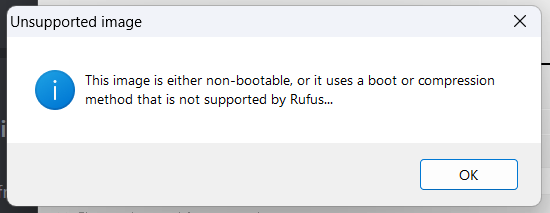 M
MThis is the error in question
 K
Kabsolutely
 K
KMmm, why would
ldwe include protonplus/protonup-qt to install it
Ktry another tool
Kfedora media writer has a windows build
Mthank you ! I am trying to make work the REsiden Evil 2 camera mod o7
 J
JIt probably has to do with how that go
linkSame with Etcher
MSeems my ISO is incomplete
JI would be interested in the contents of
/home/linuxbrew/.linuxbrew/Cellar/go/1.22.4/libexec/pkg/tool/linux_amd64/linkcheck hash
 M
MYeah, the ISO is incomplete, yet every time I try to download it through the download link on the website I get this 800MB file instead of the full ISO
 K
KIts an executable
 A
A@Kyle Gospo why does the homebrew xz change often
 N
NSo i'm trying to launch elden ring w HDR and mods active. I get the mods but not the HDR. Is there a way I need to alter these launch args?
Ngamescope --hdr-enabled --adaptive-sync -w 3440 -W 3440 -h 1440 -H 1440 -r 165 -f echo "%command%" | sed 's/start_protected_game/eldenring/' | WINEDLLOVERRIDES="dinput8.dll=n,b" sh
 R
RWhat happens when you remove the Wine DLL override?
NCrashes on launch. I've got mods in the folder to enable ultrawide and unlock the fps
 T
THow can I delete a per-game performance profile? I set a frame limit on one of 60fps but all of a sudden it’s capping the whole UI/refresh rate at 30fps. If I turn off the per game profile and set it to 60fps it works fine.
TNormally if I set a lower FPS cap it doesn’t cause the whole Steam UI to lower down to that cap.
 R
RDumb question but, does bazzite gnome nvidia testing have the pre patched mutter for fractional scaling support with xwayland apps?
ROddly specific I know
 K
KWell I successfully updated my BIOS on my Legion Go from Linux without making a brick! Go me!
 K
KIt does not, there's kinks to work out still that break some apps if no fractional scaling is applied
RYeah, that's fair 

 N
Ni've removed this udev rule and replaced it with the ones here https://codeberg.org/fabiscafe/game-devices-udev/src/branch/main/71-8bitdo-controllers.rules
 N
Nand it still doesn't work wirelessly
Nbut it does work wired
N(detected and treated as switch pro controller)
 O
OIs it safe to dual boot bazzite with AV Linux?
 D
DOpenRGB always moans that udev rules are not set up. Does it need to be done or can we ignore it? Everything works fine
Kyou can ignore it, it's a flatpak issue
Kyou can also try the appimage, does not have the problem
DI just have it set to perpetually ignore
On stable it wasn't setting my colour scheme when waking from sleep but I think on test it actually started working lol
On stable it wasn't setting my colour scheme when waking from sleep but I think on test it actually started working lol
 J
JThere is any con or security risk enrolling the key for secure boot on a Nvidia card?
 K
KNone, go for it
JAwesome
 S
SShould I test out an r7 250 on bazzite lol
