
Yes, that is what I am thinking about to drop the support for `WorkerKV` and use `DurableObjects`
Yes, that is what I am thinking about to drop the support for
WorkerKVDurableObjectsWorkerKVDurableObjects
 II
II AII
AIIKV is not really a good idea here due to it’s eventually consistent nature. You can however make a rate-limit from Durable Objects 272, which some others have already made from too.
A V
V X
X
 B
B I
I H
H V
V R
Rnpx wrangler pages deploy C
C A
A WA
WA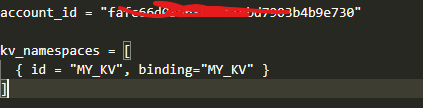
 D
Dwrangler secret put INNGEST_SIGNING_KEY SAA
SAA R
Rwrangler dev --remote J
J MMJJC
MMJJCgetPlatformProxy() R
R M
M B
B K
Kwrangler devwrangler dev J
Jwranglerpackage.jsonnpxnpx wrangler@3.63.1 devJnpm create cloudflare@latest: https://developers.cloudflare.com/workers/get-started/guide/ J
J ✘ [ERROR] Received a malformed response from the API
upstream connect error or disconnect/reset before headers. retried and the latest reset reason: conn... (length = 114)
GET /accounts/***/pages/projects/example -> 503 Service Unavailable✘ [ERROR] More than one account available but unable to select one in non-interactive mode.
Please set the appropriate `account_id` in your `wrangler.toml` file.
Available accounts are (`<name>`: `<account_id>`):PS D:\others\durable-objects-template> wrangler dev
⛅️ wrangler 3.63.1
-------------------
Your worker has access to the following bindings:
- Durable Objects:
- COUNTER: Counter
⎔ Starting local server...
╭─────────────────────────────────────────────────────────────────────────────────────────────────────────────────────╮
│ [b] open a browser, [d] open Devtools, [l] turn off local mode, [c] clear console, [x] to exit
╰─────────────────────────────────────────────────────────────────────────────────────────────────────────────────────╯
C:\Users\user\AppData\Roaming\npm\node_modules\wrangler\wrangler-dist\cli.js:29765
throw a;
^
MiniflareCoreError [ERR_RUNTIME_FAILURE]: The Workers runtime failed to start. There is likely additional logging output above.
at #assembleAndUpdateConfig (C:\Users\user\AppData\Roaming\npm\node_modules\wrangler\node_modules\miniflare\dist\src\index.js:9178:13)
at process.processTicksAndRejections (node:internal/process/task_queues:95:5)
at async Mutex.runWith (C:\Users\user\AppData\Roaming\npm\node_modules\wrangler\node_modules\miniflare\dist\src\index.js:3521:16) {
code: 'ERR_RUNTIME_FAILURE',
cause: undefined
}
Node.js v20.14.0[[d1_databases]]
binding = "DB"
database_name = "name"
database_id = "<uuid>"
migrations_dir = "./migrations"
[env.preview]
[[d1_databases]]
binding = "DB"
database_name = "name-preview"
database_id = "<uuid>"
migrations_dir = "./migrations"npx wrangler@3.63.1 devnpm create cloudflare@latest


