
So it was definitely solved at some point because my RX 6800 runs great and comparable to (sometimes
So it was definitely solved at some point because my RX 6800 runs great and comparable to (sometimes better than) it would on Windows
 AAAAA
AAAAA EAEAEAAEAAEAAAEEAAAA
 AA
AA Z
Zcopr AAAA
AAAA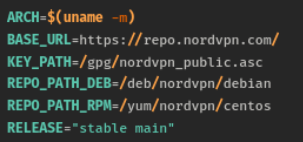
 JAAA
JAAArpm-ostree install nordvpnnordvpnsudo rpm-ostree install nordvpnhttps://repo.nordvpn.com//gpg/nordvpn_public.aschttps://repo.nordvpn.com//deb/nordvpn/debian[nordvpn]
name=NordVPN
baseurl=https://repo.nordvpn.com/yum/nordvpn/centos/x86_64/
enabled=1
gpgcheck=1
gpgkey=https://repo.nordvpn.com/gpg/nordvpn_public.asc1. open install script, in this case it was https://downloads.nordcdn.com/apps/linux/install.sh
2. look for repo url
BASE_URL=https://repo.nordvpn.com/
KEY_PATH=/gpg/nordvpn_public.asc
REPO_PATH_DEB=/deb/nordvpn/debian
REPO_PATH_RPM=/yum/nordvpn/centos
RELEASE="stable main"
ASSUME_YES=false
3. look for fedora/rpm/dnf/yum
REPO_URL_RPM=${BASE_URL}${REPO_PATH_RPM}
install_dnf() {
if check_cmd dnf; then
get_install_opts_for_dnf
install_opts="$RETVAL"
repo="${REPO_URL_RPM}"
if [ ! -f "${REPO_URL_RPM}" ]; then
repo="${repo}/${ARCH}"
fi
$SUDO rpm -v --import "${PUB_KEY}"
$SUDO dnf config-manager --add-repo "${repo}"
$SUDO dnf $install_opts install nordvpn
exit
fi
}
99% of the time you probably use x86_64 arch
so their repo is https://repo.nordvpn.com/ + /yum/nordvpn/centos + x86_64
4. create repo file
[name]
name=Pretty Name
baseurl=url that you extracted
enabled=1 -> enable repo
5. if they provide key like package.asc then find the url
PUB_KEY=${BASE_URL}${KEY_PATH}
so the url is https://repo.nordvpn.com/ + /gpg/nordvpn_public.asc
then add this line to repo file
gpgcheck=1 -> check the gpg
gpgkey=url that you extracted

