
the install.sh imports a dnf repo and installs the package from there, but obv can't do that on bazz
the install.sh imports a dnf repo and installs the package from there, but obv can't do that on bazzite
 A
A ZZAA
ZZAA AAAA
AAAA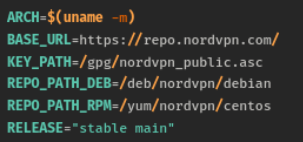
 JAAAAAAAAAAJAAAAAA
 P
P KZKAAPAAPKAAZPAAAAPAZ
sudo rpm-ostree install nordvpncoprhttps://repo.nordvpn.com//gpg/nordvpn_public.aschttps://repo.nordvpn.com//deb/nordvpn/debian[nordvpn]
name=NordVPN
baseurl=https://repo.nordvpn.com/yum/nordvpn/centos/x86_64/
enabled=1
gpgcheck=1
gpgkey=https://repo.nordvpn.com/gpg/nordvpn_public.ascrpm-ostree install nordvpn1. open install script, in this case it was https://downloads.nordcdn.com/apps/linux/install.sh
2. look for repo url
BASE_URL=https://repo.nordvpn.com/
KEY_PATH=/gpg/nordvpn_public.asc
REPO_PATH_DEB=/deb/nordvpn/debian
REPO_PATH_RPM=/yum/nordvpn/centos
RELEASE="stable main"
ASSUME_YES=false
3. look for fedora/rpm/dnf/yum
REPO_URL_RPM=${BASE_URL}${REPO_PATH_RPM}
install_dnf() {
if check_cmd dnf; then
get_install_opts_for_dnf
install_opts="$RETVAL"
repo="${REPO_URL_RPM}"
if [ ! -f "${REPO_URL_RPM}" ]; then
repo="${repo}/${ARCH}"
fi
$SUDO rpm -v --import "${PUB_KEY}"
$SUDO dnf config-manager --add-repo "${repo}"
$SUDO dnf $install_opts install nordvpn
exit
fi
}
99% of the time you probably use x86_64 arch
so their repo is https://repo.nordvpn.com/ + /yum/nordvpn/centos + x86_64
4. create repo file
[name]
name=Pretty Name
baseurl=url that you extracted
enabled=1 -> enable repo
5. if they provide key like package.asc then find the url
PUB_KEY=${BASE_URL}${KEY_PATH}
so the url is https://repo.nordvpn.com/ + /gpg/nordvpn_public.asc
then add this line to repo file
gpgcheck=1 -> check the gpg
gpgkey=url that you extracted


