

 N
Nyour damper/friction/inertia sliders and their associated effect tab settings look reasonable to me. Your expert setting LPF values look a bit off from the defaults though. I don't really know how to use these values to affect a certain change, but I do know that they can have a big impact on what a "good" setting would be for the sliders/effects.
I'm guessing there's a reason for your current values, but you might try loading the values from the default config and see if things improve. Otherwise I could only suggest disabling/reducing one or more of damper/friction/inertia and seeing what happens.
The values from the default profile:
I'm guessing there's a reason for your current values, but you might try loading the values from the default config and see if things improve. Otherwise I could only suggest disabling/reducing one or more of damper/friction/inertia and seeing what happens.
The values from the default profile:
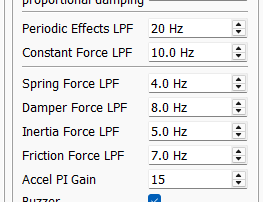

 P
PI think these were lowered on advice from walmis when I originally had x axis issues. I'll have a play with them tomorrow when I'm on again.
 B
Bmy F4 roll axis has gotten very light without me making any changes. The roll axis issue is inconsistent, sometimes feeling normal...it may be a single player vs multi-player issue but I'm not certain yet.
 T
TIs it possible to map other joystick encoders or pots, or even just keyboard shortcuts, to change some of the configurator gains like "Pot#1 Function" does? It would make tweaking my configs so much easier if I could just turn knobs to change the configurator Master, Periodic Effects, Spring, Damping, and Friction gains while feeling the changes on the fly.

 B
Bi believe the passthrough option mentioned in the manual will do that
 T
TI don't see a passthrough option mentioned in the user guide. Is there a different place I should be looking?
Blemme look, i may have the nomenclature wrong
B3.3 Rhino loopback. But it appears to only work with buttons
Bbut it does replace the buttons on the grip ...nevermind...probably wont work for your needs
TAh well, will keep going the way I have been.
 R
RI have similar issues with x axis and had to tweak expert settings. I also use a longer than usual extension which was causing some issues.
 P
Pwhat did you tweak them to?
 N
NHi guys New owner and I have a couple of questions! I have read the entire manual and understand the majority of the settings but obviously still to grab the practical experience with what each setting actually does. But I am having issues with the FFB telemetry software! It states that adjusting the settings in this can be done "on the fly" and makes an instant change but every time I make a change in the telemetry software to any setting the configurator cuts the main gain to zero giving me no effects!
I can quickly go in set it back to higher setting then apply/save to the base and all is good and it will have adjusted the setting I touched in the FFB Telemetry software, but I can't make any changes without the main gain in the configurator dropping to zero and the base losing all effects?? Any ideas??
Also the spring seems to be a big setting with regards to feedback. Took me a while to figure out why I had Zero trim in any aircraft due to having the spring gain to zero. What would any of you reccommend for the "normal" gain setting for the spring.
Sorry but one more. The F-14 seems to be giving me all the various feedback except spring even though it is set correctly and applied and stored to the base but i get zero trim effect in the F-14 and it's feels exactly the same as when I first went flying without the spring setting off, but it is definitely on and I get the feedback for the other effects but nothing from from the flight controls?
Much thanks in advance for any help!
I can quickly go in set it back to higher setting then apply/save to the base and all is good and it will have adjusted the setting I touched in the FFB Telemetry software, but I can't make any changes without the main gain in the configurator dropping to zero and the base losing all effects?? Any ideas??
Also the spring seems to be a big setting with regards to feedback. Took me a while to figure out why I had Zero trim in any aircraft due to having the spring gain to zero. What would any of you reccommend for the "normal" gain setting for the spring.
Sorry but one more. The F-14 seems to be giving me all the various feedback except spring even though it is set correctly and applied and stored to the base but i get zero trim effect in the F-14 and it's feels exactly the same as when I first went flying without the spring setting off, but it is definitely on and I get the feedback for the other effects but nothing from from the flight controls?
Much thanks in advance for any help!
 F
FI have the master gain at 100, spring setting at 70, also check the knob in your rhino next to the red emergency stop. In mine it's set to spring gain and if you have it turned all the way down it doesn't matter what setting you put in the configurator it will be zero.

 L
LScreenshots of your configurator pages would help us get started please
LMy "normal" spring setting is 100% 
NSpring seems to be working now after a shut down reset but but trim is not responding all the time in the F-14, controls are set and are receiving commands for trim all ok but trim only moving the stick "sometimes"
Biggest issue is the Congifurator setting Gain to zero everytime i make a telemetry adjustment More annoying than anything.
Biggest issue is the Congifurator setting Gain to zero everytime i make a telemetry adjustment More annoying than anything.
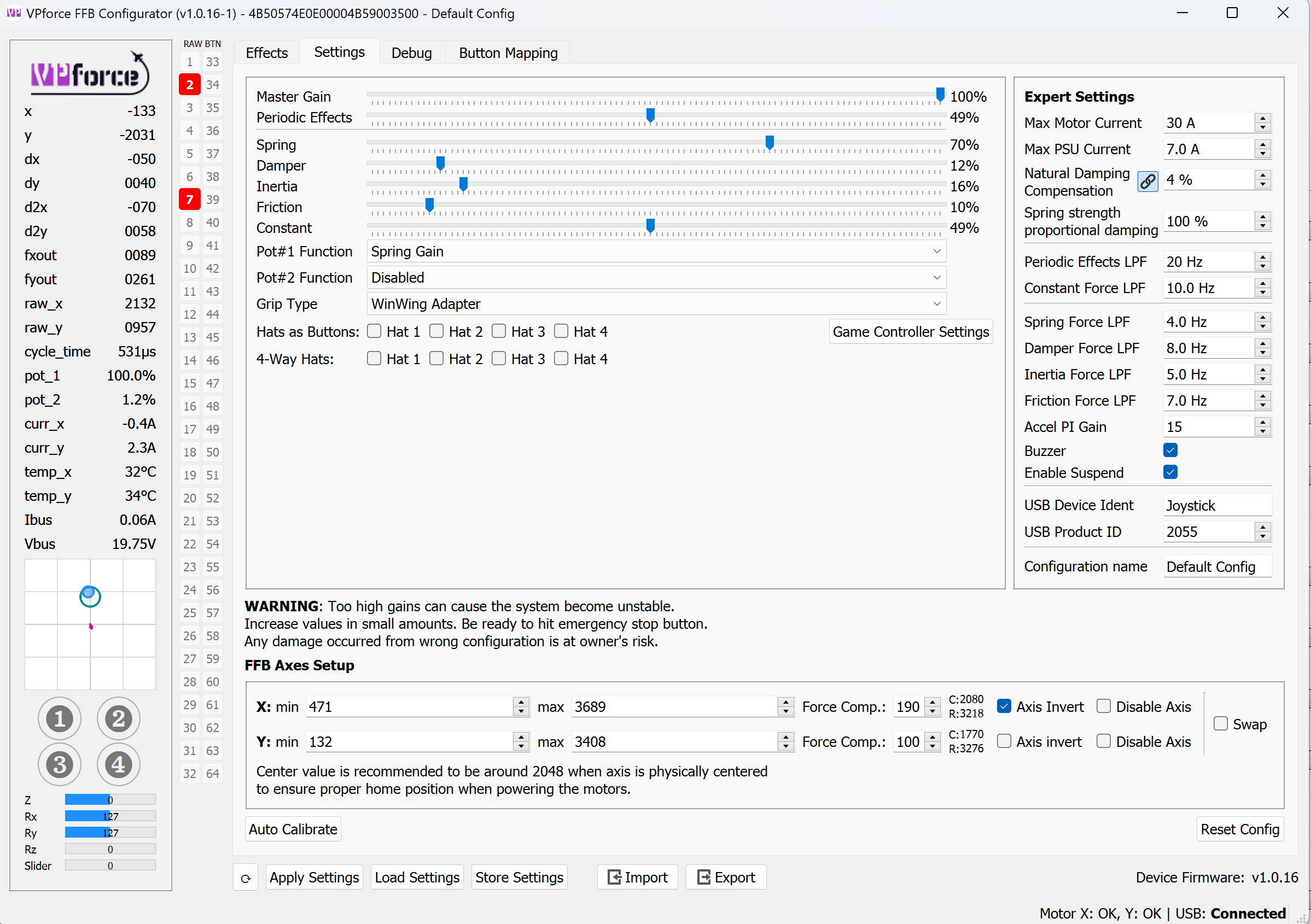 L
LNot seeing anything suspicious there. @Number481 can TelemFFB override Master gain slider too?
LHave you connected something to pot_2 connector?
 T
TShow effects tab
 N
NNo nothing added!
RI’m oot. I’ll send pic Monday
N@Fourgrinder @Nemisis Wolf
Any time you make a change in TelemFFB, the entire config is reapplied. If you are using the
Any time you make a change in TelemFFB, the entire config is reapplied. If you are using the
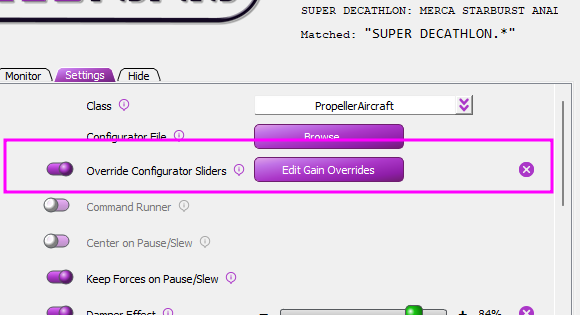
Override Configurator SlidersIt looks like that it is not checked off in the settings? or am i looking in the wrong area?
 N
NI can't tell what context you are in.. sim? class? model? You can also set/see it if you are loaded into an aircraft from the real-time settings page
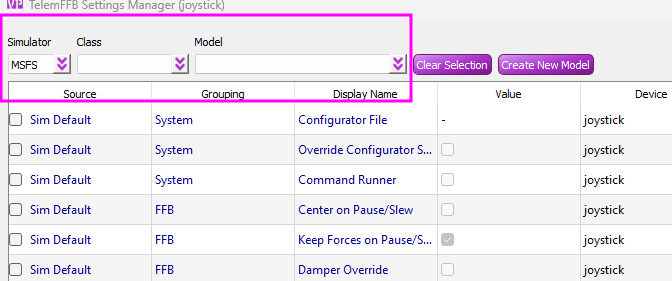
 N
NHi none of the settings for DCS have that override configurator slider active! I only fly DCS and Jet's props and Helicopters and all specific aircraft have that setting unchecked. I haven't even been in this section to alter anything since I received the Rhino. the only setting i have adjusted are the main sliders in the configurator and the main effects panel in the FFB telemetry.
Trim seems to be an issue in all the jets I've tried so far with the stick only reacting to trim commands it seems "whenever it wants to" and not all the time! Maybe I need to increase/decrease a setting.
Hate sounding like a complete noob as I'm usually good at figuring this sort of thing out myself but I'm just scratching my head when I look at all the adjustments re read the manual and still can't figure out what's causing these 2 main issues.
lots of adjustments required in the standard DCS setups from what I can see with many settings just feeling way out of whack, but I can deal with that it's DCS and anyone that's sat and mapped out keybinds in DCS for 20 modules isn't really going to mind going and mapping out the effects for each of those modules. But getting that Master Gain reset every time I adjust one thing and have to reset it to feel if my adjustment was what I wanted is a real pain. Got to be one overide setting as you say but I haven't created any personalised Config files other than adjusting the sliders on the FFB telemetry effect page.
Trim seems to be an issue in all the jets I've tried so far with the stick only reacting to trim commands it seems "whenever it wants to" and not all the time! Maybe I need to increase/decrease a setting.
Hate sounding like a complete noob as I'm usually good at figuring this sort of thing out myself but I'm just scratching my head when I look at all the adjustments re read the manual and still can't figure out what's causing these 2 main issues.
lots of adjustments required in the standard DCS setups from what I can see with many settings just feeling way out of whack, but I can deal with that it's DCS and anyone that's sat and mapped out keybinds in DCS for 20 modules isn't really going to mind going and mapping out the effects for each of those modules. But getting that Master Gain reset every time I adjust one thing and have to reset it to feel if my adjustment was what I wanted is a real pain. Got to be one overide setting as you say but I haven't created any personalised Config files other than adjusting the sliders on the FFB telemetry effect page.
NUse the help menu in TelemFFB to create a support bundle and post it here or DM it to me. I believe you about the setting not being enabled, but unless I misunderstood the symptom of the Configurator sliders resetting everytime you change a setting in TelemFFB, that is the only feature in TelemFFB that could/would do that.
The support bundle will include your system settings, user config and recent logs.
The support bundle will include your system settings, user config and recent logs.
RWhat yall printing your limiters in?
NSeems I fixed the issue hopefully. I reset the configurator to factory settings and the calibrated and went from there. Changing settings in FFB telem no longer cuts the Master Gain  Will keep you informed.
Will keep you informed.NNot sure on the Trim yet though
 B
BWould it be possible to get the .stl file for the VKB adapter nut? Mine just broke (has worked well since I received it in January)
B 1
1Hi all, my rhino developed a "shimmer" or a "purr" (very low amplitude, high-frequency vibration) which is noticeable when the stick is moving, and goes away when the stick is kept in position. Is this a sign I need to re-tighten the belts? Or is it something else?

 K
KSame for me, DCS restart helps but it's weird when it happens
 H
HI would recommend PETG for the throw limiter. PLA is to hard and PETG has a slight elastic property that makes it more pleasant for this application.
TPLA+ should be totally fine for this application
 B
BAnd I found petg very easy to print, just needed higher temps. Even less shrinkage and creep as well, and here regular pla and petg costs exactly the same.
BNo enclosure or such needed as for ABS.
 T
TPETG always gave me trouble so I tend to avoid it. What are you doing for bed adhesion to make it easy?
BI just cranked bed temp on my ender 3 til it stuck.
Going a few degrees below material glass point can be a good start point, think i was somewhere about 80-90c.
I do also have a glass panel on my bed so I peobably loose a fair few degrees between the surface and the bed heater/sensor as well.
Going a few degrees below material glass point can be a good start point, think i was somewhere about 80-90c.
I do also have a glass panel on my bed so I peobably loose a fair few degrees between the surface and the bed heater/sensor as well.
TI’ll give it a try, I have the same setup. Are you printing directly on the glass? Any glue stick?
 B
BDirect on the glass, no glue, hairspray or anything. At least not in the end.
1I gave 300 bucks for a piece of shit
1didnt last 1 month
NThe Configurator being reset to factory setting has indeed fixed all my issues I was having and brought all my aircraft to life. So it seems a bad setting in the configurator was the issue, Thanks to you and others for your help!
 S
SWhat do the "4-Way Hats" checkboxes on the Settings page in the FFB Configurator do? I have a TM F-16 grip, and have selected "Generic Grip" as the grip type, since there was no direct match. At least for this setup, the checkboxes don't seem to do much anything whether they're checked or not. Manual says nothing about the checkboxes.
 T
TIf your buttons are working as they should I wouldn’t worry. Generic Grip is the correct setting for TM. Also make sure you are storing config when making changes.
NIf you are using “hats as buttons”, it blocks the diagonal combinations like U/L, U/R, etc. if you are not using the hats as buttons, it doesn’t send the diagonal pov events that would be part of an 8-way hat.
SDid I get this right: The "Hats as buttons" checkboxes will make it so that when you push the hat to (say) upper right, then it will put out either the button for right or button for up, but not up and right simultaneously. Whereas the "4-Way Hats" checkboxes will just disable the diagonals from 8-way hats. Is this correct?
NNormally, a hat will generate hat specific events like “pov_l” or “pov_ur”. The hats as buttons feature will generate generic button numbers in stead.
The 4-way feature will block the diagonals, turning what might be electrically an 8-way into a 4 way.
The 4-way feature will block the diagonals, turning what might be electrically an 8-way into a 4 way.
