
 M
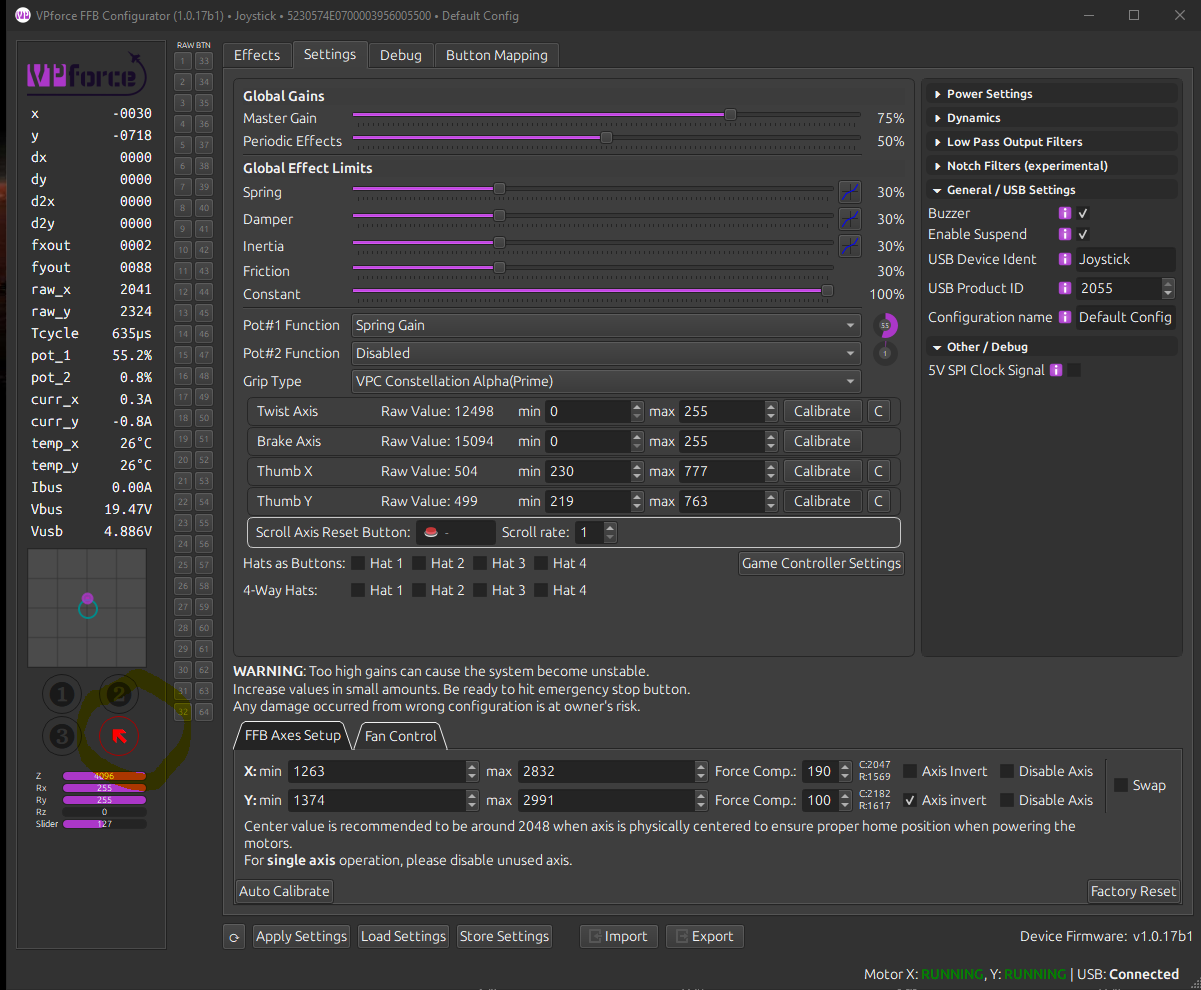
Mthe WIN10 Tool for gamecontrollers also collects the same info. I am wondering if the thumbstick is maybe damaged ... ?

 N
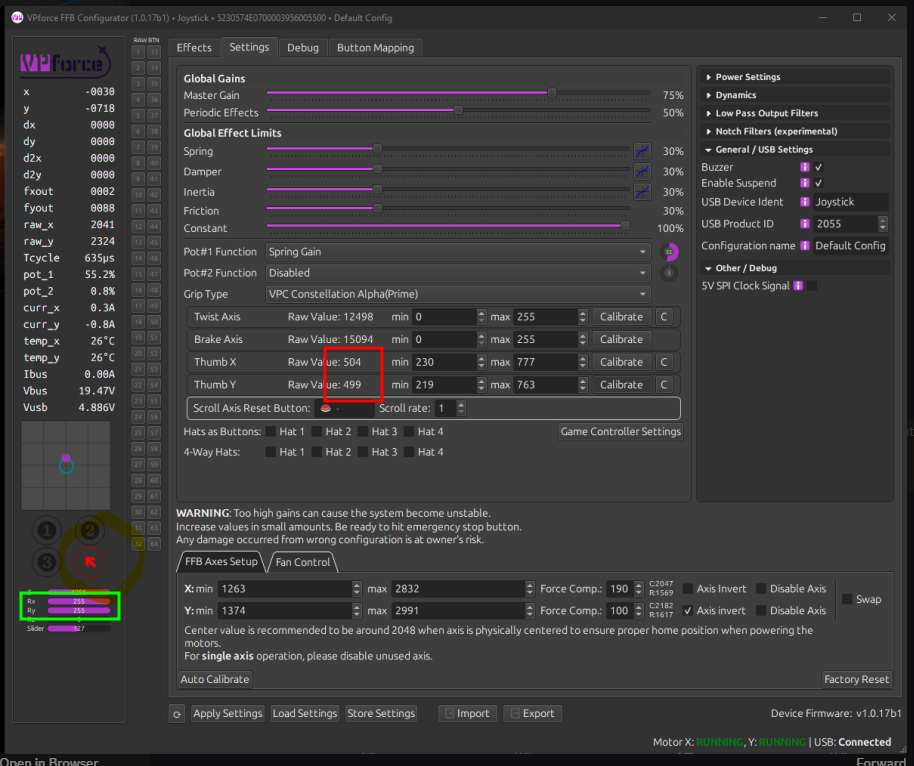
Nthats pretty strange. The axis numbers in the green box seem to agree with the hat position being triggered (both full up/left). Do they change when you mvoe the axis? What about the raw values in the red box?
 M
MRaw Value on thumb X is:770 full left, 237 full right.
Raw Value on thumb Y is: 218 max down and 734 max up BUT diagonally up right is like 754.
Something is messed up ... push thumb is button 5 ,,,#
Raw Value on thumb Y is: 218 max down and 734 max up BUT diagonally up right is like 754.
Something is messed up ... push thumb is button 5 ,,,#

 R
Rwill this also be more stable with the cyclic, to increase the strength of the center, where ever it is when using force trim?
MSolved after some tinkering: ok .. I reset all settings and also the win10 (reset to standard NOT calibrate) config. then calibrated in VPForce FFB COnfigurator and send to device and it now works -.....
 Y
YI just got my rhino, and it's great to feel the ffb. I was wondering if anyone has settings they like for MSFS and DCS helos (uh60, oh58, bell 407). The trim doesn't seem to really hold its position well and sometimes the aircraft will flip right away if I start with the aircraft running. I have been reading through the manual, but I'm not really sure if I have something on or off that I shouldn't.

 H
HFor the trim to hold well (assuming you are talking about Helicopters), you need to play around with friction settings. For helicopters in general I would recommend to use very light spring (or none) and more friction and damping (and a bit of inertia) to give the stick the right „feeling“. And personally I use the hardware enabled trim function of the VP software rather than in-game force trim.

 T
TBeen tweaking settings for a helicopter config myself. Using a both friction and damping, with a little spring. I've been playing with the DCS OH-58D Kiowa and having fun with it. Using its force trim seems to work fine. I'd like to understand why you recommend using the hardware enabled trim vs the in-game force trim - for spring centering or something else?
 H
HJust for convenience. This way I have a reliable always consistent function for all helicopter modules and don't need to rely on the implementation in the module itself. For example I didn't even noitce that there were initial problems with the FFB implementation of the Chinook. Worked like charm from day one for me.
RI tend to use ingame ffb now with tweaks in teleffb per aircraft. My 58 flies different than my oh-6 and 60
 B
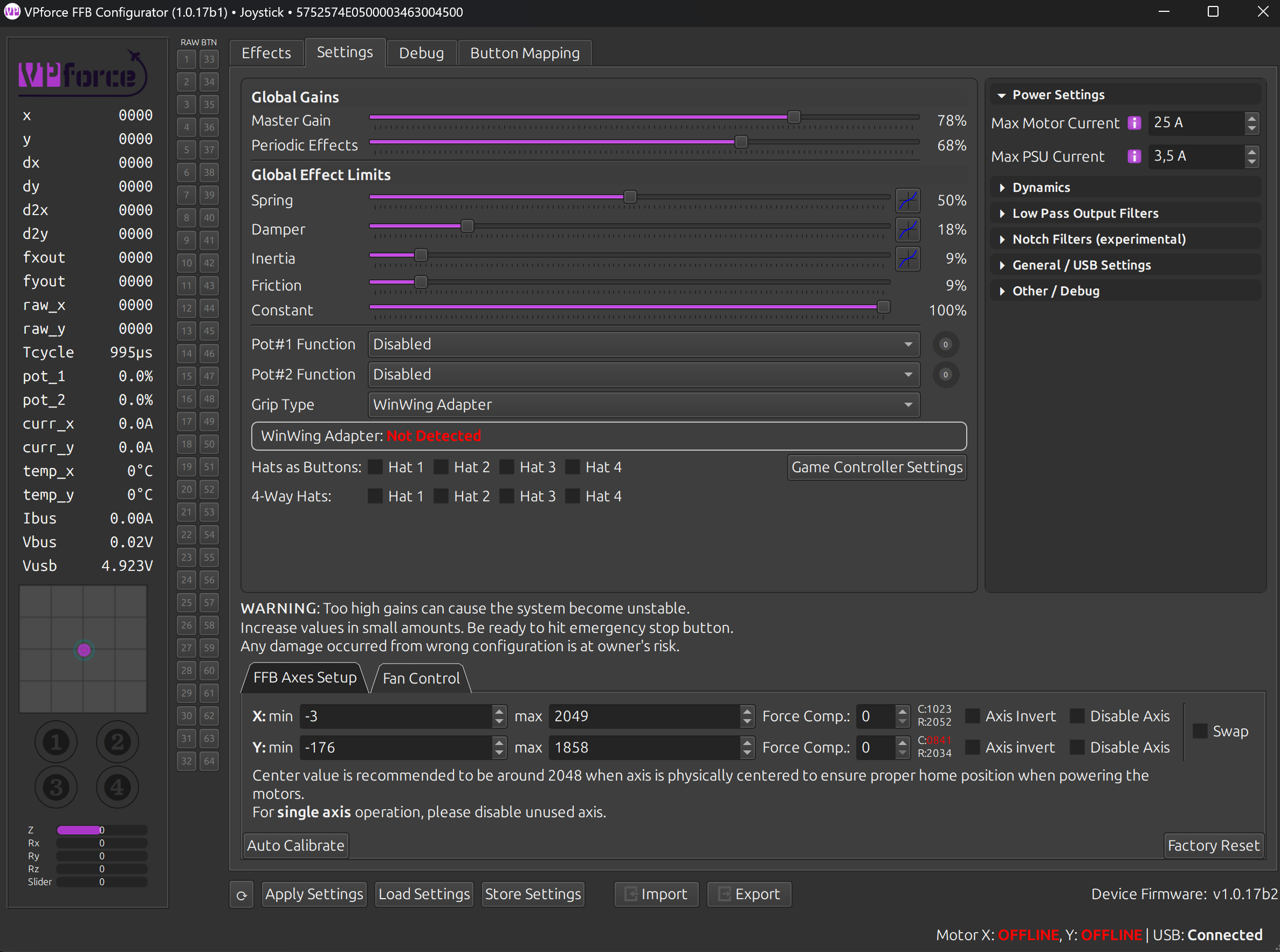
BSomethings very wrong with this setup ... Motors start randomly, most of the times at the first plugin, then if i unplug they wont start.
PCB Interface wont work most of the times - buttons not recognized etc
what t he hell is wrong ?
PCB Interface wont work most of the times - buttons not recognized etc
what t he hell is wrong ?

 T
THave you tried loading the default rhino profile?
Bjup...nothing happens. The motor issue i assume its the Capacitors of the PSU still having some undervoltage, but too less.
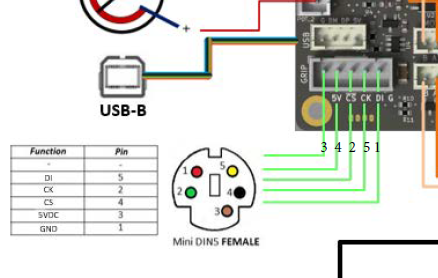
The 5 pin WinWing Adapter, well wired like here, not working:
The 5 pin WinWing Adapter, well wired like here, not working:
 B
Band after pressing the E-Stop, nothing will start up...
Bso for now, sorry to say, this is a expensive piece of trash :/
TWhat does the debug tab show? Are you hearing beeps from the board when applying power? What power supply are you using? Have you checked supply voltage?
TThe numbers on the left side in this picture is what mine looks like when it has been powered on and then off. Vbus is showing 0.02V so looks like a power supply issue to me.
 B
BGC PRO Netzteil für Dell Latitude E5510 E7240 E7440 Alienware 13 14 15 M14x M15x R1 R2 R3 Laptop Ladegerät inkl. Stromkabel (19.5V 9.23A 180W)
 B
Bi might be the trash aswell 
THow have you wired the power to the main board?
BPSU + -> E-Stop C pin
E-Stop NC -> Board +
PSU - -> Board -
E-Stop NC -> Board +
PSU - -> Board -
Band the PSU, I assume is AC
TIf you have a multimeter you could check voltage at the board to make sure you are getting 19.5V to the input terminals. Careful poking around with the probes not to short anything.
Rhaving issues since latest update virpil alpha grip constellation. button 18 is now pressed when buttons 19 and 20 are pressed. i didnt have this yesterday before lstest update. @walmis
 Z
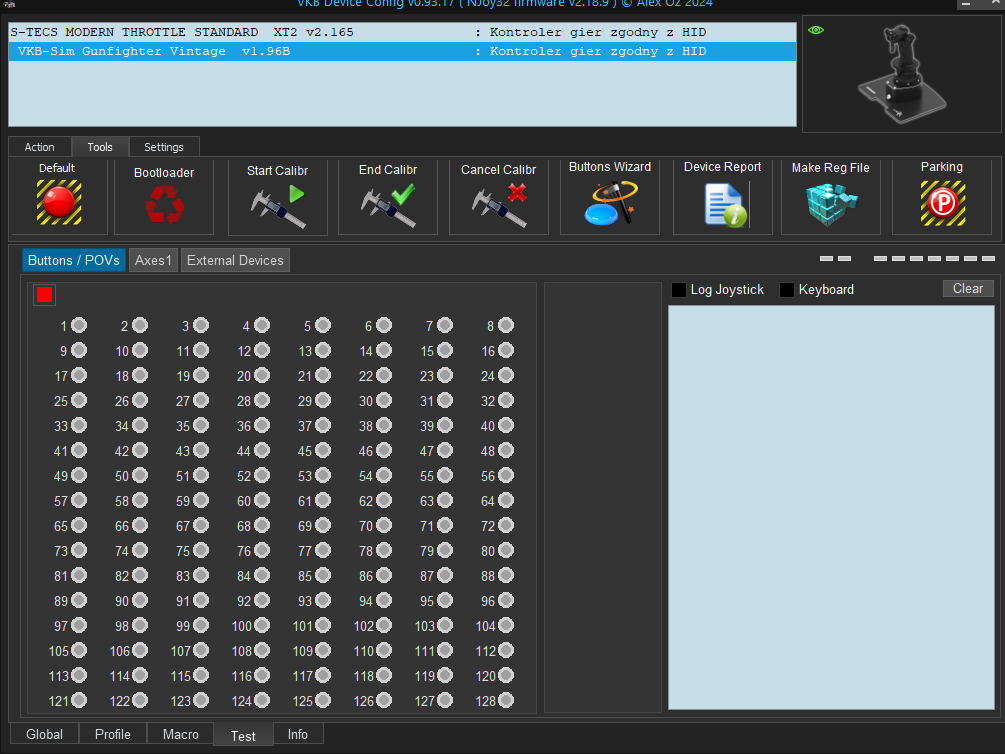
ZHi. I am connecting F-14 VKB grip to the blackbox through adapter. VKB device config says it needs to calibrate controler, but nothing happens afterwards. Any ideas what am I doing wrong? Also, it shows grip as "VKB sim gunfighter vintage"

 C
CNeed to click default to reset the grip type. Calibrate by clicking and moving all the buttons then end the calibration. Should be good to go. I switch between the mgcu, f-14 and KG12 grips.
ZMay I ask, where is this "default"?
CVkb software should be a big red button on the left in the tools tab.
ZWent through all of the buttons, ended calibration. Still no success, no buttons seams to work in test tab
ZIt's weird, because the app recognized stick in "external devices" as the KG12 grip, altough i have F-14
CMake sure you click up above in the box the grip name. Then click the default it will reset it to show the F14 grip and prompt the calibration.
ZI have selected it, but after clicking default it stays the same
 Z
ZIt prompts calibration, but finishing it doesn't do anything
CTry updating the firmware.
ZDownloaded it today, so that's the newest verion
CYa, something is wrong. The default should reset it to recognize the new grip.
ZOkay, so I had to flash new firmware for the grip, altough besides owning Mk.1 blackbox, I had to use Mk.2 setup. Weird, but now it found it right away. Thanks for help!
ZIn case if anyone needs this in the future, I own the Mk.IV (rev. C) grip
CAnd I apologize when I said update firmware I was referring to the grip. Sorry I was not clear on that.
ZNo problem, thank you again
 X
XHi all, i have received my unit today, and ran into an issue.
I connected the base via USB and via the power brick that came with the unit. My computer can see the device and I was able to update the firmware via the website, but when I turn the red knob, the motors stay offline. Also, stick movements are not detected.
I tried reconnecting (red knob down, disconnect power, disconnect in windows, remove USB and then reconnect), but that didn't help.
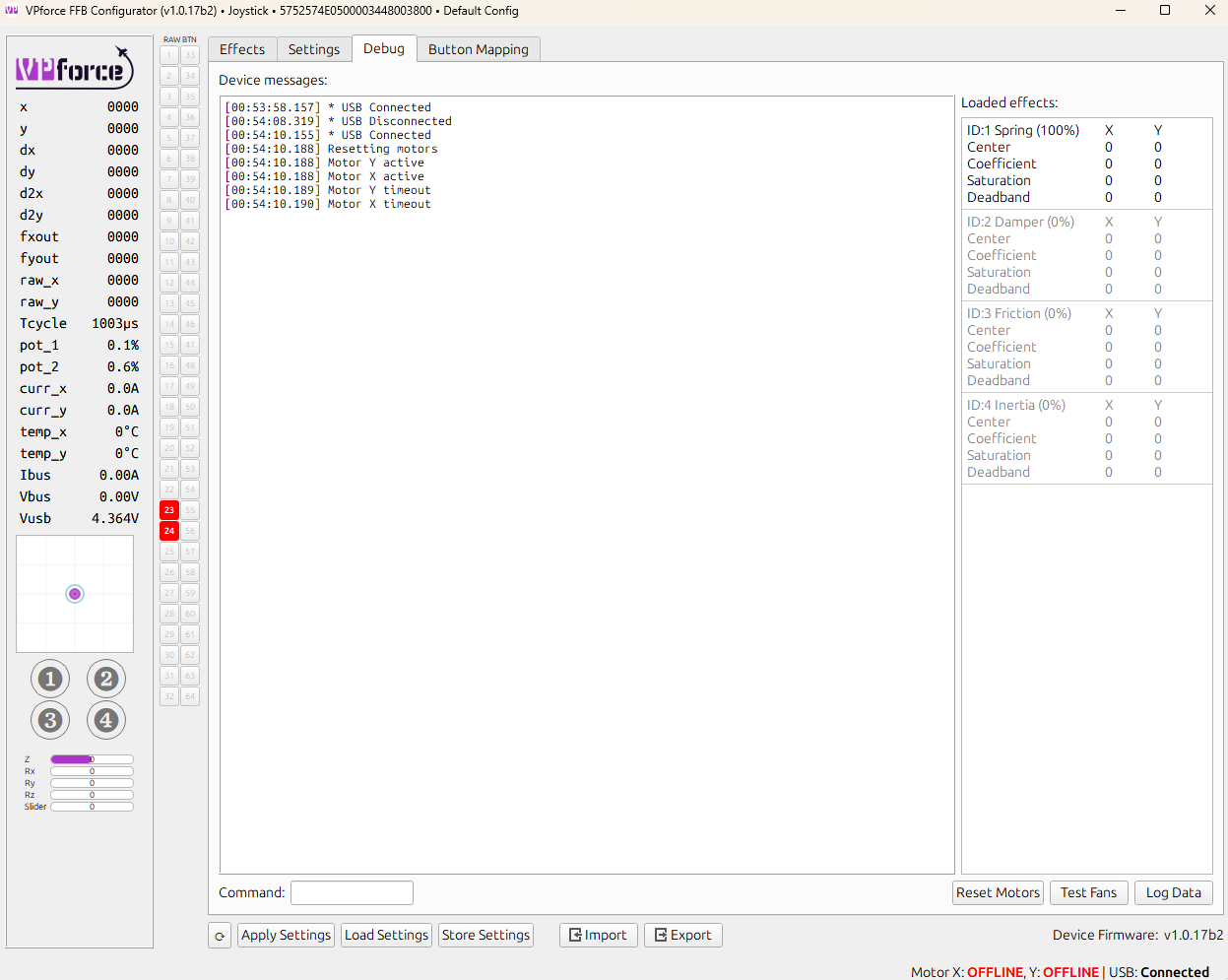
It however seems to put the motors on active, and then directly puts them into timeout (see screenshot).
I also tested the voltage of the power brick and it seems to work - however, I don't have another unit here test if it might be the brick or not.
Anybody an idea what I can do?
I connected the base via USB and via the power brick that came with the unit. My computer can see the device and I was able to update the firmware via the website, but when I turn the red knob, the motors stay offline. Also, stick movements are not detected.
I tried reconnecting (red knob down, disconnect power, disconnect in windows, remove USB and then reconnect), but that didn't help.
It however seems to put the motors on active, and then directly puts them into timeout (see screenshot).
I also tested the voltage of the power brick and it seems to work - however, I don't have another unit here test if it might be the brick or not.
Anybody an idea what I can do?
 C
CJust to clarify you are saying you push the stop down to turn off and twist up to turn back on.
Xyes
 F
FDo you hear a beep when you press or turn the emergency knob? The only way I was able to recreate your issue is by plugging my rhino to the USB port with the emergency stop button pressed down or with the power supply disconnected. If you tested the power supply with a multimeter and you get the right voltage my guess is that the emergency stop button isn't working correctly.
FYour Vbus is at 0v so the board isn't getting any power from the power supply. There you should be seeing the same voltage you get from the power supply with the multimeter.
 N
NI having a imilar issue. No power to my rhino I have tried 2 power supplies. E stop Does nothing
FIf you feel comfortable with taking the bottom and the wall in front of the e stop to check the wiring you could do that and see if the black cable going to the board and the red cable going to the e stop and from the e stop to the board are connected. You can also use a multi tester to carefully check the voltage before and after the e stop.
FMaybe the wall in front of the e stop can come off without taking the bottom off. This is what you would see:
F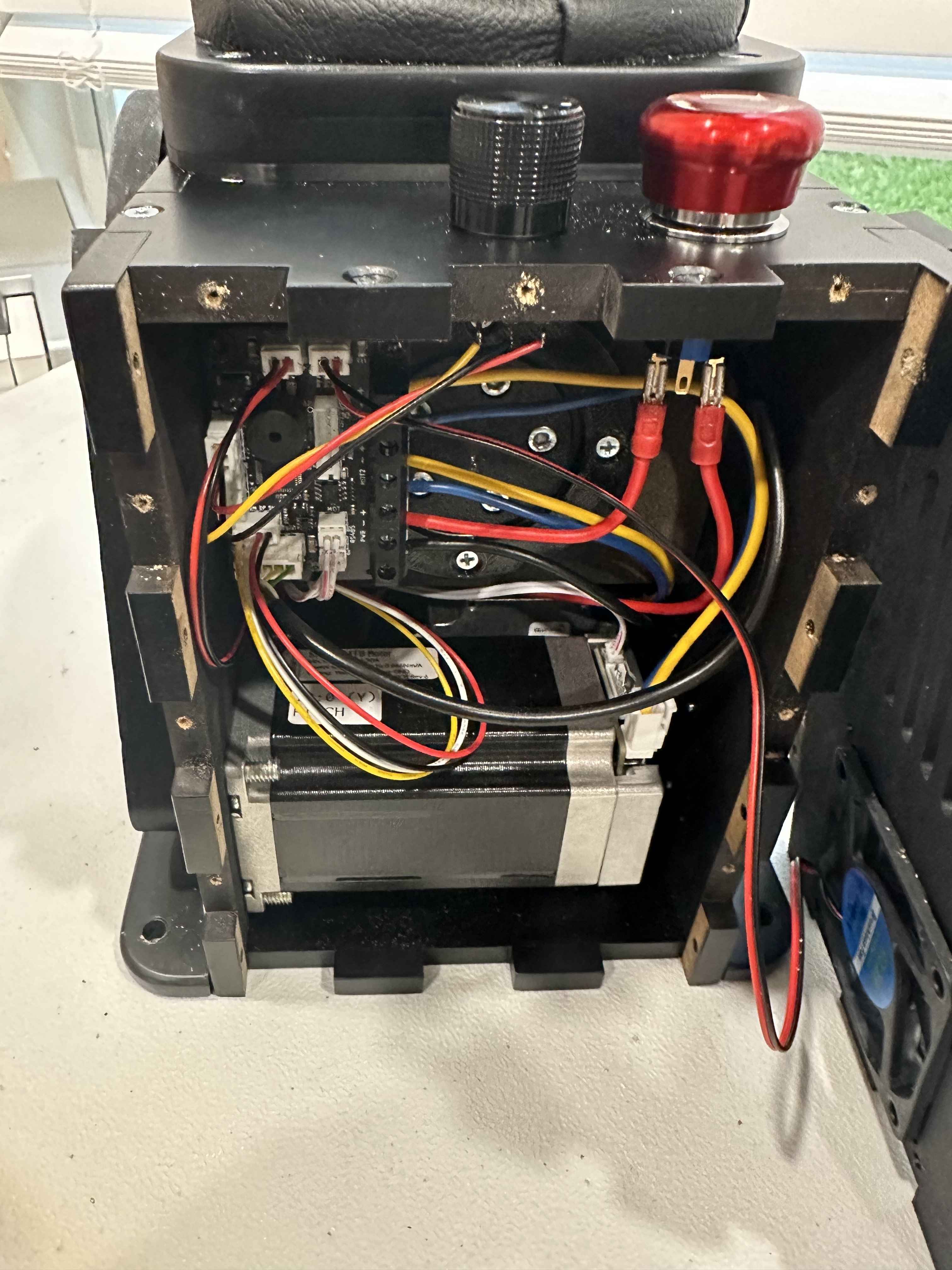 F
FHopefully the issue is just that one of the red cables going to the e stop got disconnected and you just need to reconnect it as shown in the picture.
