Cache reserve is a realy strange product. Why on Earth would you create a cache solution on top of the slow S3 style storage with 99.9999999% resilience to data loss. It is like shooting a bird with a missile. Erasure coding used in R2 is slow and expensive for reads and writes.
And write operation inquire read operation. This is just brilliant.
My point is that any cache does not need 99.99999999% durability whether it is hot or cold cache. This durability is not free in terms of performance and money. R2/S3 is slow and costly and not suitable for cache purposes.
It hurt performance on MISS badly. Becouse of Erasure coding used to store files in R2. And implementation is unbelivable. Cache Reserve gets a file from Origin, Writes it to R2 (performing Erasure coding and spreading pieces of the data to different physical servers), then READS it from R2!!! and then send it to a client.
Durability is part of the point. It's a guaranteed caching layer, it will hold your objects for the time you specify, for specific use cases where you absolutely don't want to hit the origin: https://blog.cloudflare.com/introducing-cache-reserve/
From your comments, it sounds like you're more looking for Tiered Caching. Free can use Smart Tiered Caching for free, it picks a cf location near your origin to check cache first before requesting. It's normal cache but smarter (and it has the same cache eviction/not guaranteedness/etc of normal cache)
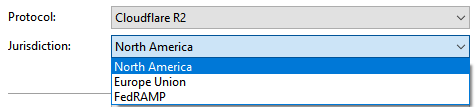
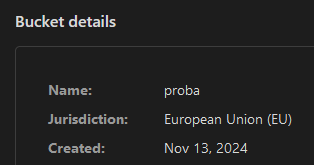
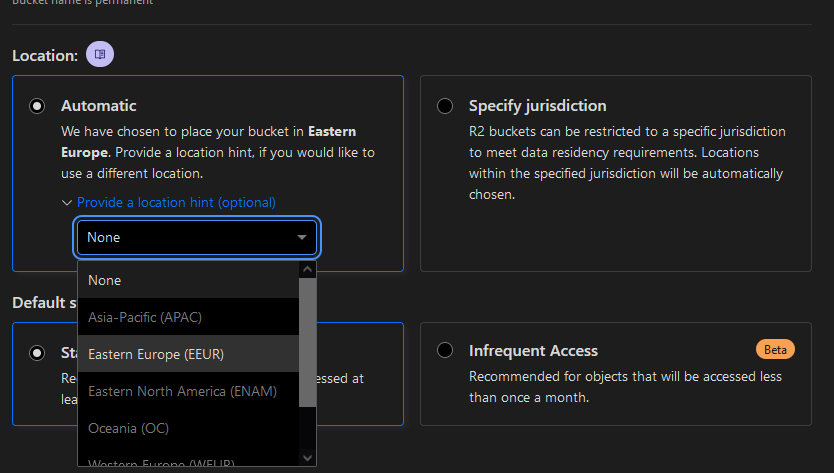
Sharing some feedback, maybe it's related to the FileZilla devs Furthermore, while using FileZilla Pro, on Windows, when I select "Jurisdiction" North America, it does connect and list all buckets no matter if I've selected location hint is EEUR/WEUR or any other. However, when I select Europe Union, then it lists only those buckets which are "European Union (EU)" for location (literally selected "Specify jurisdicition" while creating such bucket). So, those wih EEUR or some other location with "Automatic" are listed under the North America in the FileZilla FTP interface. With selected jurisdiction "North America" I get even those with location "automatic" but selected suggested location hint EEUR, WEUR, etc.
May I ask if using Automatic with location hint EEUR is actually served from outside EU or? Should I pick EU jurisdiction at first while creating bucket to make sure the data/files are served from the EU and not EEUR?
Had no clue for this! Will give it a try for sure I do have 1Gbps connection from home and server as well Used rclone 1st time, was quite fast for approx. ~2mil files and ~160GB vs aws-cli which took me a full day for only ~50GB and ~1mil
May I also ask, since I haven't tested much yet, is there any difference for EU jurisdiction bucket, e.g. are files served from EU IP addresses? https://community.cloudflare.com/t/site-ip-address-changes-very-often/374169/4-> reminds me onto this and then I wonder if I'd have some issues, with some ISPs blocking or limiting Cloudflare ...
May I use this opportunity and ask if there is any difference, or need for this to get it work in the config file for rclone? Or just define and use R2 API Token which can access read-write for both buckets?
I asked yesterday but didn't provide an example. I have this R2 custom domain setup automatically by "connecting" it. It's returning a 301 for any URL back to the URL requested. Here's an example: https://sniff.lololo.lol/hello.txt-- I have checked every set of config for the zone and there's no page rules / redirects / etc.
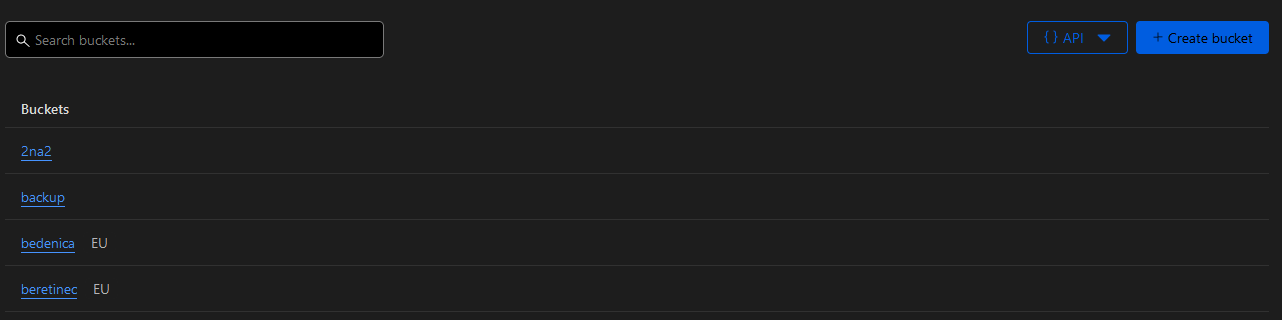
May I ask could we expect somewhere in future to be able to filter buckets on the bucket list, e.g. per location / jurisdiction? Might be it's able to do it via API, but not on the Dashboard, yet. Thank you!
 J
J S
S C
C L
L H
H
 F
F

 H
H
 T
T be up to date