

 V
Vsifu_log.txt3.79KB
VI suspect that the files got corrupted because I paused the download twice due to my slow internet, which made it take two days to complete.
Vit was 21gb but took me more than 43gb
 A
Ayou can use the
it will download anithing that's missing and fix corrupted files if any
verify and repair option, game details > 3 dots menu > verify and repairit will download anithing that's missing and fix corrupted files if any
 S
Sis that Proton Hotfix by Steam directly?
Sif verify and repair doesnt help try switch that to Proton GE Latest
Salso trun on umu
 H
HWine-GE is rather old now (last release is almost a year ago) and thus might not work correctly. Please follow these instructions on using GE-Proton with umu instead:
- Head to the Wine Manager in Heroic, click the "Proton-GE" tab, and install "Proton-GE-Latest"
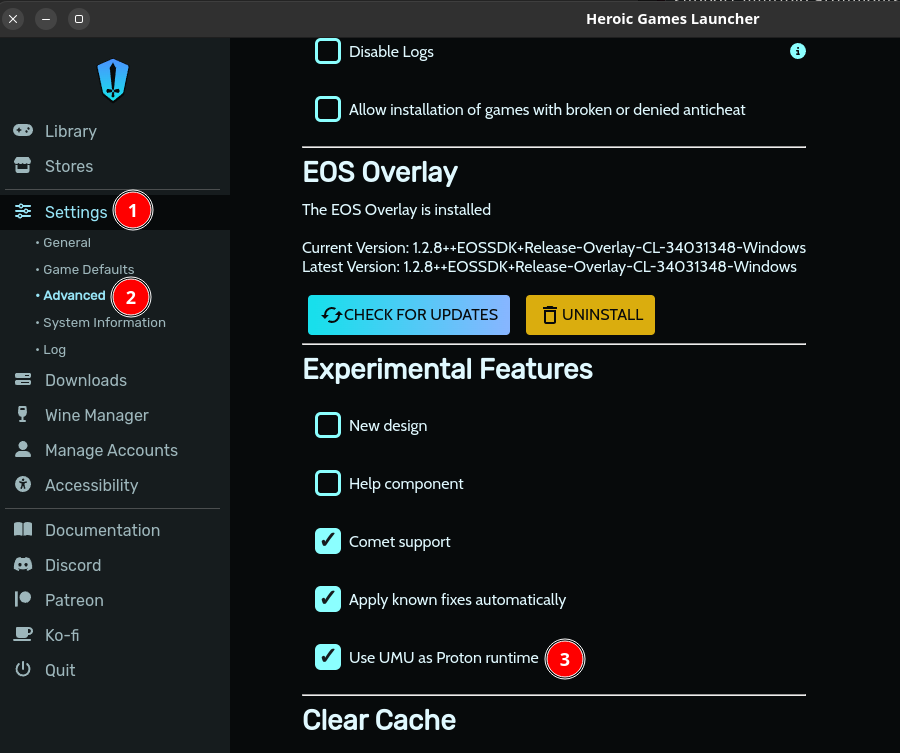
- Enable umu in "Settings" (Heroic sidebar) -> "Advanced" -> "Use UMU as Proton runtime"
Note: For a visual guide, see attached image - Head to the settings for your game(s) (icon on game card in library). In the "Wine Version" dropdown, select "Proton - Proton-GE-latest"
 V
Vi tried all these steps but now when i try to run with proton GE latest it gets stuck at launching
V V
Vmessage.txt1.56KB
Shmm maybe turn off umu see if it helps
VTurning off umu launched it
VBut unreal engine error prompts after studio logos
Vmessage.txt10.85KB
VIt is working
VI turned on umu and its working!!!
VThank You So Much!!!!
V V
V V
V

