

 Y
YYou mean the Trim Release Damper? I am assuming that we are both talking about DCS. Thanks again for your patience with me.
 C
CYeah DCS, trim release damper overrides the DCS native FFB, telemffb has an option for override DCS Spring
C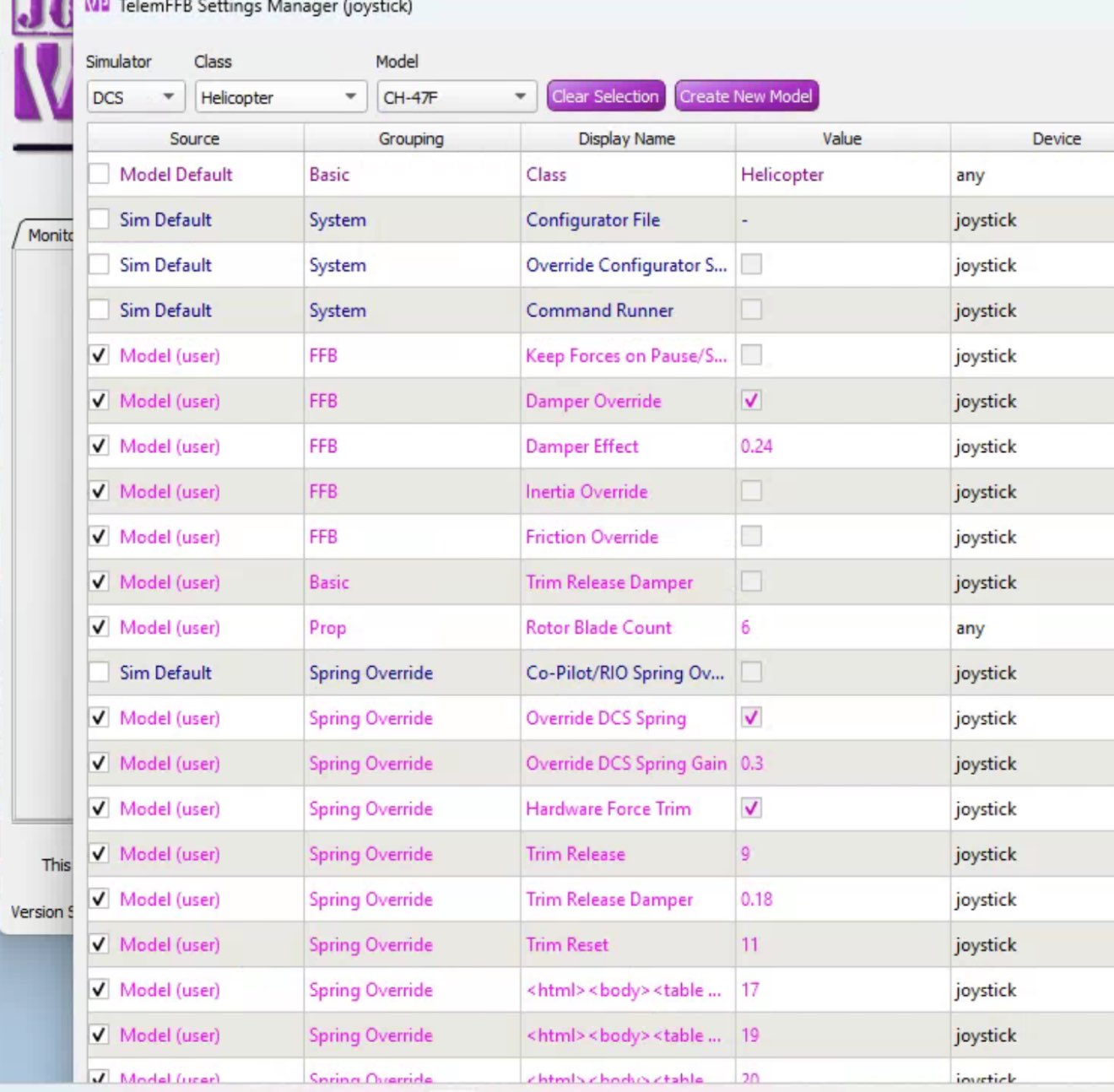 C
CI’ve had to use Remote Desktop so it looks odd
CBut the override dcs spring option lets you let a custom spring curve and strength, a force trim release and a FT re-centre bind etc
CTrim release damper etc is all in there too
 U
URecently got an email telling me my preorder was almost ready, wasn’t expecting it nearly this early so I wanted to ask do you need to fully pay within 10 days or just confirm the order via the link?
UDidn’t see anything on the FAQ about it

 F
FFor the first email with the link to the order form you just have to fill out the order form and add any additional parts you want to order (adapter...). That's the actual placing of your final order. When all parts are available you will get another email (New invoice...) containing the invoice of your ordered parts and the clear instructions how to pay.
UOk I appreciate the help, thank you
 P
PBe aware the invoice will come soon after you place that order. For me it was, I got mail on Wednesday, and placed the order on Fri and on Monday I had the invoice with a few days to pay, which I paid, and 2.5 days later it was in my hands in Florida USA. But as you noted their list seems to be moving much faster, My order only took about 3 mos total so if you can't do it now get back on the list. 
YThanks for sharing your settings, much appreaciated. In the VPForce manual, there is nothing explaining the Trim Release Damper, and all the mentions to Trim Release seemed to be related to MSFS, so I had just totally skipped this one. I will need to read more about it, to understand what is supposed to do, and see how to configure it. I went to the release note and found this: - Helicopter Trim Release Damper
- This is not a replacement of the in-game trim release functionality. It is a simple spring based dampening effect, identical to the one for MSFS.
- To configure, simply enable the effect and bind the same button that you have configured for TR in the sim. While the button is depressed, TelemFFB will add the dampening effect and will remove it when the button is released. The actual trimming and centering offset is still completely handled by DCS. Thanks again
- This is not a replacement of the in-game trim release functionality. It is a simple spring based dampening effect, identical to the one for MSFS.
- To configure, simply enable the effect and bind the same button that you have configured for TR in the sim. While the button is depressed, TelemFFB will add the dampening effect and will remove it when the button is released. The actual trimming and centering offset is still completely handled by DCS. Thanks again
CYeah that’s the case for native DCS FFB, I don’t use it all I control all my FFB through TelemFFB. To set the spring, use override DCS spring. Then you get access to two more sliders, spring gain and then a separate trim damper slider too, as well as binds for FT release, FT re-centre and a 4 way trim hat
 V
V:package:  RHINO #0939 Has Shipped!
RHINO #0939 Has Shipped!V:package:  RHINO #0940 Has Shipped!
RHINO #0940 Has Shipped!
 E
EI've got the same issue with Loopback not saving the selection. I am using the PumaX as a Button/Hat Source but on every reloading of the tool it defaults back to the Rhino. Also after a certain time flying the HPG H145 in FS2020 the Loopback tool crashes, but in the process it also kills the PumaX driver. You instantly notice this as only the stick lat/long axis (Rhino) work and everything else is dead. Any ideas?
 Y
YI also have the same issue with Loopback no saving the selection, even with the last version.
V:package: RHINO #0941 Has Shipped!
RHINO #0941 Has Shipped!V:package:  RHINO #0942 Has Shipped!
RHINO #0942 Has Shipped!YI am not sure how the effect of Trim Release Damper is supposed to feel. Do you need to have also some higher Damper Gain selected in order for to work? Because Force Trim is working in the game, but I cannot feel any difference, which point to me having probably miss something in the configuration somewhere. Thanks again.
CI’m not near my PC for the next few days or so apologies.
With a higher damper force and master gain turned up in VPConfig, the faster you move the cyclic the higher the force opposing it becomes. It simulates hydraulics quite well tbf.
With a higher damper force and master gain turned up in VPConfig, the faster you move the cyclic the higher the force opposing it becomes. It simulates hydraulics quite well tbf.
CHave you got a screenshot of your VPConfig?
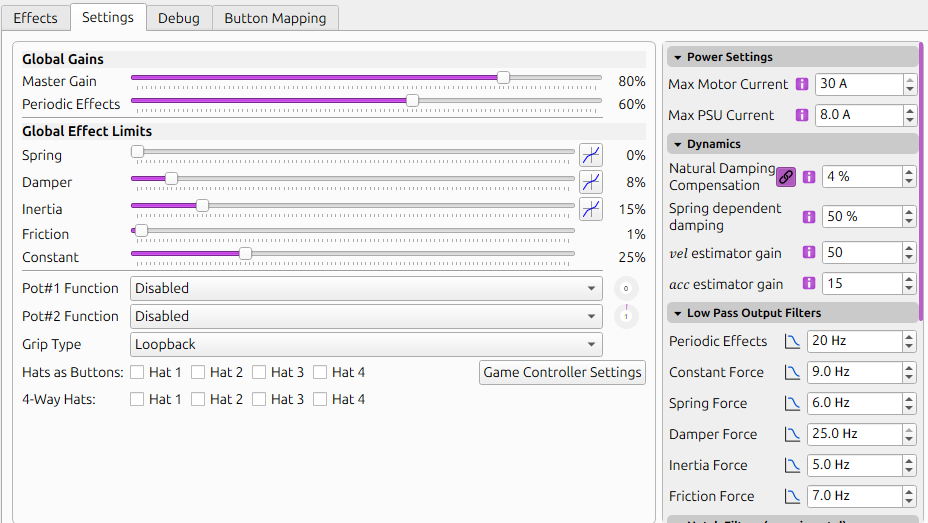
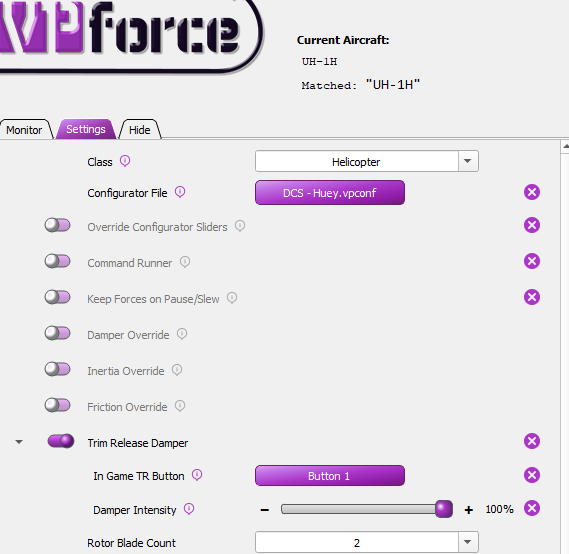
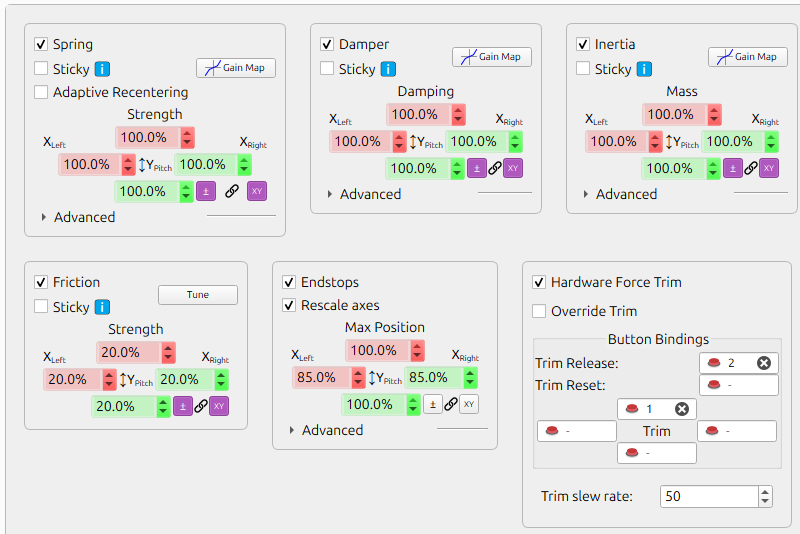
YHere it goes. Many thanks again.
 C
CDo you have the two pots wired up?
CYou have global damper set at 8% and global spring set at 0%
CPersonally I have spring at 100 and tune it per module, and damper at 70 and again tune it
CAre you using the newest version of telem? I don’t recognise the override configurator slider option you have there
 N
NTrim release damper is a spring based effect. When you press TR and the game spring goes to 0, TelemFFB starts a temporary spring effect that feeds the center position back into itself that results in a damping feeling. It’s a different sensation than straight damper effect would be.
When you release TR, TelemFFB stops the effect and hands the spring back to the game.
When you release TR, TelemFFB stops the effect and hands the spring back to the game.
YPots are not wired at all so only the values on the screenshots are applied. I am using Release 20250101 which I believe is the latest. Now I guess the problem of me not feeling the effect was because I had spring gain to 0.
CYeah that’s a likely culprit, give it a whirl and see how it goes
CI’d also turn up damper slightly
YFirst of all thank you both CaptainNel and Number481 for your help with this. I wish the manual was up-to-date, and this function explained better. I changed the Spring to 40% and the Damper to 15%, and now I can feel the effect. Whenever I push Trim Release I can move the Cyclic freely, when i push force trim, it creates a "new center" with some "spring effect" recentering the stick around this "new center", then if I push Trim Release the artificial center disappear and I can move again freely. Now the big problem I have is that when I push the Force Trim button, it does not create the new center at the exact same point the cyclic is when I push Pilot Timmer/Trim, it seems to put it at some arbitrary point instead, and not immediately. Is it supposed to be one single push or continuous push and release? I am suspecting some conflict between the Pilot Trimmer button defined in DCS and the Trim button defined in VPForce Configurator, are we supposed to configure it in both?.
CAs far as I know, it varies. What I would suggest is unbinding the DCS native keybinds and control trim through telemffb so you have no conflicts
CThe DCS binds are a method to replicate a trim system without FFB and hardware position gold
 R
RI haver used the tlelffb trim solution in the past, but have swapped over to dcs implementation as each supported airframe feels different. The 60 and still use the teleffb solution. works well for me. havetn had any issues.
CI use telemffb because everything feels the same  I prefer things to feel the same but I don’t really have anyt of the effects turned on or that it’s literally just for force trim ¯\_(ツ)_/¯
I prefer things to feel the same but I don’t really have anyt of the effects turned on or that it’s literally just for force trim ¯\_(ツ)_/¯CYa like what ya like
YIs there any use to the Trim button defined in VPForceConfigurator? The problem with TelemFFB is that it does not force trim the position of the pedals, does it?
CI personally have those off
CAnd no it doesn’t, that’s an issue I haven’t considered as mines are diy and springless tbf
CMost modules have a pedal trimmer
R★ Newest Generation Rudder Pedals★ Perfect for All Simulations★ 3-Axis Input (Yaw and Toe Brakes)★ All Metal Construction★ Adjustable Cam-Centering Mechanism★ VPC Contactless Digital Proximity Sensors
R1 Pedals Damper Upgrade Kit Available Here
R1 Pedals Damper Upgrade Kit Available Here
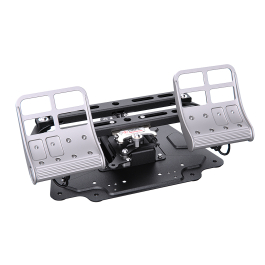 R
RThe two cut outs on the lateral sides of each metal foot rest look interesting almost like you could put a switch in there that could be depressed when you put your feet on the pedals almost like for a trim release for petals or PTT
 B
BAnybody here flying the T-45 or Hawk T1 in MSFS2020? The Rhino feels so limp on the ground and at slow speed. It seems that TelemFFB isn't recognising the module and can't set any sensible settings. Any ideas how to fix this?
YWhat do you have off exactly? The Force Trim in VPForce Configurator? VPForce Configurator Trim works well for me, but then it offset the center for the curves defined in DCS, which is not good, so I rather use the implementation of DCS, although I cannot get it to work properly anylonger
CI don’t have anything bound to the native DCS trims
CI Only use Telemffb
CNot the VPForce configurator
CGranted you need a pedal trim too but I’m not sure how you’d work around that as it’s not a feature I use
CThe only trim buttons I have bound are in telemffb
