

 J
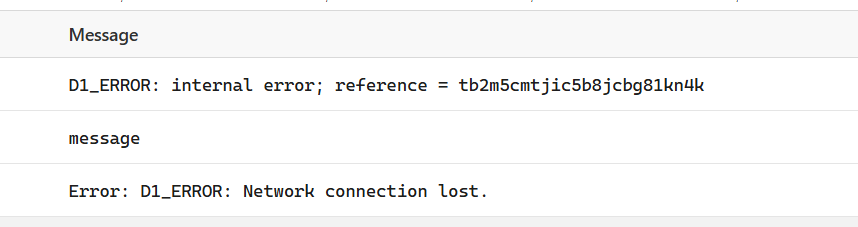
JHaving D1 internal reference error @Community Champion
account id 0292f26a5978816ec7dd8d2838ddda52
Is it global issue?
account id 0292f26a5978816ec7dd8d2838ddda52
Is it global issue?
 U
U?pings
 S
SPlease do not ping community members for non-moderation reasons. Doing so will not solve your issue faster and will make people less likely to want to help you.
 I
Ithat is a relatively common error, it happens sometimes, you need to be able to catch it and retry...
 W
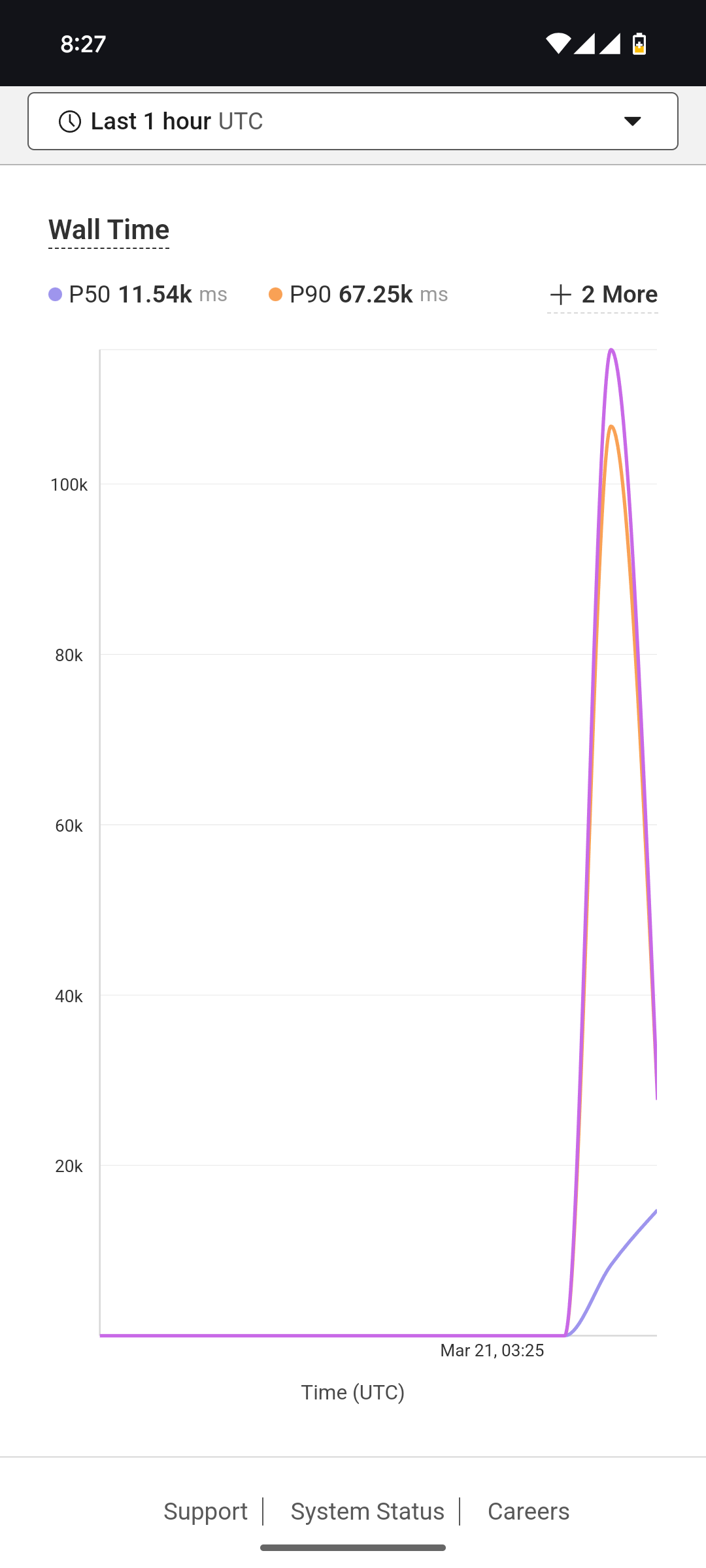
WGetting the same huge latency again, any updates? Workers id a3f6e70849e6eb5ca1ebaf6083bc84ba. d1-database
 O
OHow are you supposed to setup wrangler (jsonc) to have a local development database and a production instance? Wrangler only supports production and preview as environments, but if I define a d1 binding on the top level it takes precedence over the one defined in the environment
 L
LDoes Cloudflare D1 support database connection pooling like Supabase or Neon?
If not, does Cloudflare D1 support something similar?
If not, it's not a good option to choose D1 instead Supabase or Neon, right? (also considering other issues like lack of transactions support)
If right, what could be a good purpose to use D1 instead Postgres?
If not, does Cloudflare D1 support something similar?
If not, it's not a good option to choose D1 instead Supabase or Neon, right? (also considering other issues like lack of transactions support)
If right, what could be a good purpose to use D1 instead Postgres?

 C
CDoes Cloudflare D1 support database connection pooling like Supabase or Neon?D1 is not postgres. It's sqlite, which doesn't have a remote connection protocol. You can connect via the Rest API( not recommended, goes through core/higher latency and api rate limits) or via Workers, which just make requests to your d1 instance.
If not, it's not a good option to choose D1 instead Supabase or Neon, right? (also considering other issues like lack of transactions support)Supabase and Neon are both Postgres DBs. Compared to D1, they have more scaling options (D1 is locked to a single instance in a single region right now), higher max storage (D1 has a hard limit of 10 gb), and is postgres/instead of sqlite, less vendor lockin and such. So it's pretty different in general. D1 aims to have you scale with many DBs rather then one big one, but lacks the dynamic bindings to make that easy right now
LI know D1 is SQLite.
CYou can use neon w/ Workers using Cloudflare's Hyperdrive connecting pooling/caching service: https://neon.tech/docs/guides/cloudflare-hyperdrive, or their connecting pooling
CThen maybe it helps to extend my answer: Since D1 is SQlite, Sqlite doesn't have external database connections/any connection protocol, there's no expensive db connections to be had. When your query your db from your worker, you're getting the best performance to d1 without having to do anything, under the hood it uses rpc/http, much less expensive connections then db connections, to connect and talk to your database
L@Chaika Ok, thank you.
 M
MAccording to docs:
But I don't really see a way to dynamically bind to a D1 from a worker? How are per-user, per-tenant, or per-entity use cases actually covered? Any examples?
D1 is designed for horizontal scale out across multiple, smaller (10 GB) databases, such as per-user, per-tenant or per-entity databases.
But I don't really see a way to dynamically bind to a D1 from a worker? How are per-user, per-tenant, or per-entity use cases actually covered? Any examples?

 I
IThere is no way to dynamically bind D1 databases yet, but it's coming in the future at some point.
MI see, thank you. So if I understand, the per-user, per-tenant, or per-entity database use cases are covered by manually updating bindings to a worker and redeploying the worker?
MLooks like https://developers.cloudflare.com/d1/platform/limits/ says max bindings is approximately 5,000. So there is that constraint as well on the "per-user, per-tenant or per-entity database" use case..
ICorrect on both accounts, yeah. Hopefully in the future there will be a workaround/solution for these limitations but none at the moment.
MRoger roger, thanks - will keep an eye on how that develops
 L
Lwanting to modify a table of a d1 database using migrations, i added a second SQL file with the alter script. when I apply the migrations by 'wrangler migration apply' It re-apply the first SQL file as well (with the creation script) and obviously i get an errore. how to manage the db changes in a viable and repeatible way
 A
Acloudflare has said in the past that dynamic bindings for things like D1 are a goal, but theyve been saying that for a while.
A current solution could be to use Durable Objects' SQL storage API, but note that it has different limits and pricing than D1, and might have different features.
DO's SQL Storage could let you have a seperate object (and hence database) for each user. As a bonus, the DO would be created close to the first request, so each users' database could be located physically closer to the user.
Also note that Cloudflare Developer Week is coming up (first week of april) and they might announce relevant things during that. Don't count on it though.
A current solution could be to use Durable Objects' SQL storage API, but note that it has different limits and pricing than D1, and might have different features.
DO's SQL Storage could let you have a seperate object (and hence database) for each user. As a bonus, the DO would be created close to the first request, so each users' database could be located physically closer to the user.
Also note that Cloudflare Developer Week is coming up (first week of april) and they might announce relevant things during that. Don't count on it though.
AI personally don't have any experience with D1's migrations system, but make sure that the migration version numbers are sequential
 L
LYes are sequential but Wrangler seems apply all scripts everytime. It Seems doesn't keep any state about migration
 K
KI have an sqlite database of statistics that I update locally. I'd like to create a site to display certain statistics. Do you think it's usable? D1, is there a way to replace the sqlite file a la voler or do I have to code a warper and run it in a DO? (my data base is around 300MB)

 L
LI don't know what "a la voler" means, but you can export your local database and import it into a D1 database. Depending on the length of each row statement and the overall query load you might need to split the import into smaller chunks, but doable.
LAnyone can use D1-STUDIO on windows sucessfully? (https://d1-studio.com)
npm install -g d1-studio
npx d1s
I got this error:
Error in tables-route: Command failed: wrangler d1 execute authdb --local --command="
SELECT name FROM sqlitemaster
WHERE type='table'
AND name NOT LIKE 'sqlite%'
AND name NOT LIKE 'cf%'
ORDER BY name;
"
X [ERROR] Error: must provide --command or --file.
Node 22.14.00
npm install -g d1-studio
npx d1s
I got this error:
Error in tables-route: Command failed: wrangler d1 execute authdb --local --command="
SELECT name FROM sqlitemaster
WHERE type='table'
AND name NOT LIKE 'sqlite%'
AND name NOT LIKE 'cf%'
ORDER BY name;
"
X [ERROR] Error: must provide --command or --file.
Node 22.14.00
The first native studio for D1 databases
 V
VAlternatively, you can use
inside your cloudflare project to view D1 database
inside your cloudflare project to view D1 database
 N
Nwill there ever be support for transactions? otherwise, what's the official recommendation from Cloudflare to prevent data inconsistencies introduced by an error that could happen at some point between the start of the inserts and the last insertion?
 L
LJust
I've also tried:
And works as well.
What about a remote d1?
I've tried something likes this below, but i don't know what Is the driver's name and if the driver is includend into the
We couldn't find the right driver for this database
npx @outerbase/studio and It works perfectly for the local SQLite in the Wrangler project.I've also tried:
npx @outerbase/studio --config="$pwd\d1-outerbase.config-local.json"

{
  "driver": "sqlite",
  "connection": {
    "file": ".wrangler/state/v3/d1/miniflare-D1DatabaseObject/15c63002ced39d198237431f852a8e7204274c5a10e9861150529b8b00db0f6c.sqlite"
  },
  "port": 4000
}And works as well.
What about a remote d1?
I've tried something likes this below, but i don't know what Is the driver's name and if the driver is includend into the
@outerbase/studio packagenpx @outerbase/studio --config="$pwd\d1-outerbase.config-remote.json"
{
"driver": "cloudflare-d1",
"connection": {
"accountId": "your-account-id",
"apiToken": "your-api-token",
"databaseId": "your-database-id"
},
"port": 4000
}We couldn't find the right driver for this database

 I
I D
Dquestion: why does the hard limit of 10gb exist for d1 ?
even if its database per user, the bindings doesnt really allow us to properly manage more than one db. ( as far as i read ). even then its still limited to 50k db's
will it ever change ?
i feel like a good database solution is the only thing that cloudflare lacks in its serverless offering.
even if its database per user, the bindings doesnt really allow us to properly manage more than one db. ( as far as i read ). even then its still limited to 50k db's
will it ever change ?
i feel like a good database solution is the only thing that cloudflare lacks in its serverless offering.
VCurrently, the cli does not support remote D1 yet, I will work on it, but at the meantimes, our web interface support it, https://studio.outerbase.com/local/new-base/cloudflare-d1
 T
THow do people shard data across multiple D1 databases? This seems hard to pull off with wrangler + workers. Is there any sample code showing a solution like this?
 V
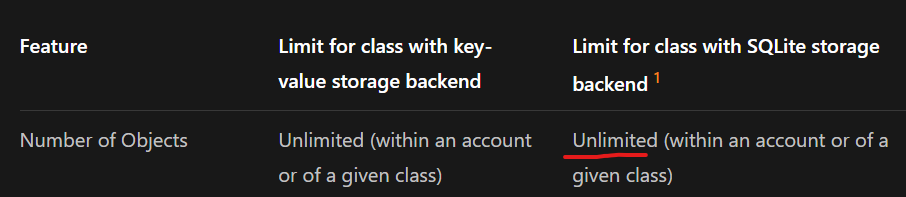
VYou can also try Durable Object SQLite storage. According to docs, you can create unlimited database, but each database is still limited to 1GB.
 V
VWhat is your current approach so far? Are you hitting the limit?
VFrom what I understand, sharding with D1 has to be handled at the application level—meaning you're responsible for deciding how to split and route data across multiple databases. Once you go that route, you lose some of the convenience of a single, unified database. It impacts how you query, sort, update, and manage data overall. There is no general approach at the moment. The solution is vary from your use-case. Maybe if you share us more detail about your problem, maybe some of our members here could provide some solutions.
TI could handle that at the application layer for a fixed number of databases but you end up predefining a fixed set of databases in a wrangler config file and then accessing them in your workers. Feels strange and hard to scale. Is there a better way?
Right now, I have everything in one DB. I'd probably shard by customer account for simplicity and replicate schemas across instances. I could of course split my data in other ways but this feels the most flexible at the moment.
Right now, I have everything in one DB. I'd probably shard by customer account for simplicity and replicate schemas across instances. I could of course split my data in other ways but this feels the most flexible at the moment.
 1
1Right now Durable Objects with SQLite with the way to scale in this way, but dynamic D1 bindings are in the pipeline somewhere, coming :soontm:
 J
JDo you have a link for info on developer week? I can’t find anything about it.
LYou can patch the Worker config through the REST API when you create a new database instead of having to put them manually in wrangler. It's a pain though since you need a bit of custom code on your side to do that. If you really want to handle thousands of databases, I would say that Durable Objects SQLite are much more suitable at the moment. The 1GB limit it only until it goes GA, soon.
LD1 databases are based on SQLite Durable Objects. If a Durable Object SQLite database could grow to 1TB then cold starts would be prohibitively slow. We could do lazy loading and all that jazz, but then you lose the super fast performance of local SQLite queries. 1-10GB is a good-enough size to enable many use-cases and OK cold starts.
TI'm thinking about living with my single 10G DB and hoping something changes with the cloudflare offering in the next 6 months. Either dynamic binding to databases in wrangler / workers or a larger single DB limit. If Durable Objects + SQLite were the future of scaling SQLite in the cloudflare stack I could start experimenting with that now but without an knowing that's the case I'd probably sit on my hands.
LIndividual DBs will not grow larger anytime soon, at least not any plans currently.
TThanks for the perspective on that! I can live with a 10GB database for the near term. I'll just need to figure out a plan to shard data should my application be successful and grow (or move to a new provider). I'm sure I'm not the only one. The more developer content that gets produced about scaling D1 or Durable Objects + SQLite the more retention you guys will drive. If I missed something LMK.
LDurable Objects can scale to great extend, as long as you design for sharding from the get go. It takes a bit of a mindshift since all traditional tutorials and online content is focused on big monolithic databases. Depending on the application doing sharding could be easier or harder, so it really depends how far you want to go.
The blog posts in this section https://developers.cloudflare.com/durable-objects/what-are-durable-objects/#durable-objects-in-cloudflare describe how we use DOs in several products, so that you get some idea of how to think with them.
At the end of the day, if you don't want or cannot think in terms of sharding, Hyperdrive is an awesome approach too, so just use that with your traditional database provider. Different tradeoffs in each approach.
The blog posts in this section https://developers.cloudflare.com/durable-objects/what-are-durable-objects/#durable-objects-in-cloudflare describe how we use DOs in several products, so that you get some idea of how to think with them.
At the end of the day, if you don't want or cannot think in terms of sharding, Hyperdrive is an awesome approach too, so just use that with your traditional database provider. Different tradeoffs in each approach.
TI was planning on just sharding by customer account. For my application, I'd be shocked if customers get more than 1G of data. That's just an easy starting place. ALL DB instances look the same.
For hyperdrive, my stack right now is hono + drizzeORM + cloudflare workers with D1 and R2. I'd have to look at how to work. hyperdrive into it and how much of a rewrite that owuld be.
For hyperdrive, my stack right now is hono + drizzeORM + cloudflare workers with D1 and R2. I'd have to look at how to work. hyperdrive into it and how much of a rewrite that owuld be.
 O
OWill D1 Dynamic Bindings essentially be a wrapper around SQLite for DO? Or will it have extra bells and whistles like tooling with the same performance as SQLite for DOs, or same as current performance. (performance as in latencies)
Dthanks. this is useful info
Dgoing to deploy a single db on d1 for now
if it gets out of hand, i guess turso is the next stop
if it gets out of hand, i guess turso is the next stop
 L
LThe SQL query performance itself is identical between D1 and SQLite DOs. The only difference is that D1 is in a different location from your Worker code location so doing multiple D1 roundtrips can be costly depending on those locations. With DOs you could colocate code inside the DO and then you always have fast access. If you are calling your DO from a different worker for each query then performance is again identical between the two products.
D1 REST API is completely separately flow, and should not be used in hot paths of your application on Workers.
D1 REST API is completely separately flow, and should not be used in hot paths of your application on Workers.
OThank you. Best performance will always come directly from a Durable Object with the SQL backed storage - I'm still pondering on building around it.
The only thing left to wonder is what kind of management tooling D1 dynamic bindings will have? (bulk DB deletion, reading/modifying multiple DBs, listing DBs?)
The only thing left to wonder is what kind of management tooling D1 dynamic bindings will have? (bulk DB deletion, reading/modifying multiple DBs, listing DBs?)
