
Anthropic Claude Sonnet 4 and Opus 4 pricing are still very wrong, they aren't taking into account c
Anthropic Claude Sonnet 4 and Opus 4 pricing are still very wrong, they aren't taking into account cache related tokens at all.
 T
T P
P A
A SS
SSgateway.run function inside workers. A
A HA
HA JJJ
JJJ V
V N
Nx-api-key header. AA
AAauthorization should be stored. Is this out-of-date? https://developers.cloudflare.com/ai-gateway/universal/#:~:text=The%20payload%20is%20expecting%20an%20array%20of%20message%2C%20and%20each%20message%20is%20an%20object%20with%20the%20following%20parametersNN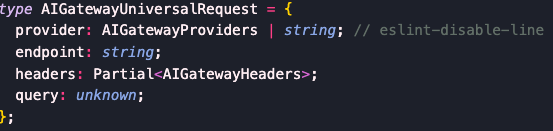 A
Acf-aig-authorization gateway-level setting. Perhaps this is header configuration hierarchy at work? https://developers.cloudflare.com/ai-gateway/universal/#header-configuration-hierarchy NNNVNN
 C
C C
C DCDCDCDC
 DDC
DDC ICICIIC
 V
Vimage_url V
V const url = await gateway.getUrl();
const client = new OpenAI({
apiKey: apiKey,
baseURL: `${url}compat`,
});
for (const file of files) {
const base64Content = Buffer.from(file.content).toString("base64");
const messageContent: Array<any> = [
{
type: "text",
text: fullPrompt,
},
];
messageContent.push({
type: "image_url", // Use "image_url" for all files.
image_url: {
url: `data:${file.contentType};base64,${base64Content}`,
},
});
}
const completionPromise = client.chat.completions.create({
model: model,
messages: [
{
role: "user",
content: messageContent,
},
],
response_format: zodResponseFormat(responseSchema, "query_response"),
});gateway.runcurl https://gateway.ai.cloudflare.com/v1/[account_id]/[gateway-id] \
--header 'Content-Type: application/json' \
--header 'cf-aig-authorization: Bearer [cf-aig-token]' \
--data '[
{
"provider": "openai",
"endpoint": "chat/completions",
"headers": {
"Authorization": "Bearer [openai_api_key]",
},
"query": {
"model": "gpt-4o-mini",
"messages": [
{
"role": "user",
"content": "What is Cloudflare?"
}
]
}
}
]'{
"error": {
"message": "You didn't provide an API key. You need to provide your API key in an Authorization header using Bearer auth (i.e. Authorization: Bearer YOUR_KEY), or as the password field (with blank username) if you're accessing the API from your browser and are prompted for a username and password. You can obtain an API key from https://platform.openai.com/account/api-keys.",
"type": "invalid_request_error",
"param": null,
"code": null
}
}x-api-keyauthorizationcf-aig-authorization


