HDMI kills Built-in Audio //Built-in Audio Analog Stereo audio device
Hey there! 
I just installed Bazzite on my laptop and have been testing it out. Everything seems to be working fine, but I’ve run into a bug—or maybe I’m doing something wrong—and I’m hoping someone can help.
The issue happens when I use a second screen via HDMI.
When I use only my laptop screen, the built-in audio device ("Built-in Audio" / "Built-in Audio Analog Stereo") is selected automatically, and sound plays correctly. However, if I boot into Bazzite with the second screen already plugged in, I lose all sound & no sound seems to output either via the external screen. The laptop’s audio device disappears from the Sound – System Settings menu and doesn’t show up when I run wpctl status in the terminal.
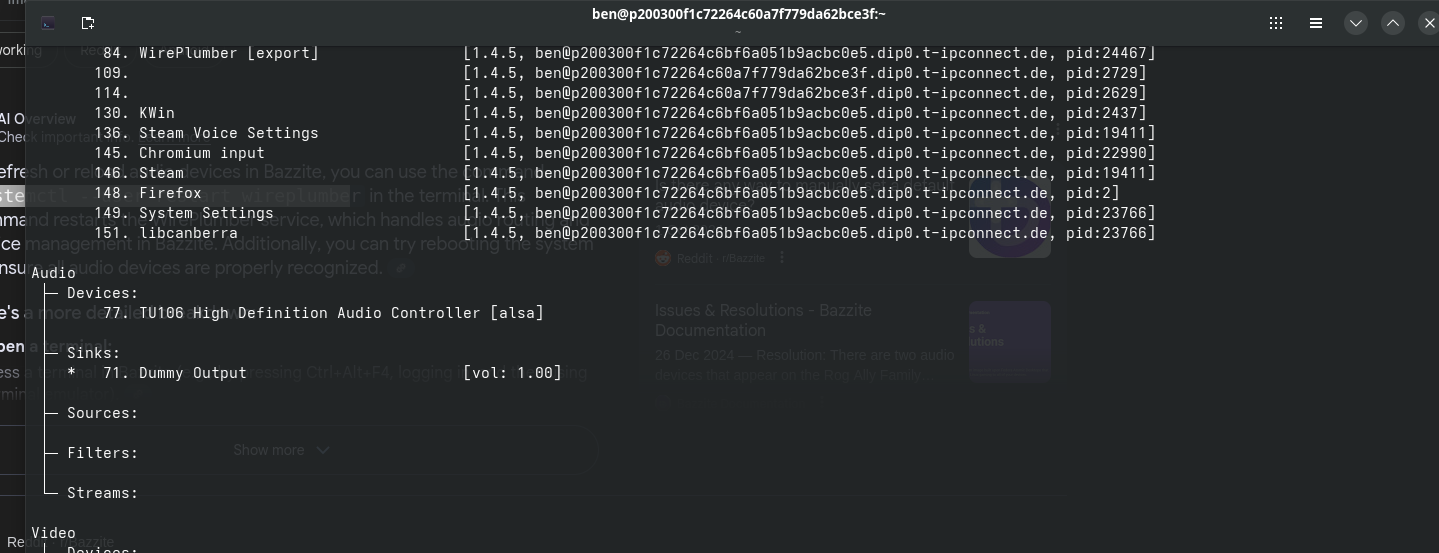
In which case, the only audio devices detected are the TU106 High Definition Audio Controller (ALSA) and a Dummy Output sink. (See attached screenshot.)
This issue only happens if the second screen is connected during boot. If I boot without the HDMI screen connected and then plug it in after reaching the desktop, the laptop's audio device works normally—it's detected and outputs sound as expected.
Any ideas on what's causing this or how to fix it? Anyway of "hard" setting the default audio device to my laptop's integrated audio device, or disabling Bazzite detecting the HDMI audio device?
Or is this a bug?
Please let me know if I need to supply any further info. Thanks!
I just installed Bazzite on my laptop and have been testing it out. Everything seems to be working fine, but I’ve run into a bug—or maybe I’m doing something wrong—and I’m hoping someone can help.
The issue happens when I use a second screen via HDMI.
When I use only my laptop screen, the built-in audio device ("Built-in Audio" / "Built-in Audio Analog Stereo") is selected automatically, and sound plays correctly. However, if I boot into Bazzite with the second screen already plugged in, I lose all sound & no sound seems to output either via the external screen. The laptop’s audio device disappears from the Sound – System Settings menu and doesn’t show up when I run wpctl status in the terminal.
In which case, the only audio devices detected are the TU106 High Definition Audio Controller (ALSA) and a Dummy Output sink. (See attached screenshot.)
This issue only happens if the second screen is connected during boot. If I boot without the HDMI screen connected and then plug it in after reaching the desktop, the laptop's audio device works normally—it's detected and outputs sound as expected.
Any ideas on what's causing this or how to fix it? Anyway of "hard" setting the default audio device to my laptop's integrated audio device, or disabling Bazzite detecting the HDMI audio device?
Or is this a bug?
Please let me know if I need to supply any further info. Thanks!