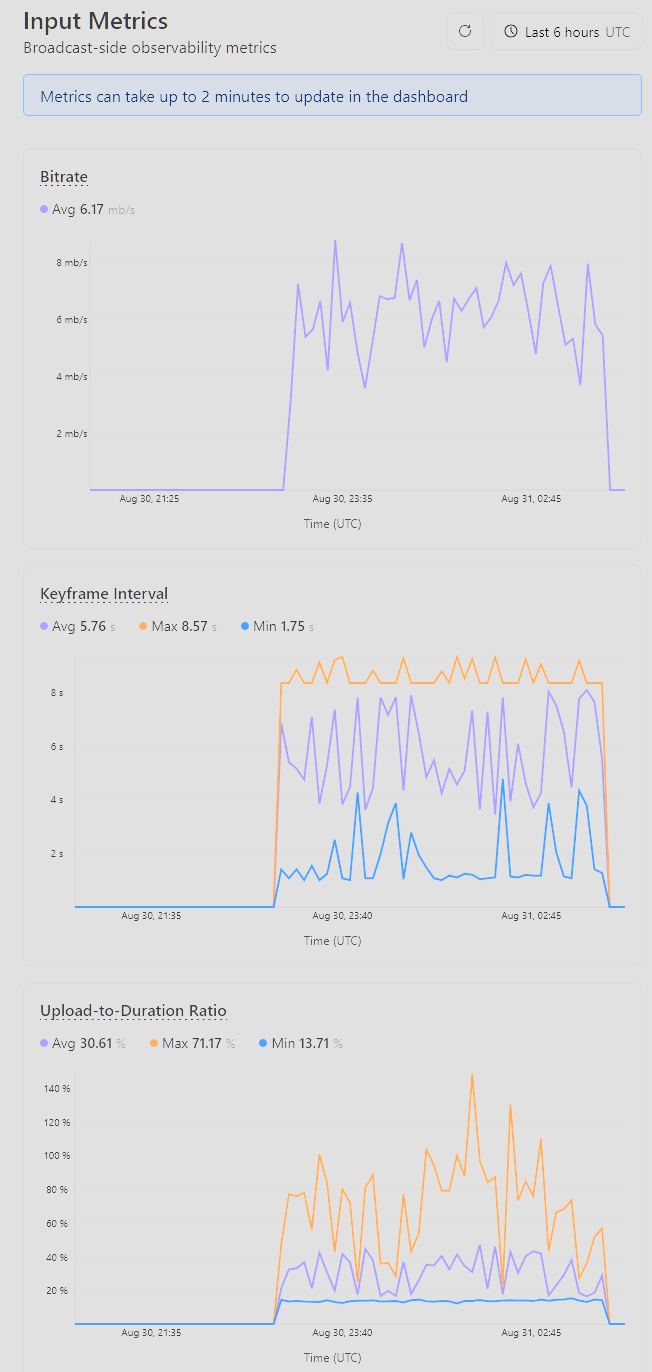
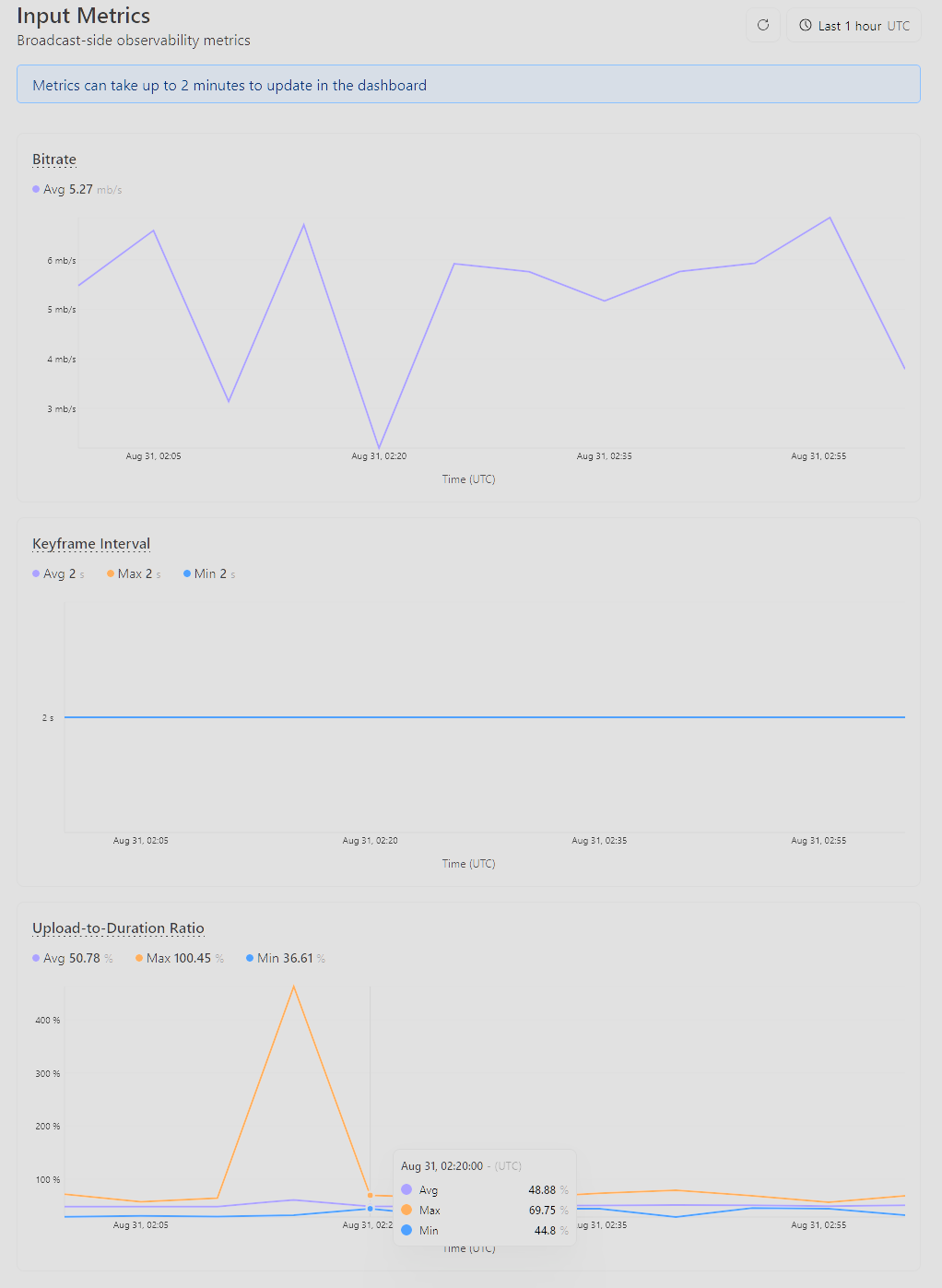
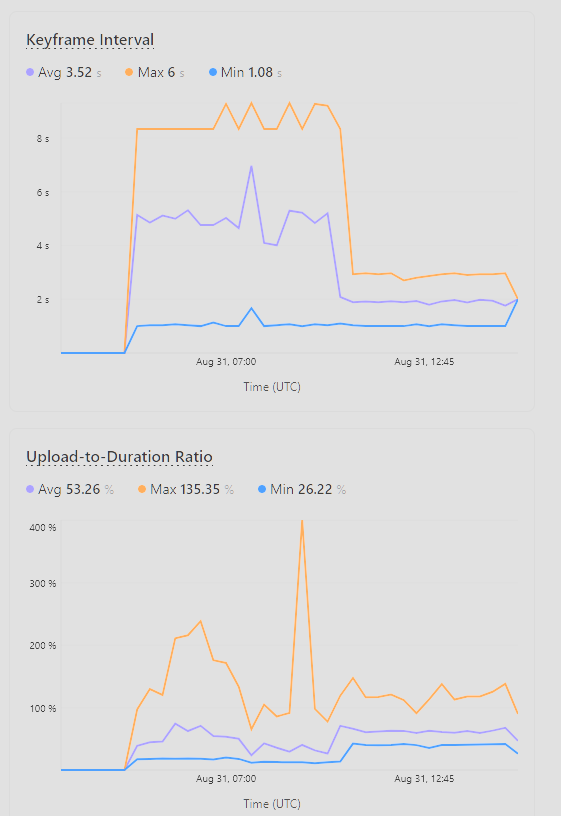
Has also happened with NVENC H.264 encoder today. Need to check on the rest of their settings. But had the issue with the left picture. No issue on a different stream by same person after that, on the right.
Troubleshooting page "It should be a consistent flat line below 90%. If you see an inconsistent or wavy line, or a line that is consistently above 100%, try the following troubleshooting steps:"
Admittedly they're not flat but they are under 90% most of the time, thought over 100% was potentially problematic.
Not mobile networks. Pretty spread out geographically. No dropped frames listed in OBS ever.
My guess has been it's related to keyframes/open GOP/b frames but haven't been able to pinpoint.
My personal ones never fluctuate with NVENC, which is probably why I've not been able to recreate the issue myself through OBS. Will have them try keyint, min-keyint, disable scenecut and maybe disable b frames. and see if we can get a constant and closed keyframe and what happens.
@claass another thought I had, do you create the live inputs for your users? Live inputs use Durable Objects under the hood, so I wonder if you're creating a really far away DO instance that's causing less than ideal routing for your users. You aren't broadcasting from outback australia by chance?
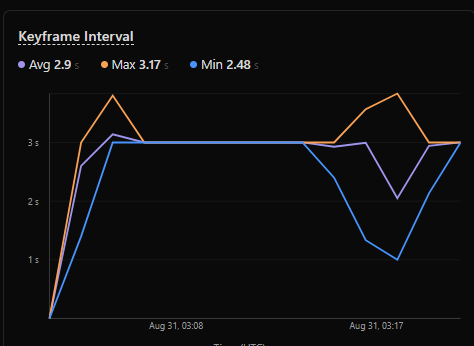
We do, will keep that in mind. I was able to recreate the issue myself overnight (on a live input I created myself). Switched to x264 on simple mode and got this. Then did a subsequent one on advanced with keyframe = 2 (hence the big keyframe dropoff and leveling) but still had the issue again. Retrying now with x264 options keyint=60 min-keyint=60 scenecut=0 closed-gop=1. I'm thinking B frames are crossing GOPs. But I'm not sure that explains the issue happening for NVENC/QSV encoders since to my understanding those are supposed to be closed GOPs by default.
You can optimize and manipulate videos stored outside of Cloudflare Stream with Media Transformations. Transformed videos and images are served from one of your zones on Cloudflare.
I’m trying to let an employee upload videos to the cloudflare “Stream” video hosting, but there’s doesn’t appear to be any user permissions for stream and even if I set her up as admin she doesn’t have stream enabled on her dashboard?
Delivering or storing? Delivering is post-paid, and you can choose any amount of storage that you want. I have 25k minutes storage and deliver easily 500k+ minutes a month
Is it possible to enforce usage limits on Stream (e.g. bandwidth, simultaneous open streams, etc.)? I'm facing an issue with customers abusing the service.
Any reason form data from react native won’t work trying to upload a video via signed direct upload ur? I tested my code with webhook.site and it worked just fine. The response Cloudflare has a 400 request, text/plain content type and blob size 0
Following up in case this ever happens to anyone else (and tagging @1984 Ford Laser since you were helping) The issues with the x264 encoder in OBS were because that encoder does not have a closed GOP despite Cloudflare's documentation saying it does. Using scenecut=0 open-gop=0 fixed this.
And for the NVENC H.264 encoder, it is closed GOP by default. However, the "Look-ahead" option was messing with this. Didn't realize it right away though because in Simple Mode, Look-ahead is not shown on the GUI. However, looking at the OBS logs, it was still enabled for some people while disabled for others, not sure why. Moving to Advanced Mode and turning it off fixed it. Also used gopLength= just to be sure it stayed closed.
I’ve been dealing with this issue for a bit: I have two live inputs both streaming to the same destination (e.g. Twitch). At first, only one input is enabled. When I switch the inputs by disabling the first input and enabling the second input, viewers see an offline screen for a few seconds. Is there a way to make input switching seamless so that the stream doesn’t appear disconnected during the switch?
Is it possible for a worker to "watch" a live stream (from a RTMP stream) and process it, such as for AI or similar workflow? Realtime kit wouldn't be appropriate, as it needs to be a RTMP based input, not a custom sdk
You would need to stream into a separate system, such as OBS, or another video switcher system, to make this work. Twitch works because it auto reconnects on changes, but a destination like YouTube or others prolly would just fail when you fail over to another feed
hello guys, I've been running for a issue since a long time ago. I have a huge delay on some chunks while trying to upload a video using "direct upload" + tus. As you can see at the screenshot, some requests took almost 2 minutes and then failed.
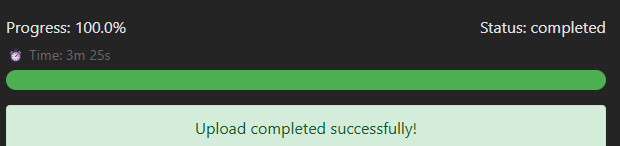
The video has near 250mb and at the dev tools screenshot, the used chunk size is 64mb I've also tried using a smaller( 20mb ) chunk size, but cloudflare took more then 3 minutes to complete the upload.

 C
C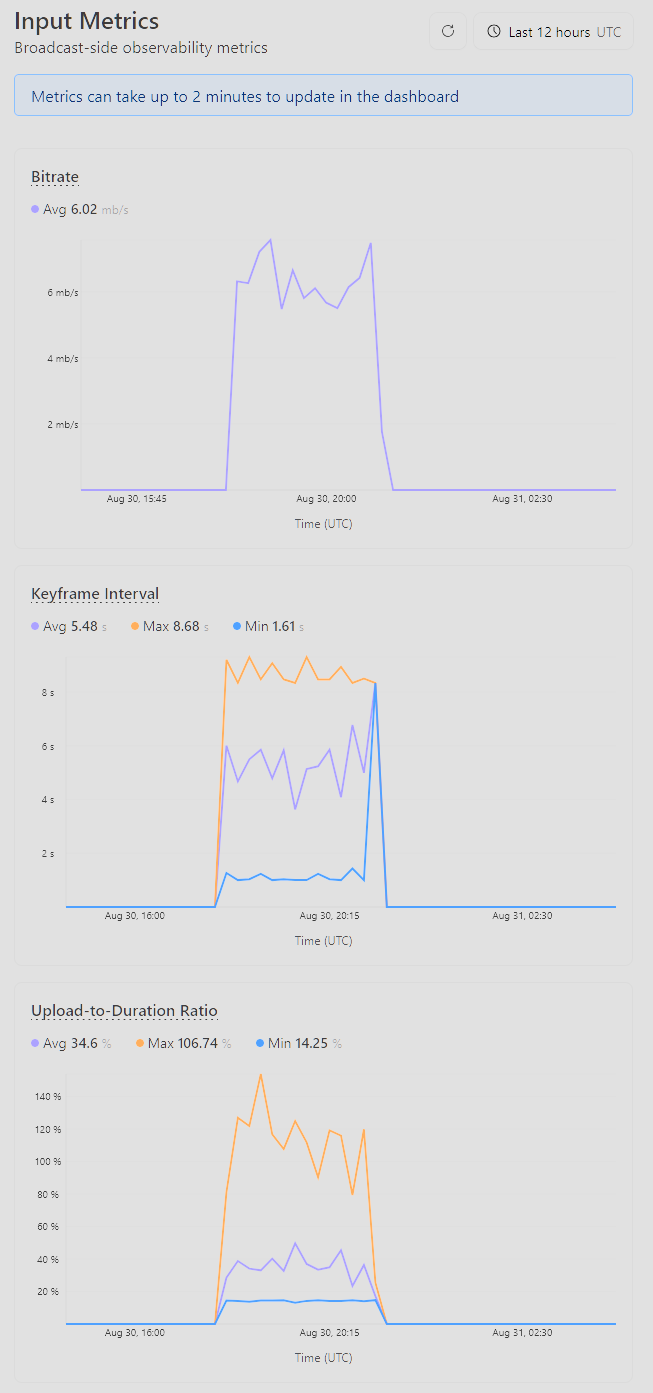
 1
1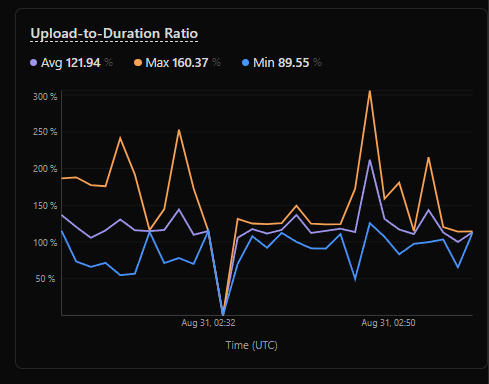
 H
H H
H
 M
M T
T J
J S
S C
C L
L M
M L
L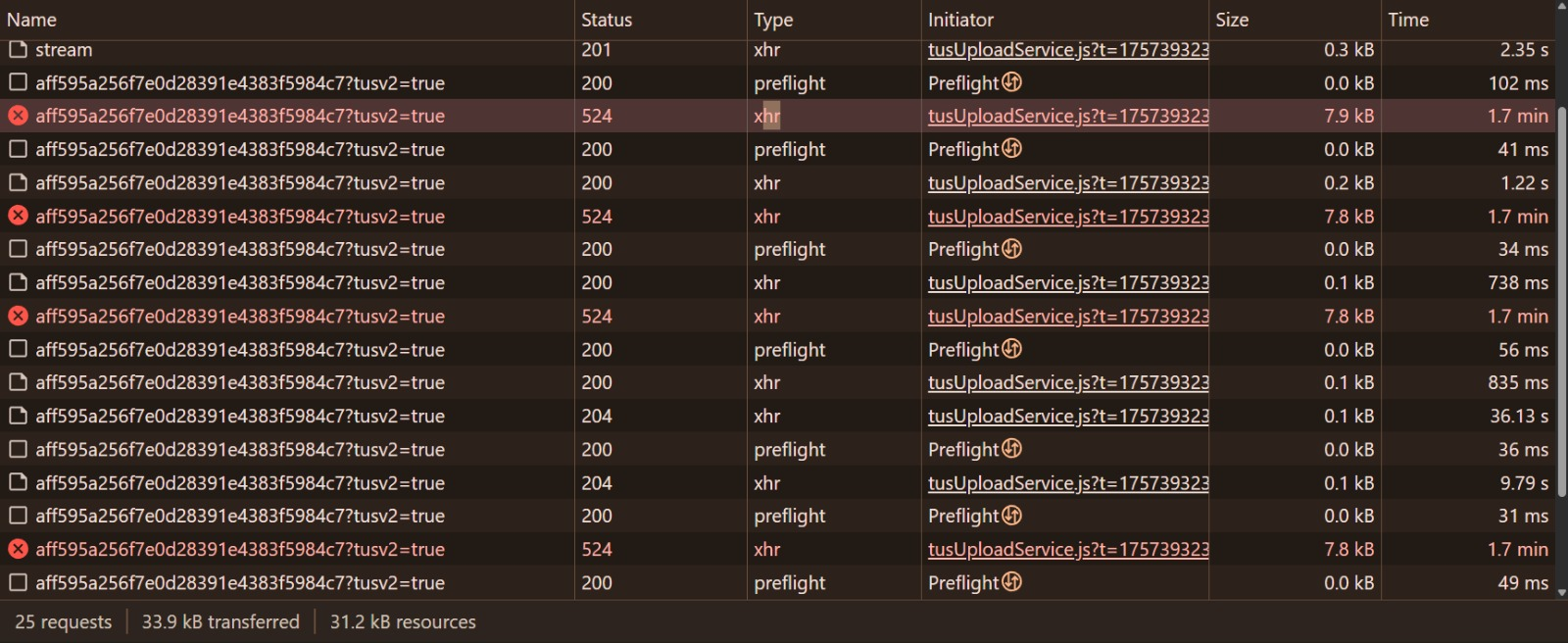
 I
I


