GND hole in PCB not open on 1 out of 2 pcbs (Hotswap)
Hi 😄
So I just received my lily58 no-solder hotswap build kit and tried to start building it and immediately ran into an issue. Apparently 1 of the two pcbs has 1 of the GND holes filled. This prevents me from inserting the No-Solder spring headers into the pcb. A little bit of research showed me that GND stands for ground and looking at the pcb there are two of them. Is it save to say that one might be enough and I can just trim one of the pins on the spring headers or would that be a bad idea? Any ideas of how I can fix this or this just a faulty pcb? Thanks a lot in advance for the help....
So I just received my lily58 no-solder hotswap build kit and tried to start building it and immediately ran into an issue. Apparently 1 of the two pcbs has 1 of the GND holes filled. This prevents me from inserting the No-Solder spring headers into the pcb. A little bit of research showed me that GND stands for ground and looking at the pcb there are two of them. Is it save to say that one might be enough and I can just trim one of the pins on the spring headers or would that be a bad idea? Any ideas of how I can fix this or this just a faulty pcb? Thanks a lot in advance for the help....

Is USBC connection enough for registering keystrokes?
Hi. This is my first time soldering something and all I want to do first is getting keys registered to be sure my soldering is alright.
Should the keyboard work just after plugin the usbc or must be connected to the bluetooth?
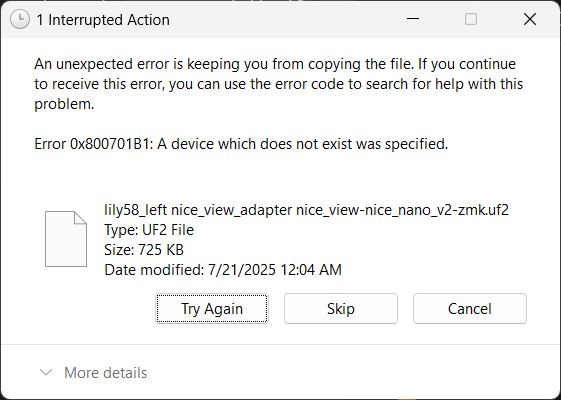
All I have done until now is copying the .uf2 left and right files to them. (One weird thing is that pressing one time the button is enough for the drive to appear, it doesn't seem to be different between one or two)
I plug the usb, press the button, the drive appears, copy the files, the drive dissapear and still no keystrokes are registered....
flashing firmware using github actions doesn't result in anything
Im trying to use the local ZMK + github actions methodology to create my own ZMK maps. When i build the UF2 files and flash them it does not update to the keymap i wrote locally. what could be happening? thank!
Lily58 nice!view pinouts?
I see the pinouts in https://docs.typeractive.xyz/build-guides/lily58-wireless/troubleshooting, however I don't know which pins on the n!n are routed to which ones on the nice!view when using the lily58 PCB from typeractive. I know that CS, SCK, and MOSI are each one of P0.06, P0.17, and P0.20 but I don't know which is which. Thank you!
5th columns on right side not working
Left side working good, however on the right side i have 2 problems:
1. Firmware for the right side don't seem to save, it never changes from the default layout even when the left one does change correctly.
2. On the right side, the fifth column doesnt work, i have identified the pin to be the p29 from the troubleshooting guide, soldering looks good and no shorts...
Water damage on Corne
A coworker spilled some water on my left Corne. As a result, it's not working properly. I'd like some help troubleshooting it. Here are some details about the situation. Please let me know if you can help!
- Only a small amount of water was spilled, and only on the left unit. The right unit is intact. The left unit wasn't submerged, but water did get under the screen cover and on the nice!view. Presumably some water also got onto the nice!nano.
- After the incident, I removed the screen cover and the nice!view, dabbed the nice!nano with a paper towel, and tried to blow away any remaining moisture (being at work, I don't have access to canned air, fine brushes, or even a screwdriver). There are now no obvious signs of moisture on the unit, though there may still be moisture between the nice!nano and the battery. Since I don't have the right tools, I can't pry the nice!nano from its base yet.
- The left unit can turn on and connect to my laptop. When it does, the right unit can connect to the left, and the whole thing works....
Keymap not updating after flashing new firmware
I setup a github repo as instructed on the ZMK official website. I also played around with the mapping with ZMK studio and all the changes would reflect immediately. However when I'm done experimenting with ZMK studio and made a complete keymap, compiled through GitHub, and flashed, nothing is changing.
ZMK studio is still working.
This is really confusing. I have probably spent 6 hours researching this and have had no success so far. I've tried the keymap editor Nick made, I've tried modifying the keymap in files myself, and it's all not working....
Issues remapping the backspace on lily58
I’m using the custom firmware from the GitHub. It worked fine in the initial loading on the keyboard but when I went back to remap the backspace to a different spot it stopped working. For some reason with the top right key specifically it simply doesn’t respond anymore. That said when I use the lower level keybind the key still works so I know hardware wise it’s fine. The backspace works in other location but now that key is stuck and I get this error message. I’m not sure if I’m doing steps wr...
Does the kit comes with a screw driver?
Have placed the order and it' s on the way. Just want to know if I'll need to get my own. If so what size.
What I got is 6 column corne no-solder kit with regular case (not the premium aluminum one)...
Display Cover touching Nice!Nano?
If the board has no batteries or nice!view over the nice!nano should your display cover go on directly over the nano? The display cover makes some contact with the pins
How do I get standoffs if I want to print my own case?
I'm looking to get a PCB, NiceNano, and battery from yall. but I want to print my own case. Do you provide the standoffs and hardware with the order of the PCB? Or is there a way to get that stuff from you?
EZ Solder Header Pin Broke
Hey all,
I have the EZ solder headers for my lily58 and unfortunately, one of the gold pins broke off.
However, I was reading the trouble shooting guide here: https://docs.typeractive.xyz/build-guides/lily58-wireless/troubleshooting...
Flashing Issue
Hello! While attempting to add underglow to my Lily58 I appear to have caused some issue while loading custom firmware. When I attempt to load the stock .uf2 files onto each side my old keybinds are still active and it is still acting up. I attempted to reflash the bootloader but following this instruction: https://nicekeyboards.com/docs/nice-nano/troubleshooting/#my-nicenano-seems-to-be-acting-up-and-i-want-to-re-flash-the-bootloader I am having no luck running the command stated.
Any help would be greatly appreciated!...
nice!nano dead
Hello, I just got my kit for a corne 6 column layout. After putting it all together , I tried flashing the firmware, but I could only get the right half to flash. The left haft does nothing when plugged into the computer. I pulled the nice!nano out of the left half and tried plugging it into my computer by itself and notice that none of the LED on the board turn on even for a second and my computer did not recognize anything being connected. Compared to the right half were after flashing the ZMK...
How to configure?
Can anyone please confirm the following...
1. If I flash my Corne using the artifacts generated by the repo, wireless access via Zmk Studio is not supported.
2. If I flash my Corne using the firmware supplied directly from the site I get wireless access via Zmk Studio, but then I lose the facility to configure from a text file in the repo....
Damaged tenting foot. No response from contact us form
Hello, I bought my Lily58 kit about a month ago. Soon after, I realized one of my tenting feet had a manufacturing defect. It was constructed in such a way that prevented it from extending at all. I reached out through the Contact Us page and got no response. That was at least two weeks ago now and I've heard nothing since.
adding or replacing a switch with a rotary encoder?
would love to get a rotary encoder on my board, has anyone figured this out?
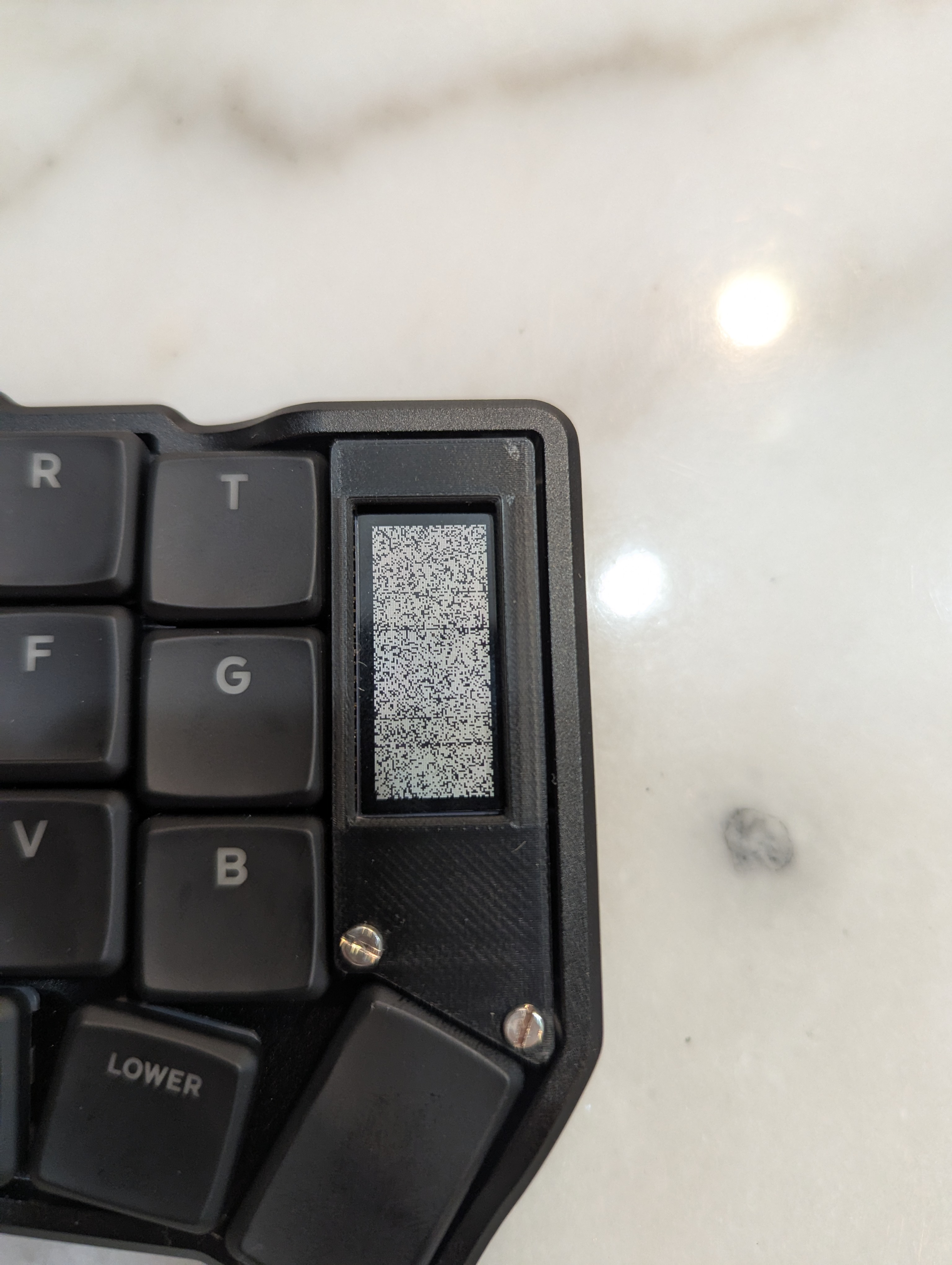
Issue With nice!view Display
Received my order (TA18584) yesterday evening and built it last night. I'm running into an issue where the right pcb's nice!view is garbled/pixelated. This will happen if turned on and running off battery or plugged into a pc. The right pcb's keys all work though.
I first thought it was isolated to the nice!view, so I swapped it to the left pcb. However, the display worked. If I were to put the working nice!view, originally from the left pcb, into the right pcb, it doesn't work. This makes me think it's not actually an issue with the nice!view after all.
My order also included the No-Solder Spring Headers. While I can rule out the absolutely terrible job I would have done soldering if I had lol, I did make sure that everything is fully pushed down and seated as I'd expect....