

 J
J/ cc @celsomartinho

 I
IHey there! Maybe @celsomartinho or @Vero  can help
can help  V
VHey Adam, welcome to the server! Sure, I've just enabled it for you
JThat sounds like a super cool use-case. Definitely let us know if you have any questions along the way! 
V^ @celsomartinho
 T
THi, would the browser-rendering-api basically be able to do similar things like for example browserless.io? Like managed puppeteer instances? We are especially looking for a solution to take screenshots of WebGL based renderings at scale. So we have a website that renders a 3D model and we want to generate preview images (WEBP/JPEG) for those 3D models. Would that work with the browser API?
 L
L would also love to know if there's a timeline for increasing the limits, and where they may end up!N
Hmm, just saw the limits after getting 429 errors:
- Two new browsers per minute per account.
- Two concurrent browsers per account.
 U
UIt is in beta currently and free so there needs to be some limits in place
 C
CYou can use the same Browser to access multiple pages, and you can persist it with Durable Objects, someone in this channel released their code for using a DO and a list of tasks: browser-rendering-api
CIt's still limited with only two concurrent browsers, but you can queue and reuse the browser
WI have been using this API in a worker and it is awesome!
I have a question. Can this be used in pages/functions??
I have a question. Can this be used in pages/functions??
 S
SIs it possible to swap the
await puppeteer.launch(this.env.MYBROWSER); for a "normal" puppeteer for local testing? I'm aware that wrangler dev --remoteok, so while the normal
puppeteer package doesn't launch (some node stuff is missing) it's working with connect to services like browserless. Think that's good enough for me right now. Gonna see if there's some opensource version of a websocket server for puppeteerSnice, so running this in a docker container https://github.com/browserless/chrome and doing this works great wing
wrangler devthis.browser = await puppeteer.connect({ browserWSEndpoint: ws://localhost:3000 });GitHub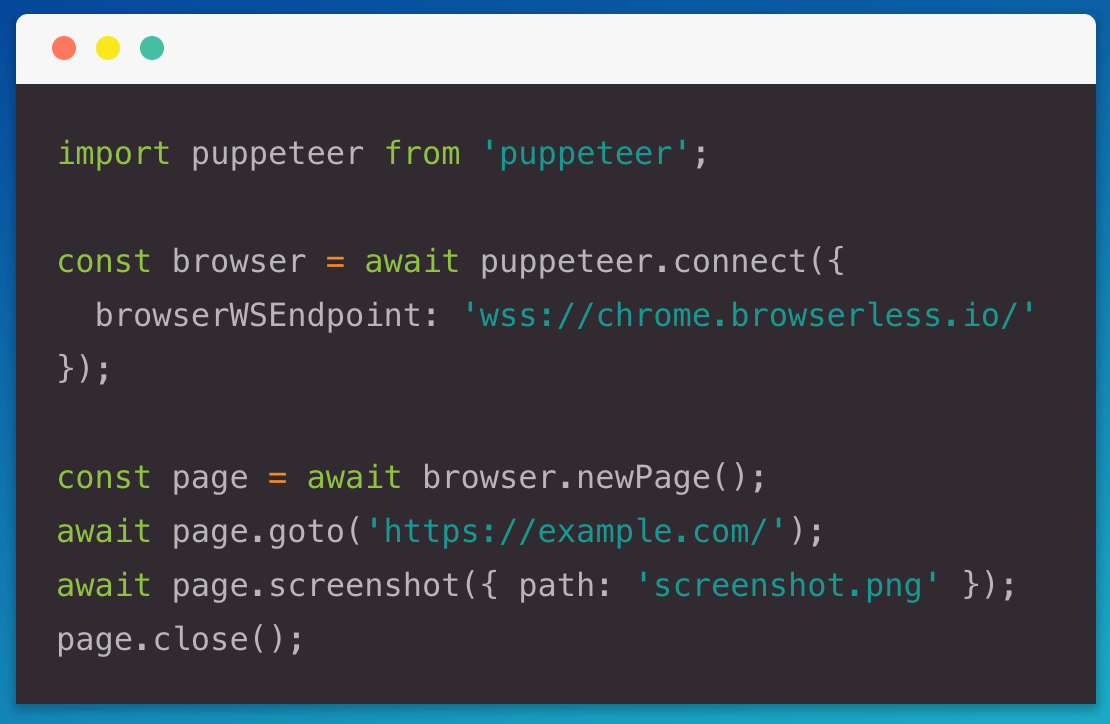
The browserless Chrome service in Docker. Run on our cloud, or bring your own. - GitHub - browserless/chrome: The browserless Chrome service in Docker. Run on our cloud, or bring your own.
 B
Bhey you all, we've been playing with the browser rendering api and it works great, thanks!
A question we have for using it properly, even though in beta:
The 2 browsers per minute spin up is quite limiting. Is there the ability to increase that, and/or when do you roughly expect this enter GA so those limits are not there anymore?
A question we have for using it properly, even though in beta:
The 2 browsers per minute spin up is quite limiting. Is there the ability to increase that, and/or when do you roughly expect this enter GA so those limits are not there anymore?
 H
H B
BWhen people at Cloudflare say "soon" what range are we talking about here?
Not trying to get you pinned down just for us to have a rough overview if that is days, weeks or months?
Not trying to get you pinned down just for us to have a rough overview if that is days, weeks or months?
N N
NHey, you got any of them Beta invites?
 M
M N
NThanks
AHey all,
I'm trying to implement ServerSideRendering using Puppetter in workers,
Does anyone know if this would work?
also can anyone enable beta access for my account id please ? cce05b73fe5b9a4bd24dcc4e56b28cfb
It would be nice to have your inputs
Thanks
I'm trying to implement ServerSideRendering using Puppetter in workers,
Does anyone know if this would work?
also can anyone enable beta access for my account id please ? cce05b73fe5b9a4bd24dcc4e56b28cfb
It would be nice to have your inputs
Thanks
VHeyo, can you please try again?
 P
Phttps://github.com/cloudflare/puppeteer/pull/15 (PDF support) broke our wrangler deployments, but it outlines: "Adds back support to page.pdf() using Cloudflare Workers Streams and Buffers support." to use node:stream and node:buffer.
Any way to make it work with wrangler deployments?
Any way to make it work with wrangler deployments?
 S
SCan I create genesis block in cloudflare and mine it
Pright.. yeah..  Thanks a lot.
Thanks a lot.SCan I create genesis block in cloudflare and mine it
 A
AI just came across this one, all the guides / blogs are I think wrong, as they all use node_compat = true in them  And I had to switch to use the compatibility_flags
And I had to switch to use the compatibility_flagsAI'm trying out the browser, using a simple bit of code:
And I'm getting
And I'm getting
Trace resource limit exceeded; subsequent logs not recorded.. I'm guessing if you're doing browser stuff, you probably need to switch your worker types to unbounded?AAlthough realistically I can't see why, as it's just getting a page and returning the content, which might take a little bit to get the page but it's not CPU time, and I'd be amazed if getting the page content was taking up a lot of CPU
AInterestingly, if I load a simpler web page, it completes
AYeah, just seen this:
Median CPU Time 51.7 ms so will switch this one to unbound, ty!AI'm definitely being thick, but when I go to change the worker to unbound, and agree, it says I don't have an active subscription... but I can't for the life of me work out where to enable that subscription? As under billing -> subscriptions there's no option to add any And I can't for the life of me find it anywhere in the dashboard!
And I can't for the life of me find it anywhere in the dashboard!AI'm being thick, there's literally a plans item on the left menu under workers 
ANot sure if a bug or I'm doing something wrong, but the following code (amended the URLs) results in
Effectively I'm trying to extract data from a network request that's made during the second page load, and using
Buffer is not defined, which is a bit odd (same for .text() and .json()):Effectively I'm trying to extract data from a network request that's made during the second page load, and using
pages.on was behaving very strangely so gave this a whirl insteadA(I have
compatibility_flags = [ "nodejs_compat" ] in my wrangler.toml)AI feel like this is possibly some Pupetter quirk I'm not aware of, but:
It will log 123 many times, but nothing after - never the text, nor the 456. Quite confused by this one
It will log 123 many times, but nothing after - never the text, nor the 456. Quite confused by this one
 R
RHey folks, excited to try out this new API, any chance I could get access to the beta?
