

 T
Tsince you have a nvidia GPU, you actually only have the choice of the normal desktop version since the version with "Game Mode" doesn't run with the nvidia drivers
 T
Tyour choice
Tthere are KDE and GNOME images
Tdefault Bazzite image is KDE but there's
-gnome F
Fwould you mind linking the GNOME ISO? I just installed the UBUNTU OS on my system and was going to just do the patching myself
 F
FIs that recommended or advised against
Tall of the images are in the regular ISO, you just choose before installing. latest ISO is here - https://github.com/ublue-os/bazzite/releases/tag/v2.0.2
Tboth are supported
Tit's really just if you like one or the other more
Tif you like GNOME, use the GNOME images. if you like KDE, then use the images without GNOME attached
Tinstallation guide - https://universal-blue.discourse.group/docs?topic=30
installation troubleshoot guide (may need because of upstream issues with installer) - https://universal-blue.discourse.group/docs?topic=34
faq - https://universal-blue.discourse.group/docs?topic=33
installation troubleshoot guide (may need because of upstream issues with installer) - https://universal-blue.discourse.group/docs?topic=34
faq - https://universal-blue.discourse.group/docs?topic=33
FI guess worst case, i pull the bazzite .iso and wipe the entire steamdeck, write the bazzite iso over it
 V
VThanks.
VIs the featurelist on https://github.com/ublue-os/bazzite#desktop everything that's different from regular uBlue? I'm wondering if there's any UI / KDE changes over the default uBlue. It seems like there is based on what's listed here. I mentioned earlier that I'm looking for a normal Desktop environment, and not a big-picture esque UI, so that's the make or break for me personally.
Tthat link is just for the specific difference with the desktop images. the full feature is part of the desktop image too.
Tbut the only difference with KDE is that it uses Valve's SteamOS theme
Twhich you might not even notice
Tbecause it looks just like Breeze
Twith some minor changes
Thttps://github.com/ublue-os/bazzite/#about--features
here's all the features that affect most of the images including desktop
here's all the features that affect most of the images including desktop
TSteam and Lutris are also preinstalled
VThank you! Sounds good to me, I'll have to check this out then.
VAnd yeah, your link is what I meant to post lol accidentally pasted the wrong thing
VDumb question, I can change the theme in the future right? I'm guessing that's very obvious but I'd figure I'd ask just in the slim chance it's not because of some weird immutable thing I'm unaware of haha
 F
FWhat's the word on Deck OLED support? I know it was being worked on.

 K
KEverything but changing the refresh rate works
KWorking to fix that now
FOh hell yeah, that's fast! Especially with the holidays. Looking forward to full support and release!
T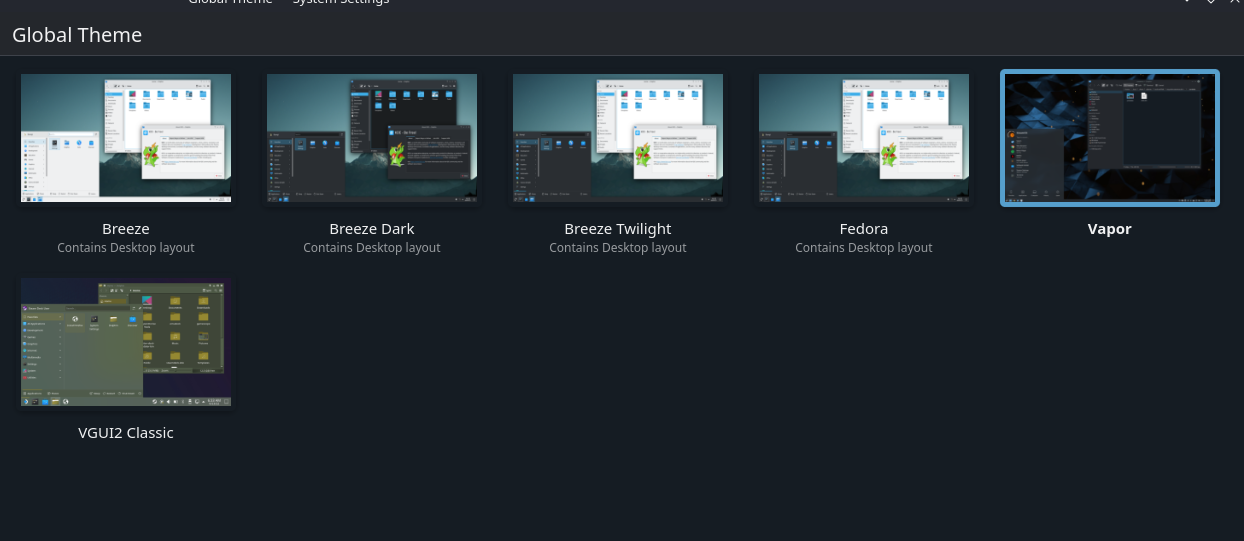

 D
DAlienware m17. 3080, ax210 wifi, Intel 10th Gen I think. Maybe 11th. Has Intel graphics too
 V
VYes, slight thing is that Global themes in KDE can be finnicky because SDDM themes are not supported.
VIf you just download the individual components of the theme it'll work just fine
 E
EI plugged in a mouse and since then even though its unplugged now and system rebooted drop down menus toggle and sliders don't work it makes a noise like I'm changing it but theu don't move in steam deck image before it was working perfectly
EPlugging the keyboard and mouse back in fixes the issue even after unplugging again but as soon as reboot it stops working unable to change any toggles in menus sliders or drop downs
EGive up
 R
R@KyleGospo or if you prefer just to also include this as a test on the latest mainline, I guess it would be enough :P
 C
CAnyone experiencing laggy ui? Im running on latest gnome deck
 Z
ZI'm now telling Windows boot manager to boot grub to boot Bazzite
ZHow does UEFI boot work to tell it to use the grub one directly?

 H
Hif efibootmgr and uefi bootorder is not respected, then you can forcefully change it,
not sure how the deck will handle this so you will be on your own if you do this on a deck, but you can rename the BOOTX64.EFI file (rename, dont delete, incase your machine for some reason dislikes this forceful change and you need to restore the original file) on the EFI partition and copy grubx64.efi into the same folder as BOOTX64.EFI and rename the grub efi to BOOTX64.EFI.
in theory that should force grub to be first until windows wipes the EFI partition to reinstall its own bootloader in a random update (and this is why we install windows and linux on separate disks)
not sure how the deck will handle this so you will be on your own if you do this on a deck, but you can rename the BOOTX64.EFI file (rename, dont delete, incase your machine for some reason dislikes this forceful change and you need to restore the original file) on the EFI partition and copy grubx64.efi into the same folder as BOOTX64.EFI and rename the grub efi to BOOTX64.EFI.
in theory that should force grub to be first until windows wipes the EFI partition to reinstall its own bootloader in a random update
(and this is why we install windows and linux on separate disks)Hit is not a change i recommend
ZWhat was the key combo for grub again?
 Z
ZI'll give this a go when I'm home, thank you 
Hesc i think, i hate hiding the grub menu so i dont hide 
ZThere was one button for the deck as well that would work
ZMaybe B since I think that default bound to esc
Hthink its B
RNope, select
