is there any way to but a stop on the base to not allow it to go in farther forward. Just got the MIP from WinWing and the stick gose so far forward that I hit the MIP
lol if I was him Iβd get or split together an adapter cable and duct tape that sucker on somehow with a piece of PVC or something in the meantime lmao
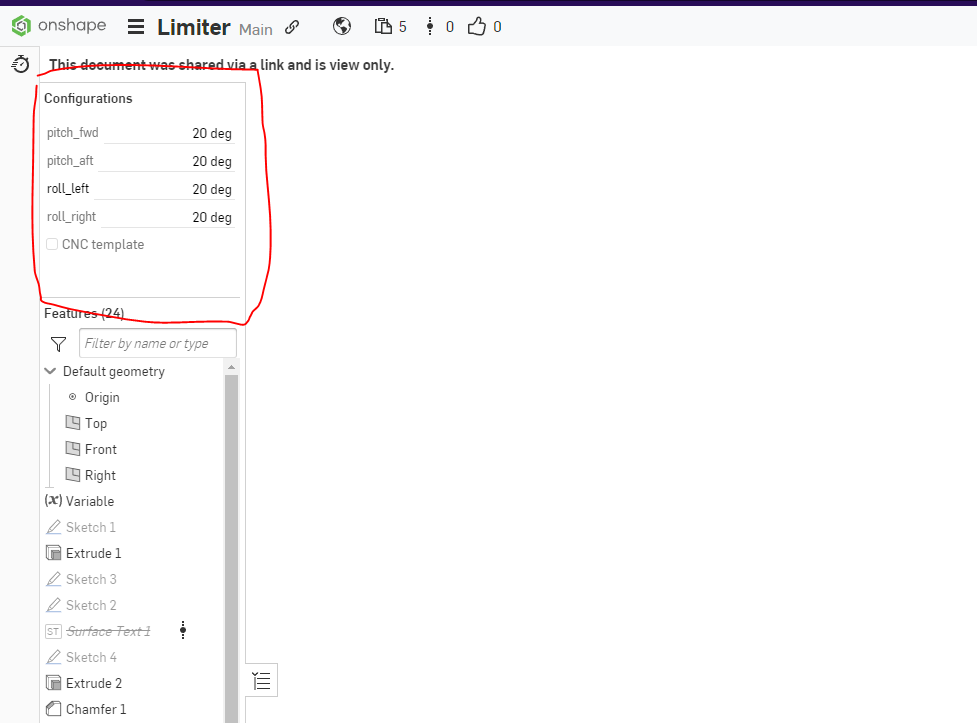
You can experiment with the software Endstops feature in configurator, or, if you have access to a 3d printer, you can print off hardware throw limiters of any range: https://discord.com/channels/965234441511383080/1092338475795238962(or you can order a set from walmis)
Finally rejigged the 'pit and rotated the rhino with the cut off switch way from me ( rather than tucked under the seat!) but with the extension I have it is obviously reversed. so... I thought, lets rotate the Rhino ' thrustmaster' connector round by 180... I'm a bit wary as there did not appear to be much slack in the cabling - so put it back together and asking here.
Out of the tube do you mean ? As in OUT of the base of the rhino screw base.. undo the 2 silver screws holding the 'PS2 ' connector and pull ...and there should be enough cable in there to rotate.
luckily I am sucked in by some other games at the moment otherwise I would take on your suggestions. (But it seems the adapter is already being shipped out, so maybe not another two weeks waiting time)
Has anyone run into issues where the Rhino imparts a nose up or strong roll which canβt be cleared? This has happened to me a few times in the Hornet and Strike Eagle. Itβs not constant but occasional. I was using the Telem FFB program as well at the time but exiting from that didnβt fix the issue. I probably have something set incorrectly and thought Iβd ask here. Thanks!
Yes, that's it! It gets very wonky. I managed to land a couple of times this has happened and also had to just exit and then restart the mission (sucks)
May I speak with a dev about my Rhino shipment? The address was incorrectly put on my Fedex label and Fedex is telling me only the shipper can change it. My package has been in a sorting facility limbo for a week.
For the throw limiter provided in Onshape as a CAD data by Walmis, I can only modify the pitch value forward and backward in the "Configurations" tab. But how can i change the values for the roll? (it is said to be parametrically adjustable)
@walmis for the Limit CAD When you export the file and put it in to a slicer to print its blank. I've tried 3 different slicers. LycheeSlicer Anycubic, and Chitubox. I'm in need of FWD 12, all others no limit the highest I can get it is Left/Right 22, Aft 21.
Hey guy I just put the Winwing F18 stick on the VPforce with the winwing adapter all the buttons and axis work except the trim switch. Has anyone had this issue and know how to fix it. The simapp pro dose not see the stick so I cant program it in there
hey guys, i have 2 yoke system made from the motors for VPforce. I wanted to know if the software has any function to link the 2 yokes together. or if there is any other ways to lik the 2 yokes so that they roll and pitch together. Thank you
Did you try just simply bind both of them to the axis? In theory they get the same input from TelemFFB they might mirror stick position as well... never tried, just thinking out loud
I have 2 separate yokes (2 motors per yoke) which are not mechanically connected, and I would prefer to connect both sides electronically. And i do not have space for a mechenical connection
Sorry, maybe i was not clear. What i am saying is try to bind both yokes in game to the same axis, if there is a 2 way com between the yoke and the pc (which should be imo) maybe the FFB will automaticaly updates the position of the yoke you are not moving based on your input. Again, not a professional just thinking out loud
Two questions; Are these shift registers compatible with the Rhino base? BM4021 shift registers. Output 5 pin & What is the max peak torque you get out of the 86BLF04 motors? Thanks
I am trying to setup my new Rhino with my Realsimulator F-16 grip. Right now, I've tried both generic grip, and generic grip (Realsimulator 64-button), but no button presses register on the Rhino side. The grip BLE funtion works fine, but no buttons on the Rhino itself. I tried plugging up a regular TM Warthog grip set to generic, and the buttons register fine. Anything I'm missing to get the RS grip to work correctly?
Anybody happened to have got both VP-Joystick and VP-Pedal FFB working on Condor2? I'm getting control input for both Joystick and Pedal working, however, only one can get the FFB effect. 90% at time the joystick gets FFB, sometimes the Pedal gets FFB. The issue well might be on Condor side, I'm just wondering if anyone have got both working simultaneously.
If I had to guess, the sim most likely has no concept of FFB on the rudder axis. FFB pedals are extremely rare and there has never anything remotely resembling βaffordableβ pedals (talking in terms of ms sidewinder land). Itβs unlikely the devs would develop support without gear to test against.
I guess the same, or the Condor2 may not be anticipating two FFB devices to work with at same time. I wish the FFB pedal was not this rare. It's been some 25 years since the last time I played the MS Combat Flight Simulator with the Sidewinder FFB (1st model). I'm so happy I've got the VPforce FFB setup. Somebody has mentioned about this awesome FFB solution in the Condor2 forum so I'm hoping their devs will look into this rare but existing(and growing I'd like to assume)demand someday.
Finally got the Winwing adapter but itβs shaking and cannot be secured. How can I fix that? I saw a post suggesting rubber washer earlier but not sure if itβs same problem