I am using rclone to upload files to my s3 bucket, and today I found this very interesting issue. When I upload files using rclone and it uses multi-part upload, the etag value returned is an invalid md5sum, but if I use singe part uploads, the etag value is a valid md5sum of the uploaded file. is this intentional? I have never seen such behavior with other s3 compatible storage providers. I am attaching a few screenshots for reference, the first one shows etag with multipart upload file, and the second one shows etag with single part / full / no multi part upload.
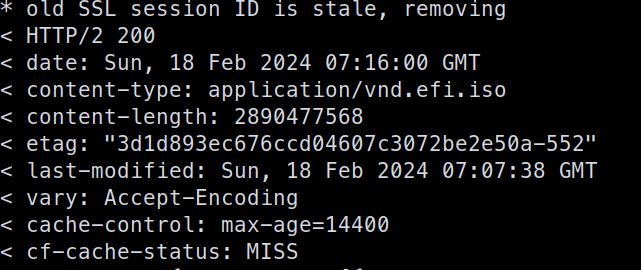
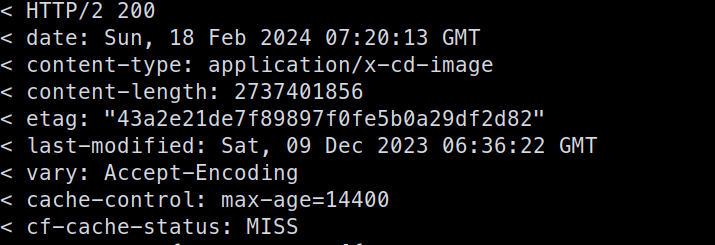
R2's multipart ETag behaviour still differs, regardless of that - you won't be able to checksum the concatentated checksums of the parts with R2 whereas you can with S3.
Hi, I'm using presigned URLs to allow users to upload videos directly to R2. It seems my account ID is exposed though, and the docs say to not use the presigned URL on the frontend. Can I still do that, or does exposing my account ID pose a security risk? Thank you for your time
I was just worried, that someone could use my account ID to simply annoy me. e.g. open support requests and ask for a password reset, or sth along those lines
Could anyone explain why tiered caching works with S3 but not with R2? It’s perplexing that to enable tiered caching on Cloudflare with R2, one must resort to using a third-party proxy.
why is tiered cache even disabled by default ? and what does it being disabled even mean ? does that mean its not cached globally but only in the main datacenter where r2 is at ?
how does that increase latency ? if lower tiers need to contact an upper tier thats probably closer than the origin shouldn't that reduce the latency ?
Cache Reserve with R2 data would make no difference since Cache Reserve has the same pricing as R2 and stores your data in R2 behind the scenes. Since you have an Enterprise account you can talk to Support for specific issues and with your account team if you have any feature requests or questions about product implementations for your use-case.
Regional Tiered Cache provides an additional layer of caching for Enterprise customers who have a global traffic footprint and want to serve content faster by avoiding network latency when there is a cache MISS in a lower-tier, resulting in an upper-tier fetch in a data center located far away. We just want to serve content faster from r2, so It would make difference if it work
Put in a feature request for tiered cache on R2 with your account team. The more requests especially from enterprise customers the more likely it will be prioritized
Tiered Cache relies on information about the origin server which currently isn't available in this case because Cloudflare's anycast IP is the origin server. It's a limitation that I'm sure will be worked out in time, and the best way for you to expedite that is to put in a feature request so the team are aware that your company is waiting for this to be addressed. I definitely feel the pain here as Tiered Cache is a valuable tool for optimising the benefits from cache, so I also hope it can be sorted out soon
@Erisa | Support Engineer thank you for your feedback, please tell us how to serve static assets (css/js) from R2 via worker in a way that is fast. What's the official solution here?
We discovered that https://webstudio.is/ is fast on lighthouse and COMPLETELY fails core web vitals specifically because static assets globally are slow (the way we currently serve them), up to 500ms latency
Similar to Webflow, Webstudio visually translates CSS without obscuring it, giving designers superpowers that were exclusive to developers in the past.
"is fast" is subjective and hard to make recommendations for, there are many things that can be optimised for that fall outside the control of R2 (e.g. not loading so much JS/CSS, optimizing execution of scripts, all things pointed out on that page)
In terms of serving files from R2, the fastest method is to use the CDN cache either by Custom Domain or by Worker with Cache API: https://developers.cloudflare.com/r2/examples/cache-api/ Yes this will not be as efficient as an external origin with Tiered Cache, however it is the best available with R2 at the moment due to the aforementioned limitations. If the cache is setup fully for all files, the speed will depend on whether the resource is cached in the local datacenter that the user is hitting. The more traffic you get, the faster the site becomes when it relies on cache. Increasing the cache TTL will keep those caches around for longer but increase time to revalidate when you push new updates.
If you are hosting smaller assets you could potentially consider KV or host the whole website on Cloudflare Pages which should be better optimised for web assets. Pages comes with intelligent invalidation of assets when you make a new deploy and has its own internal caching system to keep sites as fast as possible without having a lag to deploy.
I am specifically talking about latency. Globally its currrently up to 500ms waiting for response from the worker that is trying to get the asset from R2.
What is the location for that bucket? And as I mentioned it will depend whether the asset is cached or not. When I access it from the UK I get a HIT and it loads in between 40 and 50 ms. Is there a reason you are deploying these assets to R2 instead of a product designed for website hosting like Pages?