
 A
Athere is no electrical connection between the base and the adapter, the wire that comes out of the adapter goes to a black box
 P
P@walmis Just want to say the new wire arrived - all works as expected now!

 A
Awhich black box are you referring to? Is this something that I have to order separately?
Aif you don't have one already, you'll need one of these (the black one I think): https://flightsimcontrols.com/product/vkb-main-controller-blackbox-stand-alone/
VKB FSC Europe
Aif you have bought vkb controller systems before you should already have one, but probably not if you just got the grip
 S
SSpaceMonkey seems to have an impressive library of games it can get telemetry data from. Would it be possible to somehow interface that with TelemFFB or regular VPForce DirectInput functionality?
Here's the link:
https://github.com/PHARTGAMES/SpaceMonkey
Here's the link:
https://github.com/PHARTGAMES/SpaceMonkey
GitHub
Contribute to PHARTGAMES/SpaceMonkey development by creating an account on GitHub.
 T
TAny reason the Rhino might suddenly whack itself full negative elevator and roll left and turn off its motors when entering the aircraft on the airstrip in IL-2?
Calibration went completely out of whack too. Had to exit absolutely everything I was doing, all the VPForce software, unplug the stick (both power supply & USB), replug the stick, restart the Configurator and calibrate the stick again.
Calibration went completely out of whack too. Had to exit absolutely everything I was doing, all the VPForce software, unplug the stick (both power supply & USB), replug the stick, restart the Configurator and calibrate the stick again.
TIt kinda randomly does stuff like that, (which is to mean, tries to foreversleep itself with violent moves when just entering the mission).

 C
CI have noticed that after crashing when you load into the next mission the stick wants to behave like you have just crashed. Takes a second to recognize the new position.
TRight, yeah, not ideal. Kinda wish crashes weren't emulated in the FFB Telemetry, in the interest of not destroying an expensive piece of hardware
CI just considered it workout trying to hold it steady
 N
Nusing TelemFFB? There's an elevator droop effect that will pull your stick forward when not moving on the ground.. but it wouldn't 'slam' the stick unless you had the effect turned up super high.
As for the motors going into fault protection, check your inertia and friction settings in configurator. I find too much friction or inertia, specifically with IL2 will often cause motor fault protections to occur.
BTW, if you do get a motor shut down, you can usually recover by using the
As for the motors going into fault protection, check your inertia and friction settings in configurator. I find too much friction or inertia, specifically with IL2 will often cause motor fault protections to occur.
BTW, if you do get a motor shut down, you can usually recover by using the
Reset Motors
 T
TUsing TelemFFB indeed. That effect has to be adjusted in TelemFFB config or in Configurator?
I'll dial back inertia and friction settings, and I'll remember the Reset Motors button
Thanks for chiming in, much appreciated
I'll dial back inertia and friction settings, and I'll remember the Reset Motors button
Thanks for chiming in, much appreciated
NThe droop effect is in TelemFFB. You can reduce the intensity or even turn it off, but while that may be part of the cause, it’s more likely a symptom of something else (like inertia/friction).
Also check your periodic effects slider in VPForce configurator. All the default effect intensities in TelemFFB for things like gunfire/engine are based on having the periodics slider at %50.
Constant force effects like elevator droop are based on the Constant effect slider at %100.
Also check your periodic effects slider in VPForce configurator. All the default effect intensities in TelemFFB for things like gunfire/engine are based on having the periodics slider at %50.
Constant force effects like elevator droop are based on the Constant effect slider at %100.
 B
BHi. I’ve ordered my RHINO with mounting plate and VKB adapter. Closer to shipping time will it be possible to add the physical throw limiters as I suspect I will need them?

 S
SYes, when you are down to last 20 or so you’ll get prompted to update your order for the final invoice.
 W
WCan you share a screenshot of the configurator settings panel? You mentioned the calibration went out of whack, which is a bit sus. Maybe the belt slipped, can you check the tension?
 M
Mhelp! - my rhino has started behaving erratically - main 2 issues are sometimes when I start it up am getting a zero value on the ibus (stick remains limp) - then when it starts working strangely my left and right axis seem to be reversed (the little blue circle when I push the stick right moves left!) previously it was moving the same way as the stick - what would you suggest and is there any way to do a reset?
M(note also when I start DCS (AH64) to test it with the reversed axis things don't feel right the force trim button works but the stick does not assume the new position)
WSounds like your calibration/configuration got reset - probably by accident.
WImport the default Rhino config included with the configurator (in 'configs' folder), tick the invert X axis in the configurator and do the auto calibration.
 M
MOk will give it a try - by invert the x u mean in the FFB axes setup box bottom of the settings page?
MJust did it and the axis has now reversed - but stick has gone limp and ibus value has dropped off to zero again?
WCan you show your settings?
MStrangely the ibus has now come back (around 0.7A from zero) and stick is now working again! (Not sure if it’s intermittent issue)- no idea what’s causing the behaviour…..
MBy settings do you mean the sliders along the top?
Wscreenshots of the configurator with effects/settings tabs open
M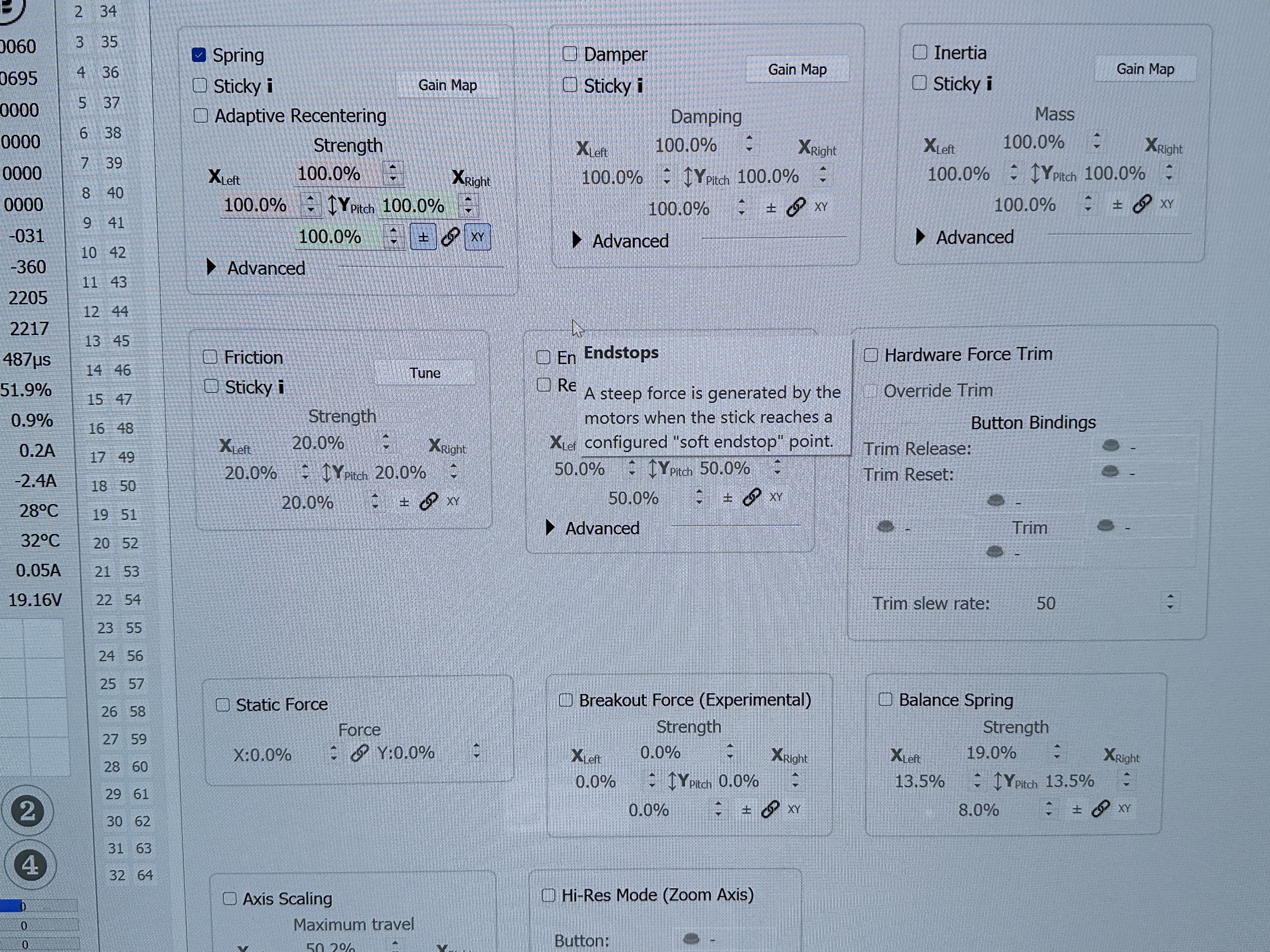
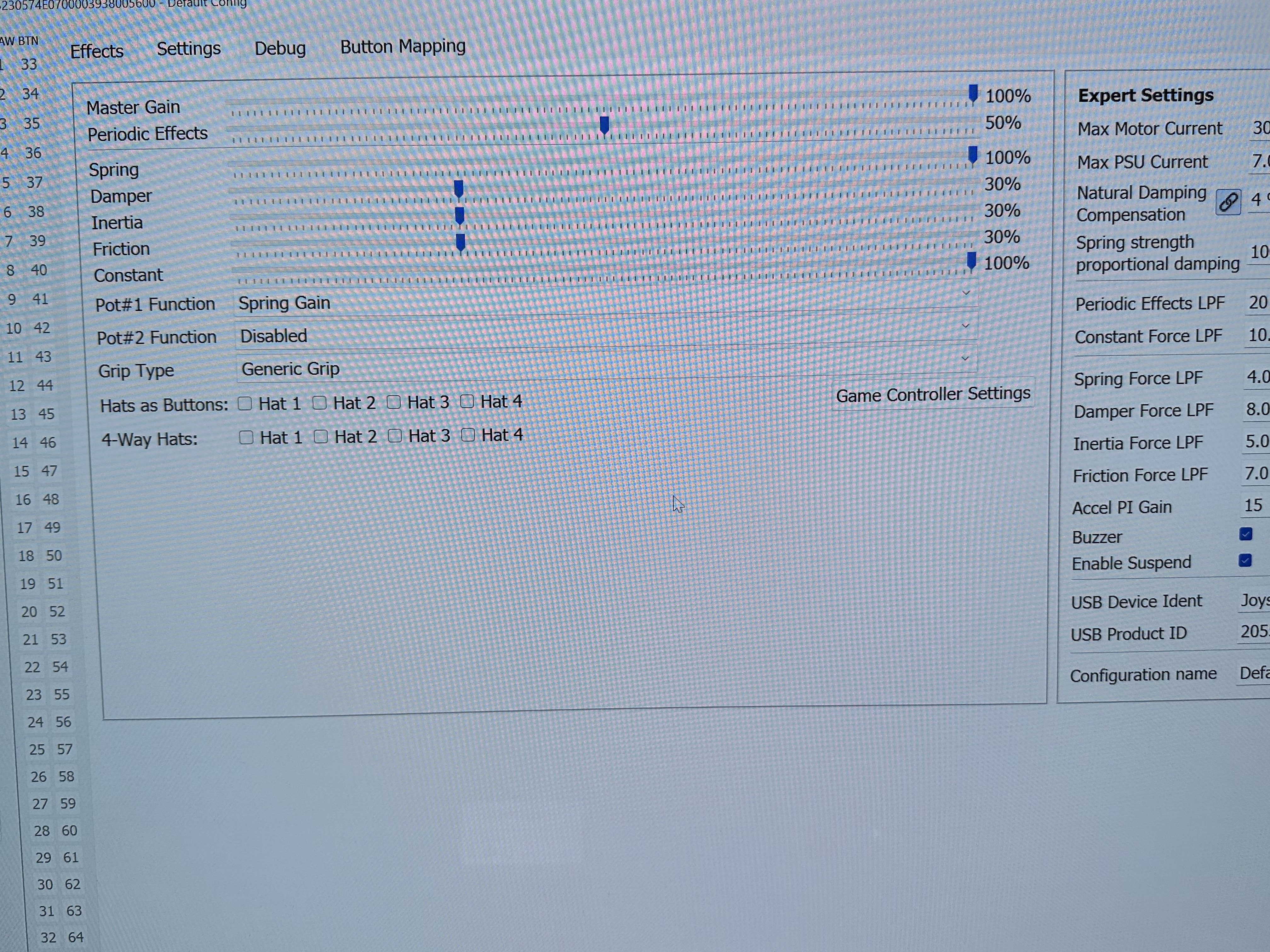 M
MSee above - seems to be working though for the Moment - issue seems to be the ibus value sometimes sitting at zero (will test some more)
WOnce you start DCS it's normal for it go limp until you start a flight.
Can you grab with everything in view? Win+Shift+S for windows snip tool vs pictures with your phone
Can you grab with everything in view? Win+Shift+S for windows snip tool vs pictures with your phone
MYes aware of this behaviour on startup (assume when this happens i bus sets to zero?)
WIbus is not a good indicator, it's normally at zero when motors are idle
MThe issue I had was before Dcs was started stuck was limp….
WCould be numerous things - maybe your master gain was at 0%?
WOr maybe spring adjust pot was turned off.
MOk gain was definitely not zero - understood on the ibus - but when this happened the only noticeable thing that looked weird was the. Ibus was zero normally mine sits just above …
MNot at my pc now but will do some more testing (and get a full screen when I am testing)
 I
ISometimes in DCS flying warbirds in cruise , not moving the stick, I loose vibration for a sec or two and then a tiny movement of the stick gets it back, is there a way to solve this?
MSo have done some more testing since the recalibration and it’s working much better however found 1)everything seems to be working ok except in the ah64 couldn’t get the force trim to work correctly (can see from the stick monitor the stick centre is changing but the rhino does not seem to be moving to the new centre) 2)need to reset the FFB between planes in DCs for the FFB to work 3)unrelated to the above but my anti virus is picking up a virus on one of the Telem files qtcore.pyd ….
 K
Khow do I recenter the joystick in configurator? it shows the green centre circle to be sitting quite far forward, in that I need a lot of forward stick to fly level

 O
Oin the effects tab setup hardware trim tick box then assign the buttons trim release / trim reset /trim up, down, left, right. Then put the stick where you want and press trim reset. Apply settings and store settings after each change you make to save the settings.
 F
FI don't think setting the trim buttons is necessary. afaik it is for sims that don't have native force trim support.
I'd just reset the motors or the config. calibrate the axes if you haven't done that before.
if you have used TelemFFB it might have got stuck there and you could reset the effect in there.
I'd just reset the motors or the config. calibrate the axes if you haven't done that before.
if you have used TelemFFB it might have got stuck there and you could reset the effect in there.
 3
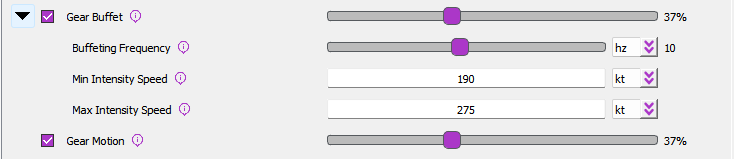
3Which effect controls the stick when the landing gear is retracted and deployed? My stick shakes violently when the gear is deployed or retracted.
 N
Non which aircraft? If you look at the settings you will see these two.. neither should produce violent results unless maybe if your periodics gain was at %100.
Buffet is a rumble if the gear are deployed above the speed threshold, but has nothing to do with the gear moving
Motion is a high frequency vibration while the gear are in motion.
Buffet is a rumble if the gear are deployed above the speed threshold, but has nothing to do with the gear moving
Motion is a high frequency vibration while the gear are in motion.
 3
3Thanks for the reply,
3The problem is with all aircraft. I'll look into the buffeting
 F
Fthere is also the one slider in the rhino configurator that governs all special effects
Fforgot what its called but it covers stuff like gear, guns etc
Nthats the periodics gain I mentioned (in configurator)
 T
TJust curios, can you upgrade the stock motors of the Rhino with the Nema34 variants? I take it it won't fit the stock case and/or the other parts need to be strengthened?