

 K
Kyour BIOS not seeing it is evidence something is very wrong
 M
Mhttps://github.com/ublue-os/bazzite/issues/560 could be relate or not
GitHub
Hello, There's an instruction how to dual boot on one drive. In my case I got separate drive for bazzite deck htpc edition and found out that I can add thru ujust command option to unhide-grub ...
Kare you positive your drive with bazzite on it didn't have your bootloader on it for Windows?
Kor worse -- was your windows drive?
 A
AI don't understand the first question, a bit confusing.
Windows drive is still there, I can navigate in "Files" app on Bazzite.
Windows drive is still there, I can navigate in "Files" app on Bazzite.
Kyour bootloader can be on a different drive
Kit would appear in your BIOS if it was intact
Ksince it doesn't, your issue is w/ your windows bootloader one way or another
Kcan't find what's broken or doesn't exist
AWell, I had PopOS on Drive 2 and then installed Windows 11 on Drive 1.
And now I installed Bazzite instead of PopOS.
And now I installed Bazzite instead of PopOS.
AThis sounds like I won't be able to boot into Windows again.
AUnless I format that drive, I mean.
 A
AI see there's a way to add the entry manually, looking into that now.
Mcould work, but since I rarely do dual boot, formatting, or partitioning, so I don't know what to say more, aside from linking the issue looks similar to your case
AI'm attempting to restore the EFI on Windows. Looks like it's something quite common, will write back in a bit.
Mah I see

 B
Byou could probably do something with windows boot media
Ayep, exactly
Bwhen i was dual booting i just booted windows through the bios lol although i did lose my bootloader when installing bazzite anyways
Bi didnt really use it much so ill just reinstall windows if i ever need it
Mthe only thing I'm missing from windows probably is an android emulator (nvidia so no waydroid)
Bi used windows mainly just for FiveM (GTA V multiplayer)
AWell, the only reason I need to get into Windows is that I have all my Brave browser data in there. I'm been changing ROMs on my phone and distro hopping on laptop and forgot to sync Brave, of course, I didn't expect for Windows boot to break. So I really want to get that Brave sync back up.
Bcan't you access the files still? all my windows stuff is still accessible from linux
ABut they're not exactly files. I don't know how Brave stores its history, extensions, bookmarks, and some other stuff, even passwords. Brave has a sync feature but it's local, not cloud.
MI can help with that
Msince I never do official sync and just move the profile folder myself since official sync doesn't included extensions sync
ABut it does include extensions. I didn't think moving profile folder would work out of the box.
Moh it's firefox my bad, but still I did it with brave before
Mseems fine
Mlet's me open up my windows container to check brave profile path
MC:\Users\yourusernamehere\AppData\Local\BraveSoftware\Brave-Browser\User Dataso the profile name isn't exactly straight forward
Mbrave will name it as
also save the
DefaultProfile 1Profile 2DefaultProfile nUser Dataalso save the
System ProfileUser Datapath in brave is a bit different
M~/.var/app/com.brave.Browser/config/BraveSoftware/Brave-Browser/paste your profile folder and
System Profileedit: ok I check again I think it's should be fine to just paste every files in
User dataBrave-Browserthis is for flatpak, other method might not be in
.var/app/com.brave.Browserconfig/BraveSoftware/Brave-Browser/could test it first before trying with your real profile
 C
Ccan i set some game i play to high priority in Bazzite ?
 A
AIm pretty sure bazzite do that by default for foreground application
 C
Coh that's great ty
Cdoes the Envycontrol work on bazzite ?
 M
MGuys I’m a newbie with Linux and trying to install bazzite os expecting to have a similar experience as steam OS.
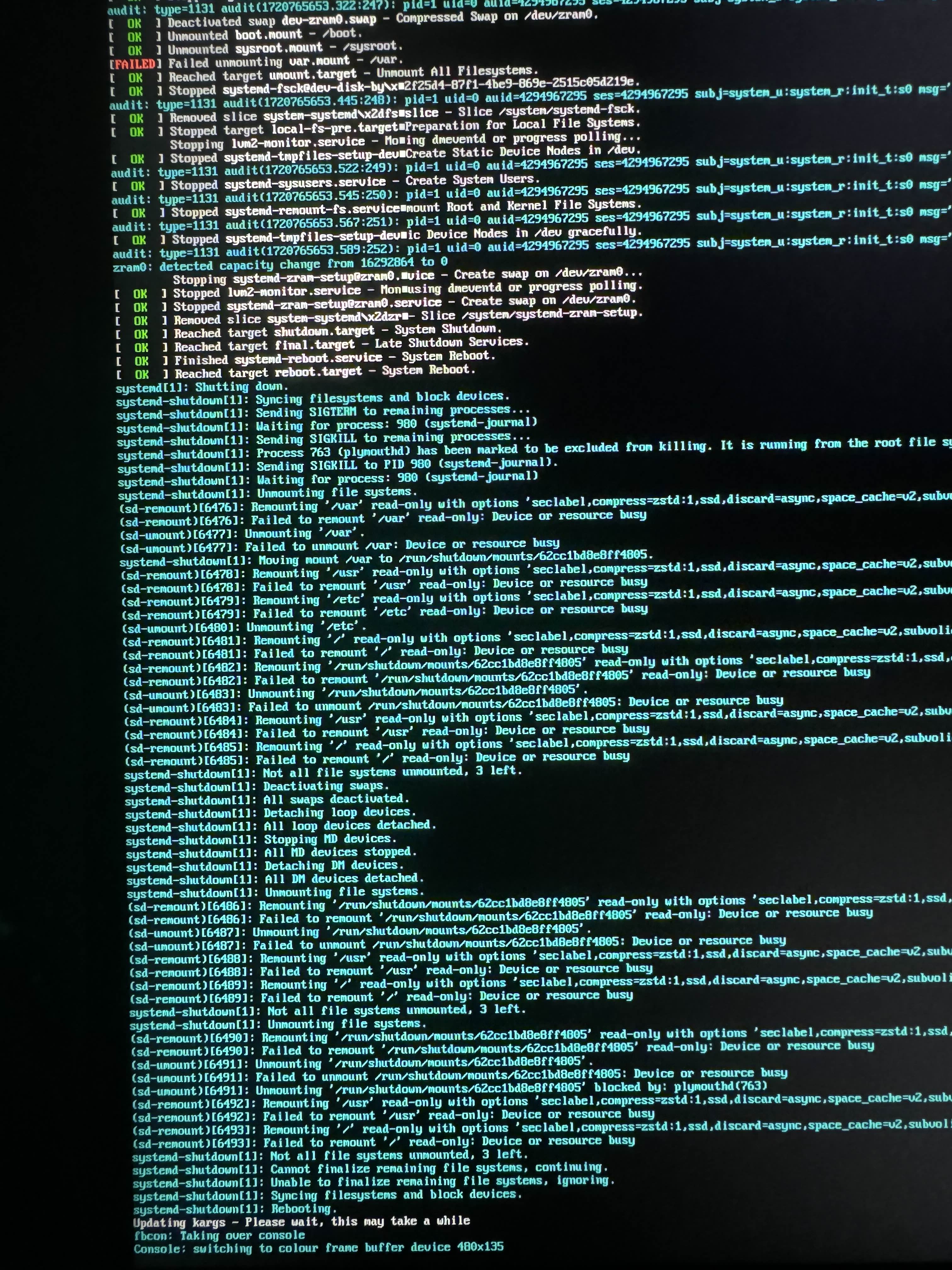
I’m trying to get a dual boot with windows 11 and after formatting the disk and setting the efi and var partitions following a YouTube tutorial . I’m getting this screen saying
“failed unmounting var.mount - /var”
I don’t have internet connection for this installation because my WiFi card from Broadcom (bcm94360ng) wasn’t compatible at first. I had Switched the original WiFi card for hackintosh purposes. (Still have it in a second ssd)
I don’t know if this error is related to the fact that the installation don’t have internet access.
My setup:
Mobo: asus 760i
Intel i7 13700k
Gpu amd 6950xt
Dell 4k monitor
I was intending to fix the WiFi problem using the following command:
“just use-Broadcom-wl”
found on a bazzite discourse post.
Could anyone have clues on how to fix this? Thx in advance
I’m trying to get a dual boot with windows 11 and after formatting the disk and setting the efi and var partitions following a YouTube tutorial . I’m getting this screen saying
“failed unmounting var.mount - /var”
I don’t have internet connection for this installation because my WiFi card from Broadcom (bcm94360ng) wasn’t compatible at first. I had Switched the original WiFi card for hackintosh purposes. (Still have it in a second ssd)
I don’t know if this error is related to the fact that the installation don’t have internet access.
My setup:
Mobo: asus 760i
Intel i7 13700k
Gpu amd 6950xt
Dell 4k monitor
I was intending to fix the WiFi problem using the following command:
“just use-Broadcom-wl”
found on a bazzite discourse post.
Could anyone have clues on how to fix this? Thx in advance
 T
TThere is a bug in
[1] https://github.com/ublue-os/bazzite/issues/1350
/usr/libexec/bazzite-hardware-setuprpm-ostree usroverlay --hotfix/usr/libexec/bazzite-hardware-setup[1] https://github.com/ublue-os/bazzite/issues/1350
GitHub
Describe the bug The GPD Win Mini 2024 has a native landscape panel. For the 2024 7640u model, this code looks to incorrectly set it to a right_size_up panel, like the 2023 model. bazzite/system_fi...
Kyou can disable the service, but I'd recommend we add detection for your hardware to this so it doesn't add it
Kas a PR
Kyou're in a unique position to help w/ that since we don't have the hardware
TI am new to rpm-ostree but familiar with Linux. How can I test this? I think it's just adding
Edit: I have forked the repo and am attempting to use GitHub actions to build a new image.
|7640U to the end of the CPU models on the line I linked.Edit: I have forked the repo and am attempting to use GitHub actions to build a new image.
 M
MIs it ok to post this question here or should I move it to 🛟bazzite-help
