
What should I do if I want to use `wrangler dev` locally to test fetch origin address ? ~~~
What should I do if I want to use
~~~
wrangler dev~~~
wrangler dev K
K R
R I
I C
Cwrangler pages dev doesn't start the server unless you restart your computer (macOS arm, bun)? C
C
 0
0wrangler pages dev and vite buildsveltekit app with the local D1 database. I can access my landing page, but most of generated scripts by vitewrangler[wrangler:inf] GET /_app/immutable/entry/start.C9uj9_pe.js 404 Not Found (13ms)0--live-reload flag. Is doesn't reload nor update the page with whatever modifications I've done.0wrangler.tomlsvelte.config.js and scripts ran during launch Y
Y
 S
S HY
HYRoutes, but not under Custom Domains. This is confusing...Hwix-app-test2.run directlyHwix-app-test2.run/*, with automatic DNS record creation and Certificate IssuanceYH*.wix-app-test2.run(pointing to AAAA 100:: HY
HY*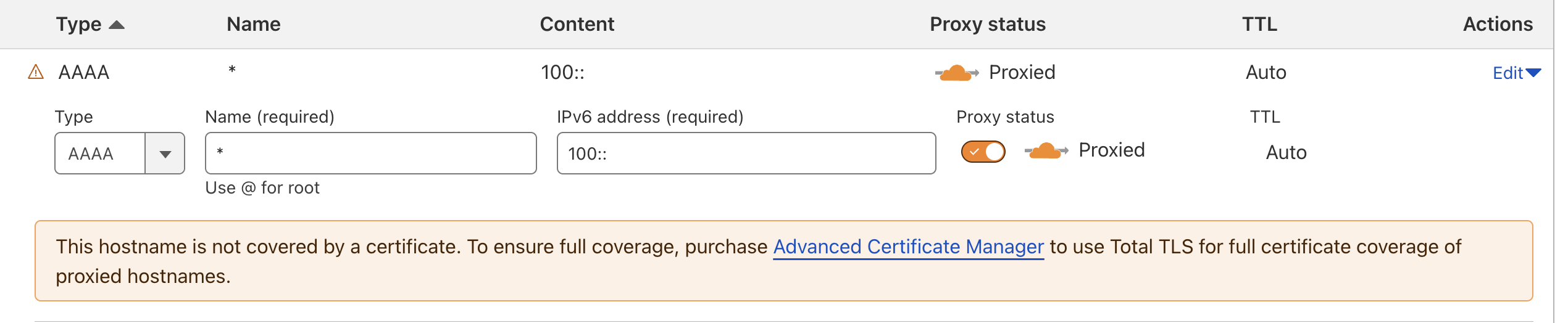 Y
Y
 H
H CCY
CCYcloudflare/wrangler-action@v3 JJ
JJ
 J
J Home to Wrangler, the CLI for Cloudflare Workers® - Issues · cloudflare/workers-sdk
 HJHJH
HJHJHwrangler.toml H
Hwrangler versions is not working in 3.68, even though it's supposed to be there since a while. J
Jmysite-stagingwrangler.toml<nameFromWrangler>-<nameSpecified> , or worker- if outside a dir containing wrangler.tomlwrangler.json coming! A
Anpm create cloudflare@2.21.1 auto-upgrading to the latest minor version? I understand that, in a lot of cases, it's completely safe to use the latest minor as it's non-breaking.2.21.1 where the initial list of options is a long-ish list - now it's been tidied up to be into categories with the lists behind. This means anywhere this command is used needs rewriting to account for the new options - not a large amount of work - but if this happens again it then means the printed material would come across wrong, which would be fixed by pinning the version, but it refuses to run without upgrading to the latest minor.A
npm create cloudflare@2.21.1 -- --no-auto-update (didn't realise this existed!) S
Swrangler deploy KSS
KSSbun run deploy H
H
 V
V S
Swrangler pages devwrangler pages dev⎔ Starting local server...
[wrangler:inf] Ready on http://localhost:5010
✘ [ERROR] service core:user:phosphor-server: Uncaught Error: No such module "wrangler:modules-watch".
imported from "_worker.js"
✘ [ERROR] MiniflareCoreError [ERR_RUNTIME_FAILURE]: The Workers runtime failed to start. There is likely additional logging output above.sveltekitD1[wrangler:inf] GET /_app/immutable/entry/start.C9uj9_pe.js 404 Not Found (13ms)--live-reloadsvelte.config.jsroutes = [
{ pattern = "*.mydomain.com/*", custom_domain = true }
]✘ [ERROR] Cannot use "*.wix-app-test2.run/*" as a Custom Domain; wildcard operators (*) are not allowedRoutesCustom Domainswix-app-test2.runwix-app-test2.run/**.wix-app-test2.run/**.wix-app-test2.runroutes = [
{ pattern = "*.wix-app.run/*", zone_name = "wix-app.run" }
]name: Deploy Worker
on:
push:
branches:
- wrangler
jobs:
deploy:
runs-on: ubuntu-latest
timeout-minutes: 60
steps:
- uses: actions/checkout@v4
- name: Build & Deploy Worker
uses: cloudflare/wrangler-action@v3
with:
apiToken: ${{ secrets.CLOUDFLARE_API_TOKEN }}
accountId: ${{ secrets.CLOUDFLARE_ACCOUNT_ID }}
workingDirectory: "./cloudflare-services/platforms-dispatcher"Checking for existing Wrangler installation
/usr/local/bin/npx --no-install wrangler --version
npm error npx canceled due to missing packages and no YES option: ["wrangler@3.67.1"]
npm error A complete log of this run can be found in: /home/runner/.npm/_logs/2024-07-31T13_20_24_246Z-debug-0.log
⚠️ Wrangler not found or version is incompatible. Installing...
📥 Installing Wrangler
/usr/local/bin/npm i wrangler@3.13.2
npm error code E404
npm error 404 Not Found - GET https://registry.npmjs.org/@wix%2fambassador-bootstrap-plugin - Not found
npm error 404
npm error 404 '@wix/ambassador-bootstrap-plugin@^1.0.617' is not in this registry.
npm error 404
npm error 404 Note that you can also install from a
npm error 404 tarball, folder, http url, or git url.
npm error A complete log of this run can be found in: /home/runner/.npm/_logs/2024-07-31T13_20_31_572Z-debug-0.logpackageManager: npm npm error Exit handler never called!
npm error This is an error with npm itself. Please report this error at:wrangler versionsmysite-staging<nameFromWrangler>-<nameSpecified>worker-wrangler.jsonnpm create cloudflare@2.21.12.21.1npm create cloudflare@2.21.1 -- --no-auto-update✘ [ERROR] Missing entry-point: The entry-point should be specified via the command line (e.g. `wrangler deploy path/to/script`) or the `main` config field.bun run deploy#:schema node_modules/wrangler/config-schema.json
name = "phosphor-server"
compatibility_date = "2024-07-12"
compatibility_flags = ["nodejs_compat"]
no_bundle = trueroutes = [
{ pattern = "*.wix-app-test2.run/*", zone_name = "wix-app-test2.run" }
]bunx wrangler d1 create mysite-staging
bunx wrangler r2 bucket create mysite-staging
bunx wrangler kv:namespace create staging CDCloudflare Developers / workers-and-pages-helpCDCloudflare Developers / pages-helpCDCloudflare Developers / workers-and-pages-help


