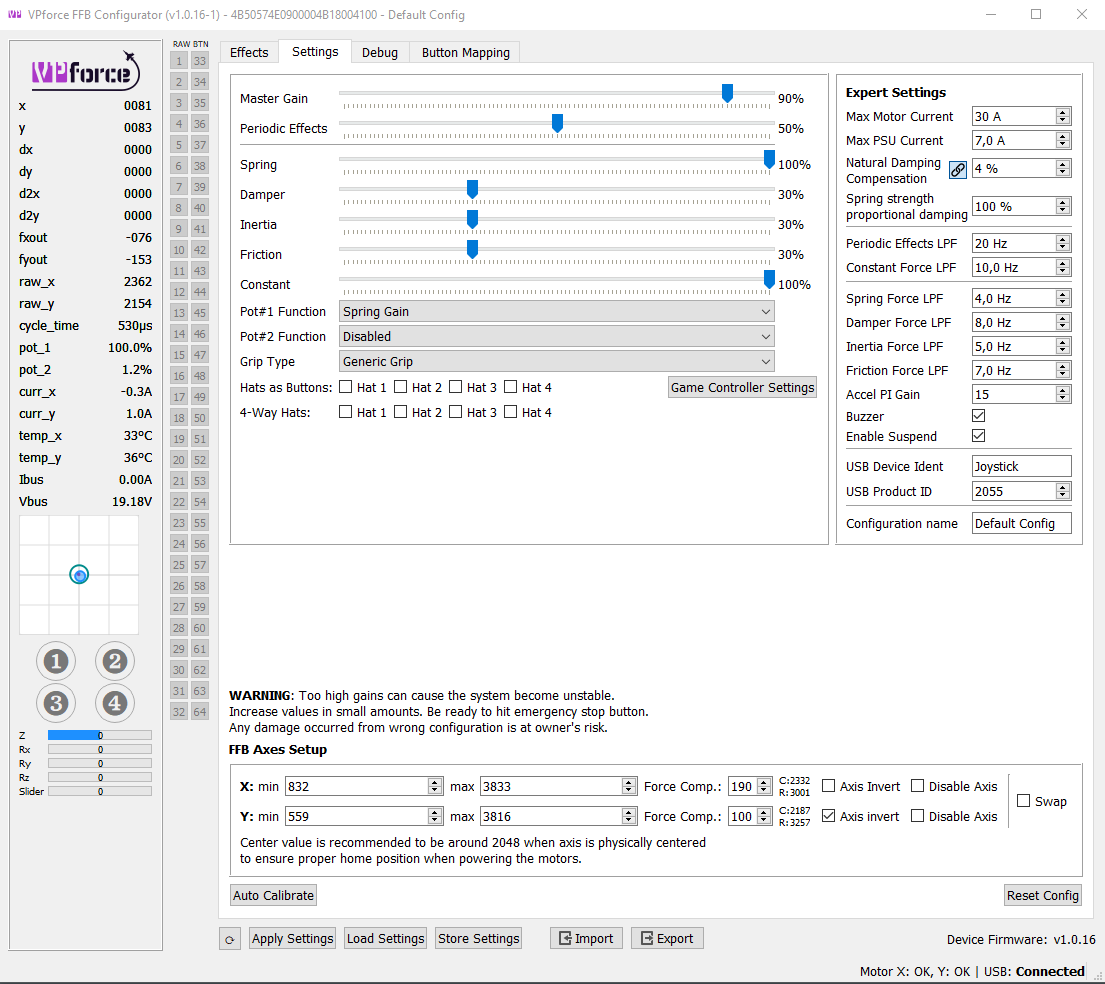
Are we talking woth this offset trim while DCS is running or not? I'm a bit confused. When you want to calibrate the hardware, neither DCS or TelemFFB should be running. Just the configurator. From there, after calibrating -> applying -> saving, the stick should be perfectly centered.
Then - inside DCS, it depends very much on the airframe. Most old school jets have the stick trimmed forward for level flight at cruising+ speeds. That's normal. Same for Helicopters of course.
Basically, for classic joysticks, the logical (simulated) stick position was detached from the physical stick position. That being no longer necessary is one of the perks of FFB sticks.
It’s modeling real life behavior of jets. There is less forward travel because negative G maneuvers are frowned upon. So there is more positive G travel to “roll and pull”.
I get that but I somehow messed this up. I know that you need to trim forward travel. I did run the calibrate with Telemffb and DCS on so maybe that's how i messed it up. I could always do that with my Virpil base. I'm just trying to figure out how in the heck I can undo this because even with DCS and Telemffb turned off it's still trying to give me that trim center blue circle way forward which is totally wrong. Is there anyway I can just reset everything?
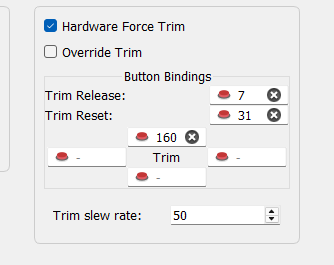
did you inadvertently change the center point using the hardware trim feature? What happens if you press the bound (or bind and press) the reset button?
I think I messed up my rhino. When I was moving it on its mount. I dropped it, not very far but it hit hard. When I fly and the buffeting effect turns on it bucks hard and feels out of balance. I had not changed any settings. Tried turning the buffeting effect way down and as long as it turns on it causes the issue.
I have taken the top off and the gimble looks fine and I can't see anything obvious. I'm hesitant to tear it down further. Without knowing what I am looking for.
Everything else feels normal? No grinding, no cracking noises etc. ? Can’t think of a reason why only one certain effect could cause issues….. Checked the settings? (in config and telem!)
Telemffb needs an Config file to use the settings.... In the Settings Page I selected a standard profile that should be loaded at startup.... But.... When starting the sim, the stick is passiv... only acts like a spring / Damper.... If I select / load the same profile in the planes dialog the stick comes alive... why?
I don't fully understand what you are asking. You don't say the sim, but I'll assume DCS.
Taking TelemFFB out of the equation here (all it's doing is pushing a saved profile to the joystick)....
DCS "takes over" the spring effect during startup, this is why your stick goes limp when the sim is loading. It takes ownership of the spring effect and sets the gain to 0.
When you load into an aircraft, the FFB implementation for that aircraft will set the gain of the effect to whatever it should be based on the phase of flight you load into.
When you exit back out to the main menu, the stick generally goes back to a springless state.
Hi, I am looking for a X-Plane/MSFS airplane, where the autopilot following works well. So far, I am always having increasing oscillation issues. I want to turn on the ALT or HDG knob and see the magic. Does this work for any of you? On which plane?
Hard to say without knowing the exact process you are following and when it is changing (you can watch the configurator slider to see exactly when it changes). However...
Today, TelemFFB attempts to leave the gains in exactly the same state in which it found it when it was started. Upon startup, the gains are read from the base. When you exit TelemFFB, it reapplies those gains. This means that if you start TelemFFB with a slider set at %50, then realize you want it at %100 and change it manually, TelemFFB will set it back to %50 when it exits.
In the next version, this functionality will be placed behind a system setting rather than being the default behavior. It can be useful, but can lead to confusing results if you don't know its happening.
This should be raised with the IL2 devs. IL2 has native FFB, meaning the spring forces are generated by the sim. A given FFB base just "does what its told" in this regard.
I took my rhino apart some and am reassembling now. I did not realize the pulley gears had a couple longer screws. Does anyone know which spot the longer screws go?
What do you mean? The long screws attach the belt pulley to the gimbal. 5 or 6 each iirc. These are the longest screws in the rhino I can think of - and they can't go anywhere else. I have a DIY rhino though.