

 A
Awalmis has it on his order form: https://docs.google.com/forms/d/e/1FAIpQLSflUrHfM9AB0f-0WGyhOLxvXQNMr7E8TBDSYYJUBQ8kqaDC7g/viewform
Google Docs
Order request for VPforce products.
Please note: to reserve a VPforce RHINO FFB base, please use reservation form here.
Once the order is ready to be fulfilled an invoice will be sent to the provided email address.
Please note: to reserve a VPforce RHINO FFB base, please use reservation form here.
Once the order is ready to be fulfilled an invoice will be sent to the provided email address.
 *
*@walmis How do I order just the aluminium thread head? 200mm extension with metal Warthog stick was obviously too much for the plastic one... 
 W
WHey, it's via the order form one post above 
*Thx!
 K
KHi @walmis just popped in an order form for the winwing adapter, the one I was using, the plastic screw on part that attaches to the base snapped in half and the joystick fell off. The adapter on the left is the one that broke, the one on the right was the original I ordered but it never worked. Just tried it again but it wouldn’t connect correctly in that the flight controls worked, but the functions on the joystick would not work such as the gun trigger or any other buttons. Might it have something to do with the metal surround under the arrow around the pins? The broken one doesn’t have one and all functions worked normally……just a thought. Cheers.
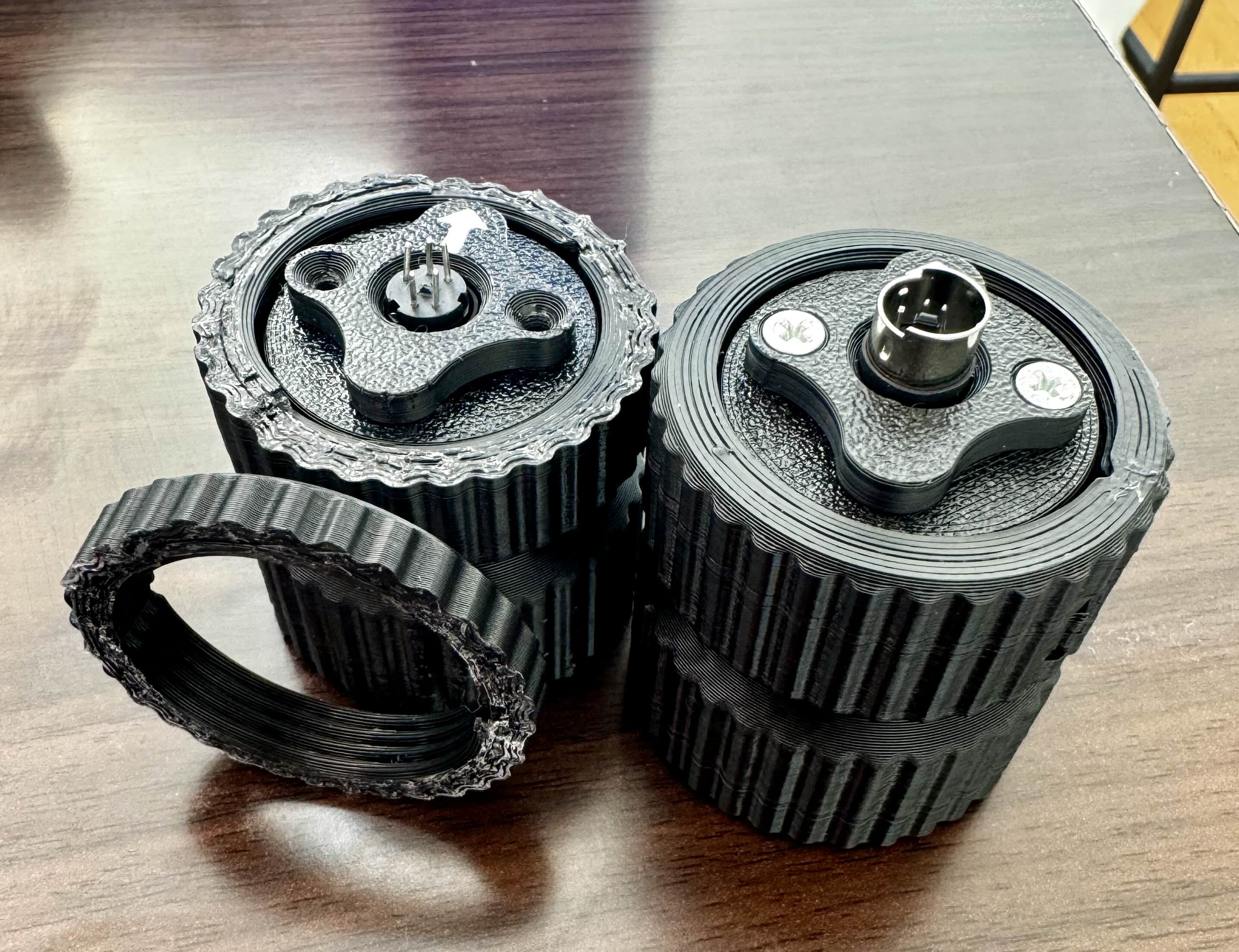
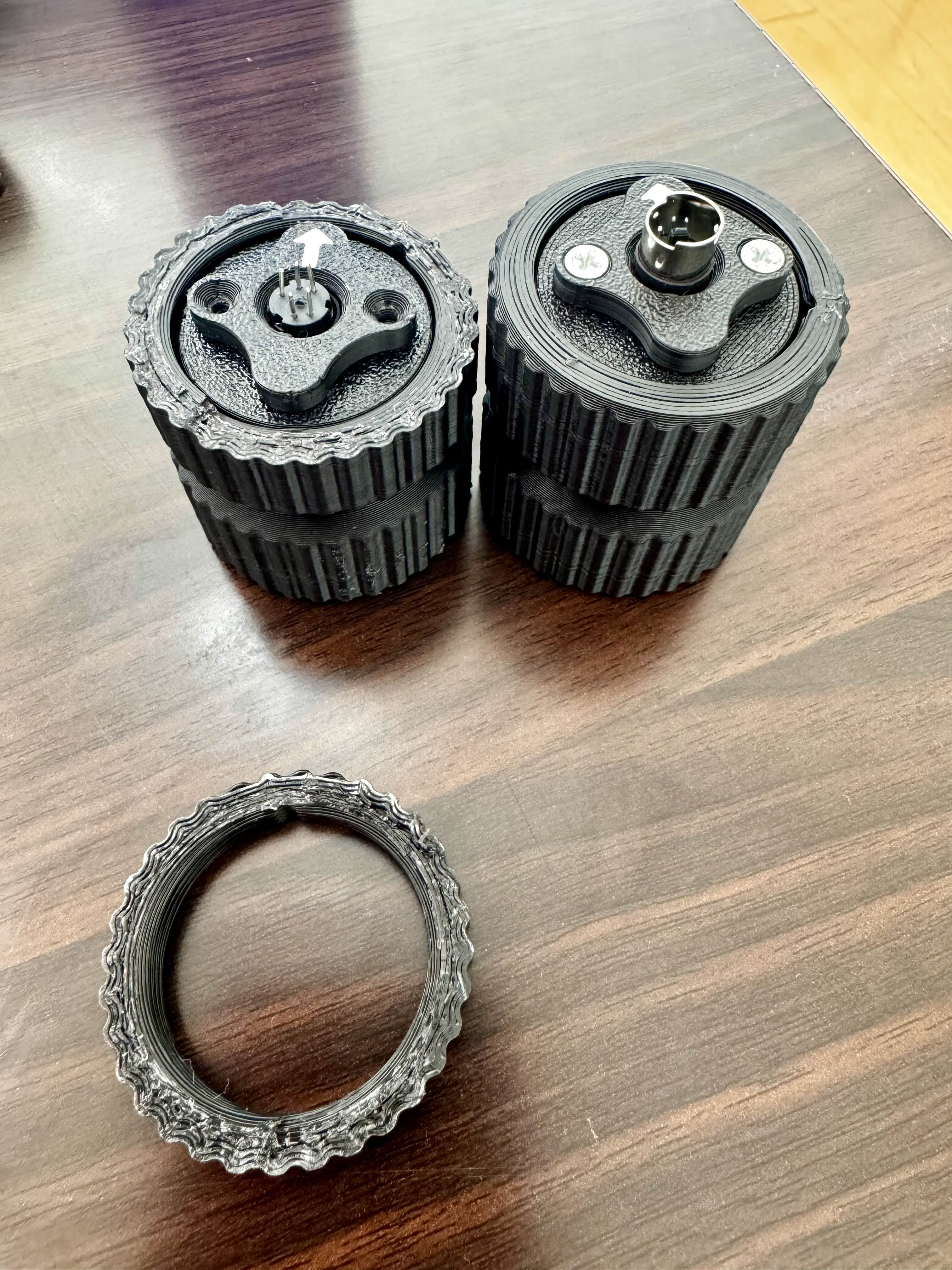

 V
VHave you checked to make sure you have Winwing selected under the grip drop down in VP CONFIG?
VI had the same issue until I was told to do this. 
 K
KI’ve been using this Winwing joystick for awhile now with my Rhino with no issues. Could changing out the adapter do that? I’ll give it a try
VOh well I’m not 100% sure, I just know that was my problem with mine not working. Now that I think about it though, you do have a point. Still worth it to check. Gets you back in the seat quicker.
KAbsolutely mate, thank you for your advice, cheers
WHey, I'll send you a replacement
 K
KThanks, let me know how to pay you, my email is on the order form. Cheers
 L
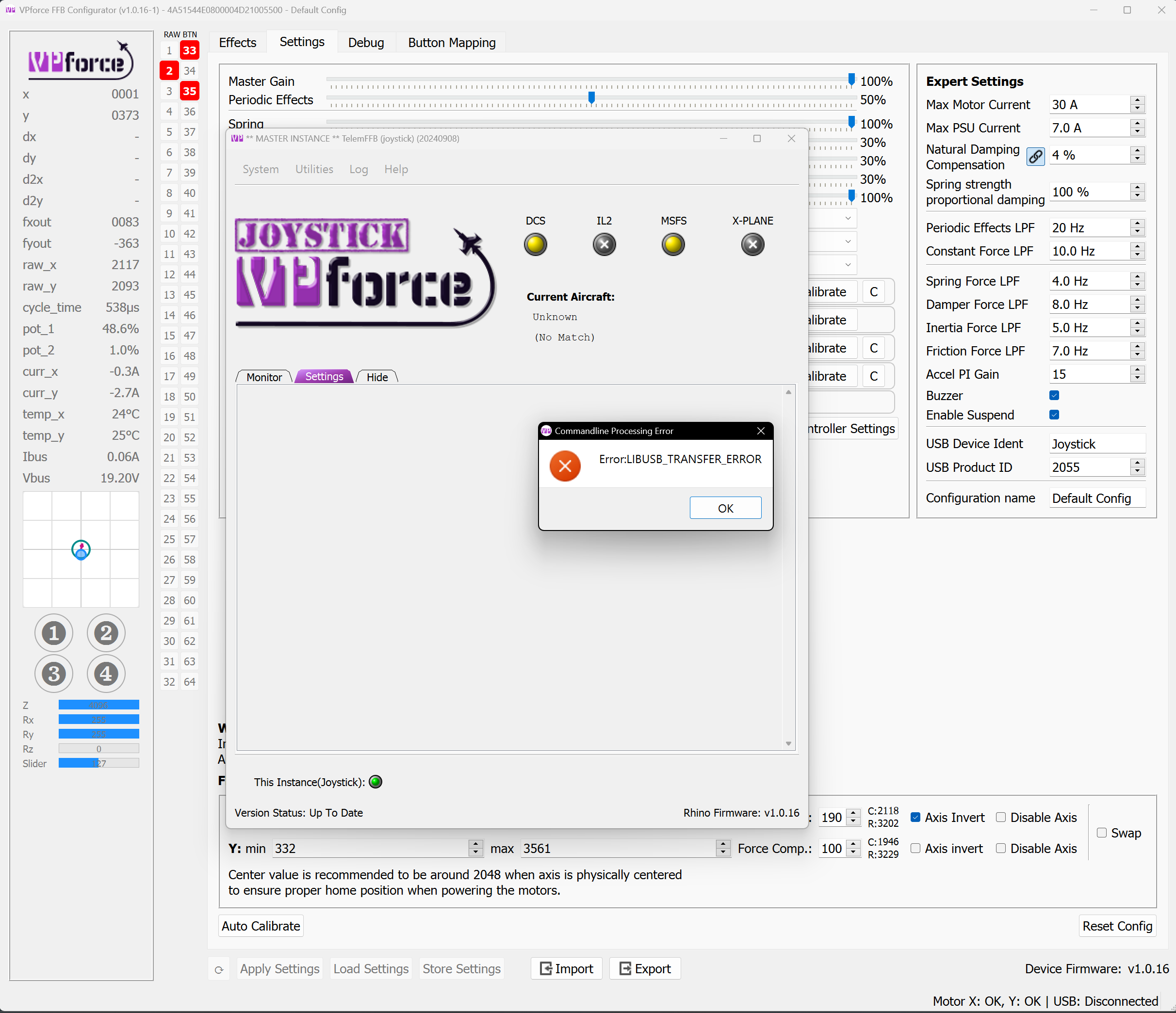
LI got a lib usb transfer error, I think from telemffb while trying to fly in msfs and now my stick won't turn on
and windows says device not recognized when I unplug/replug
and windows says device not recognized when I unplug/replug
LJust happened again after restarting pc

 N
NThat error isn't from TelemFFB, its actually from Configurator (occurring when TelemFFB uses the CLI to load the profile).
Suggests a USB error, commonly caused by overloaded or misbehaving USB hub. If its connected to a powered hub, try power cycling the hub, or try plugging directly into the PC
Suggests a USB error, commonly caused by overloaded or misbehaving USB hub. If its connected to a powered hub, try power cycling the hub, or try plugging directly into the PC
 M
MHave you switched between Rio and pilot seat by chance? There's a known issue where the Ai moves the trim to the extreme while you sit in the aft cockpit. Makes a wild ride when you go back to pilot seat.
 W
WHello guys im having some issues with ny rhino i tried to install the throw limiter and after installing the piece and hitting auto calibrate in the software im
Getting this behavior
Getting this behavior
 V
VInteresting. I’ve never seen mine do that. I also have the limiters in. Do you have DCS running in the background not paused by chance?
WNothing running in the background
VAbove my pay grade then. Hope it gets sorted and it’s nothing more than a quick update of firmware etc.
WAnd the rhino was just working before that! I tried to do a reset config and still the same 
VRestart comp?
WYep
 H
HDid you just hit calibrate or did you actually do the calibration? Auto doesn't mean you don't need to do anything. I assume the axis values are bogus.
HYou need to move the stick in all corners and after that end the calibration AND save the values to the stick
WI hit auto calibration and then moved the axis to the limits
Hok
HDo you have a screenshot of the VP config page? The one with the axis calibration?
WOne second
HEven better - a short video of the page, while the stick is dancing?
WI think i resolved the issue. Turned off and loaded default options then did the calibration process and seems to be working now
WThanks for the help
 V
Vhello guys
so i just installed my 10 degree throw limiter but after doing the full calibration it seems to not give me full deflection in the control viewer?
so i just installed my 10 degree throw limiter but after doing the full calibration it seems to not give me full deflection in the control viewer?
 T
TDid you apply/store settings? There could also be some mechanical flex in the assembly which can be tuned out with the numbers to the right of the axis limit values.
 B
BMinor issue - the red power button base loosened up. I assume I just remove the screws in the top panel, lift it up and I should be able to tighten the button. Are there any tips or a better way to do this?
I think while I have it apart, I’m going to look at the possibility of moving the adjustment dial - it’s too close to the power button for my big fingers. Again, any tips?
I think while I have it apart, I’m going to look at the possibility of moving the adjustment dial - it’s too close to the power button for my big fingers. Again, any tips?
 W
WYou can access the power button nut by opening the rear panel (with the fan)
 P
PI'm convinced there is something wrong with my x axis motor or it's sensor or maybe it's my settings but it is almost constantly cutting out with telemffb effects & even without that running when flying in IL2. Any ideas on how I can test this? Happy to post my settings if someone would be willing to check them out & test them. Any help would be great thanks.
 N
Nare you saying that, without TelemFFB running, even the spring effect from IL2 is cutting in and out on the x axis?
 P
Pwithout telemffb running the native ffb effects from IL2 will cause the x axis to do it's 'safety-cut-out'. It happens the worse in DCS with telemffb & heli effects like ETL VRS etc. it's never the y axis only the x axis.
NI see. I thought you meant it was cutting in and out like stopping/starting.
If the axis is going into failsafe cutout, there's likely something in your settings that is leading to the instability. For me, this usually happens if I get too aggressive with combinations of damper/friction/inertia. Could also be something in your "expert settings".
Post your configurator settings, both the "settings" and "effects" tabs. Maybe something will jump out or maybe walmis will have a suggestion.
If the axis is going into failsafe cutout, there's likely something in your settings that is leading to the instability. For me, this usually happens if I get too aggressive with combinations of damper/friction/inertia. Could also be something in your "expert settings".
Post your configurator settings, both the "settings" and "effects" tabs. Maybe something will jump out or maybe walmis will have a suggestion.
P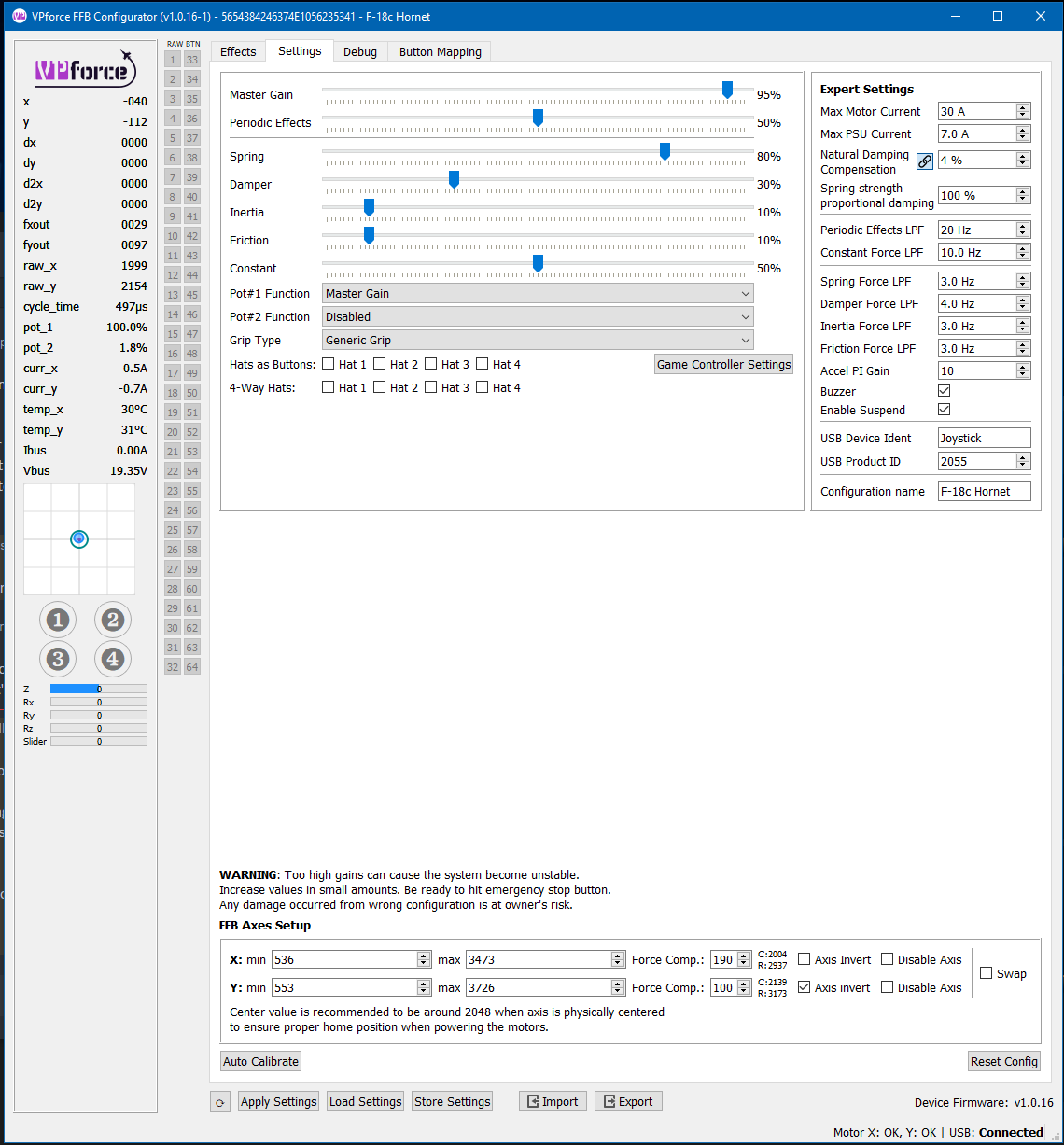
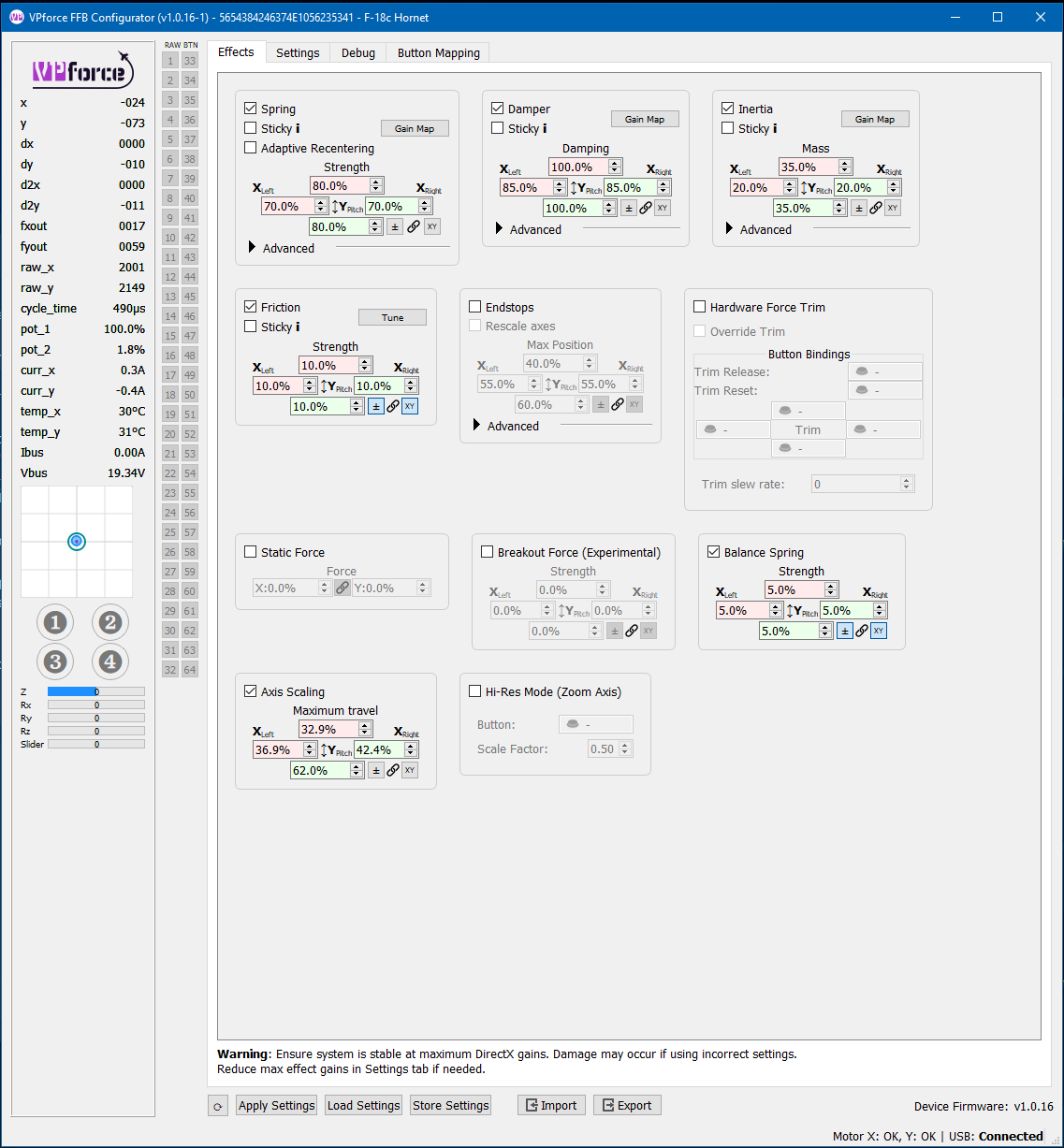 P
Pmy settings
Nyour damper/friction/inertia sliders and their associated effect tab settings look reasonable to me. Your expert setting LPF values look a bit off from the defaults though. I don't really know how to use these values to affect a certain change, but I do know that they can have a big impact on what a "good" setting would be for the sliders/effects.
I'm guessing there's a reason for your current values, but you might try loading the values from the default config and see if things improve. Otherwise I could only suggest disabling/reducing one or more of damper/friction/inertia and seeing what happens.
The values from the default profile:
I'm guessing there's a reason for your current values, but you might try loading the values from the default config and see if things improve. Otherwise I could only suggest disabling/reducing one or more of damper/friction/inertia and seeing what happens.
The values from the default profile:
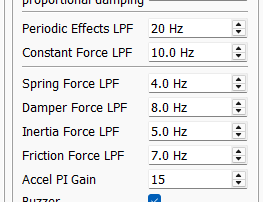 P
PI think these were lowered on advice from walmis when I originally had x axis issues. I'll have a play with them tomorrow when I'm on again.
 B
Bmy F4 roll axis has gotten very light without me making any changes. The roll axis issue is inconsistent, sometimes feeling normal...it may be a single player vs multi-player issue but I'm not certain yet.
 T
TIs it possible to map other joystick encoders or pots, or even just keyboard shortcuts, to change some of the configurator gains like "Pot#1 Function" does? It would make tweaking my configs so much easier if I could just turn knobs to change the configurator Master, Periodic Effects, Spring, Damping, and Friction gains while feeling the changes on the fly.

 B
Bi believe the passthrough option mentioned in the manual will do that
 T
TI don't see a passthrough option mentioned in the user guide. Is there a different place I should be looking?
Blemme look, i may have the nomenclature wrong
B3.3 Rhino loopback. But it appears to only work with buttons