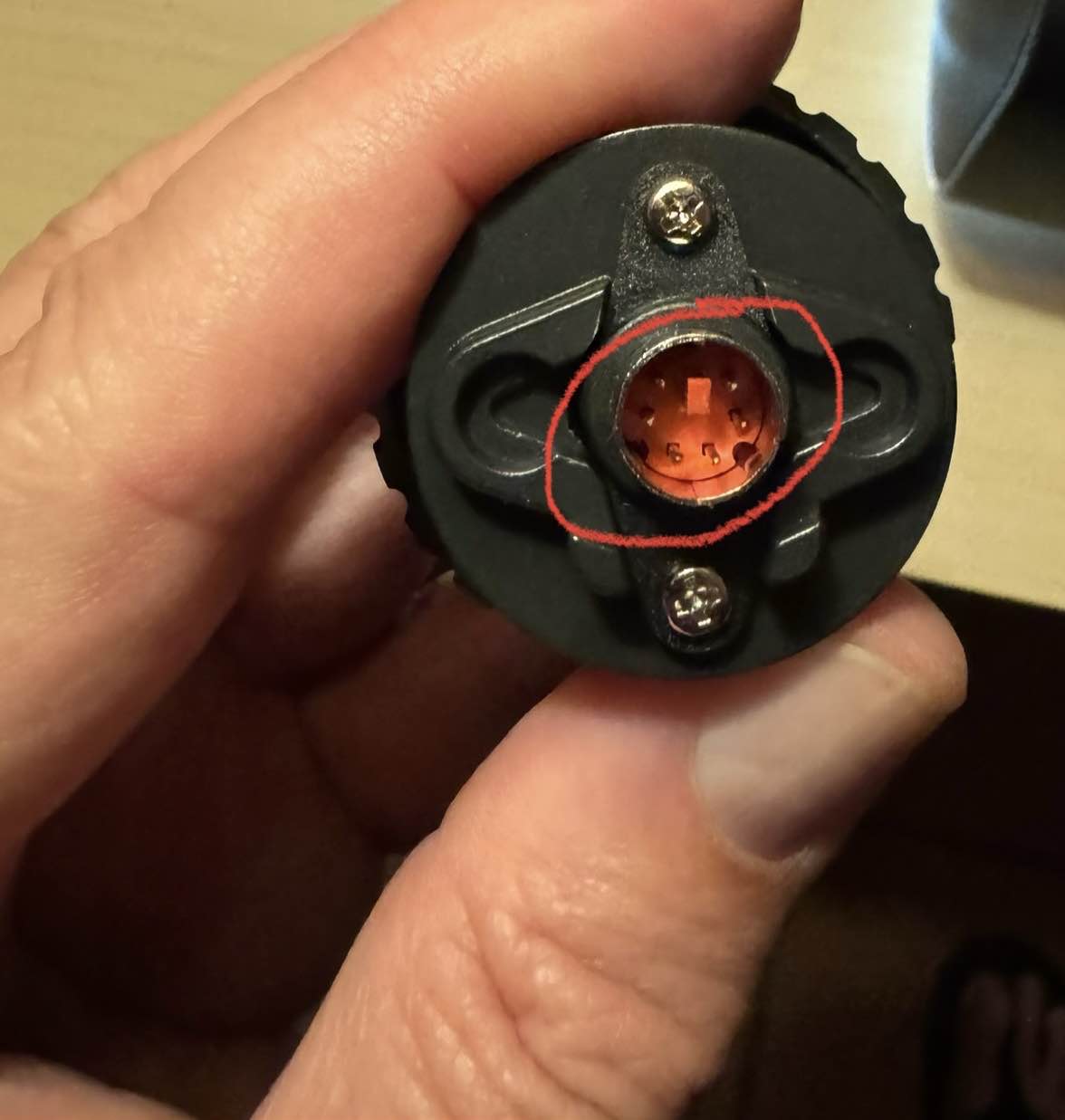
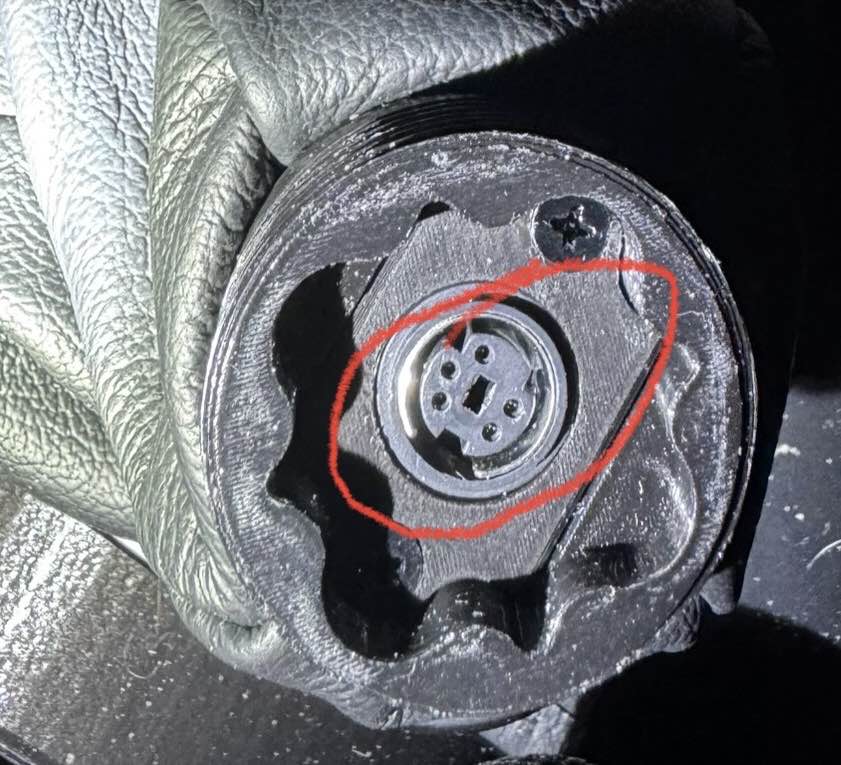
OK, I got the Amazon thrustmaster 5 cm extension and I don’t see how it’s going to fit. There are not enough holes in the rhino base to accommodate the seven pins on the thrust master adapter.
Yeah I could do that - but why on earth would a thrustmaster branded extension not have the right pattern I’m wondering if this is counterfeit or something
Now that I look at it, I think I can just remove the pins and the connector altogether. I’m literally just using it to extend …no electrical connection is being made with a VKB stick
The official statement I heard is that there is no native FFB in MSFS 2024 at the moment. Their plan is to provide FFB in the future but they want to define some kind of new interface which needs time to talk to involved parties - sounds like a longer iteration for me...
Optimize the realism and comfort of your piloting sessions with a configuration of the joystick in the central position. With AVA Offset Adapter, you can adjust the orientation of the joystick on the AVA base to 15° or 30°, providing more realistic immersion and comfort. Don't waste time making a...
I just got an AVA adapter as well.. still trying to figure the best way to cut off that extra pin. not much space to get in there. I thought about trying to just pull it out, but that sounds like a recipe for a bigger problem.
Haha what morons.. the main thing keeping them relevant in the face of other companies advancements is the fact their setup defined the standard, now they're breaking away from it lol
my solution at the moment instead of the ava is to use a short extension from virpil. I took the screws out of the female bracket on the rhino and there was enough slack in the cable to bring that up through the extension and plug it directly into the stick. this allows me to loosen the stick and tighten it at the 40 degree angle I was looking for (F18 grip)
★ Available in 50mm/75mm/100mm ★ Increased Precision and Smoother Handling ★ Allows for Offset Grip Rotation - Perfect for Center Mounted Setups ★ Includes Cable Extensions ★ Metal Construction
from Virpil: "Note: As the 50mm extension includes a solid connector it is not suitable for use with the TM Warthog base + TM Warthog grip combination."
This is why I pulled the rhino cable through the extension. It would also work if you fashioned a short enough extension cable instead of pulling the existing one through.
I’m betting they are trying to go different to get people locked into their ecosystem. Not very smart IMO but honestly 6 pin mini din would be welcomed by me because it’s the same as PS/2 which are a dime a dozen.
one other note is that the amount of available slack in that existing cable will be dependent on the throw of your stick base. Mine is 15 degrees in each direction and seems fine.
That was my thought.. like adding a ministick or anaog brake or something but still going to diminish what's left of their market share since keeping that standard was basically the last thing keeping them relevant
That's a great idea. Since I wanted to use the 5cm extension I asked virpil to send me their 7.5cm cable with it and I was able to fit it in the 5cm tube. All that trouble and now I'm actually using the 7.5cm tube with its own cable haha.
My plan is just to remove the two screws on either end (four screws total) and remove the electrical connection inside the adapter - that should work for me since I am using a VKB with black box
Well, I was able to remove the electrical connection and the pins on either side but now there’s no way to tighten it enough to where it doesn’t slop back-and-forth so this part was a complete waste of money
@walmis Hardware Trim behavior: Hey Walmis, I noticed that after the latest Firmware update, a trimmed position will be reset to the neutral point when a) the trim option is disabled or b) a profile without trim enabled is loaded. Which is an improvement and I assume is intentional. However - when you then enable the trim feature again OR load a profile with trim enabled, it will instantly return to the last trimmed position. I don't know if that is intentional, but I don't think, that is desirable behavior. I think once reset, the trim position should stay neutral until intentionally trimmed again. (also that suggests, that the trimmed position stay stored somewhere in the firmware even if a different config is loaded - which could cause unforeseen trouble I guess?!)
Imagine flying a helicopter and being in some weird trimmed position and than crashing, flying fixed wing aftre that and then hop in a different helicopter again, being totally surprised by a weirdly trimmed cyclic.
@walmis wait you actually added the #41 and #42 virtual buttons on the WinWing F-16EX grip already? :hkYAY: couldnt find any mention in the firmware changelog and i was about to write a reminder but checked if you stealthadded them and turns out you did thx
Hi all I’ve got the monster Rhino up and running does anyone have some baseline settings I could start with for someone playing 99% warbirds (il2 & dcs)
I am trying to get hardware force trim to work in MFS 2024 is that a known issue or only for me, hardware force trim works in helis in mfs 2020 just tested it now .
seeems like I cant get my X-axis centered? anyone have a suggestion for which settings to look for first? im flying the F-4 in DCS and itll be off to the right slightly, and trim doesnt seem to help
I would recommend to setup your own config. It's very much a matter of your personal setup (stick extension for example) and taste. From my experience you don't really need a different config for each aircraft. Just one default per class (Warbirds, Jets, Helicopters).
I would recommend to start by activating "spring", "inertia", "friction" and "damping" in the effects tab and set all to 100%.
Then in the Settings tab, put Master Gain to 100%, Periodic Effects to 50%, Constant Force to 100%.
Then put "Spring" to 0% and start playing with Inertia, Damping and Friction until the Stick feels "right" to you (giving some feeling of hydraulics/cables/pulley some friction and inertia etc.) That part is really a matter of taste.
When this is all dialed in, increase Spring until you find a level of force that you like.
Et Voila - your first "base" config is done. You con build upon and fine tune from here