What I mean is that the vibrations generated by the VP's engines will be felt in your rig. This can lead to high sensitivity, and you'll have to turn up your deadzone.
Thats good cause I haven't even tried the HPGs in 24 yet
We need to step back to basics to figure out where the hangup is.. this is just a basic sanity check and is a copy/paste from another troubleshooting I did some time back (sorry if it seems remedial)...
Start MSFS (do not start TelemFFB yet)
Load into the H145/H160 and start a flight on the runway/helipad
Wait for the avionics and ipad to initialize
Pause MSFS
Now start TelemFFB
When you start TelemFFB, your stick should suddenly go limp as soon as TelemFFB starts, loads the aircraft info in the telemetry window and realizes the sim is paused
Un-pause MSFS
When you un-pause, the spring force should return to the stick and it will center
On the center display, press the CTRL button (top right soft key)
Press and hold the Trim Release Button
Verify that when you press the TR button that 'Trim Release' is highlighted on the center display and "OVERRIDE" is displayed on the right display. It should remain lit until you release the TR button.
While pressing the TR button, move the stick around and verify that there are no spring forces fighting against you and that the yellow box/green crosshair remain together
Release the TR button somewhere away from center (but not far enough to upset the helicopter) and verify that the spring forces return and hold your stick in the new position
Recenter the cyclic either by pressing the
force_trim_reset_button
button, or by holding TR and moving the stick back towards center and then letting go of TR
Without pressing TR, slightly deflect the stick away from center and verify that "OVERRIDE" is shown on the right display. It should activate if you deflect the stick %5 (by default) away from the center point in any direction. When you release the stick, the "OVERRIDE" message should disappear
However, what you are describing definitley sounds like what B83 of the H160 does (B82 is fine). If the stick starts moving and just tips the heli while stationary on the pad I would suggest trying build 499. For reference, this is what the 160 was doing... https://discord.com/channels/426503612819046401/1159133211868282941/1304970135068479518(vid I posted on the Hype discord)
I'll give this a shot after dinner. Have to feed the wife lol. I don't want to go back to 499. The heli Flys much better in build 500. If there is an issue on Hypes end perhaps we can have Dave get to the bottom of it
Can’t reproduce it at all. But sounds similar to an issue that was seen on the latest 160 build. Dave said he made the same changes to 160_b83 and 145_b500. I’ve not heard of anyone with issues on b500 but that doesn’t mean there isn’t something unique triggering it.
thats good.. means it should be something simple...
My configurator profile won't do you any good. The only important thing is that you have sufficient spring force enabled in the settings tab and that your centering is sufficient, which yours appears to be. Do disable the "override trim" though as that will only mess things up further and make it impossible to find the issue.
From a TelemFFB perspective, literally the only thing you should have to do from the default config is bind your TR button.
I did disable override trim. As for telemffb that's exactly what I did initially was simply bind the TR. Yes I went through the steps in the exact both in build 499 and 500. Same issue. I know the spring force is set properly. No issue when telem ffb isn't running
I need to know which part of the steps I outlined doesn't work. The entire AFCS implementation in TelemFFB is dependent on all of what I wrote working as described.
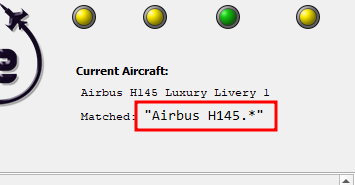
its on by default for the HPG Helicopter type since its required for the AFCS implementation... which brings another point.. I believe you said you were using the default HEMS livery.. but just in case.. make sure TelemFFB is matching on the default profile (i.e., it doesn't pop up and want you to create a new profile). If you're seeing the new aircraft popup.. let me know.
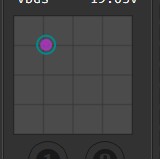
another stupid question.. the axis dot in configurator moves in the correct direction as you manipulate the stick (ie not reversed)? I know this is a stupid question because you already said you don't have anything mapped in the sim and I'm pretty sure you'd have noticed if the stick was moving backwards in the sim but if the direction was reversed it could cause a runway condition, so I gotta rule it out...
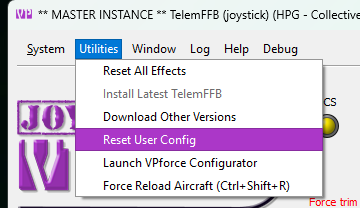
Okay so I reset the config in telemffb. Exit. Went in fs2020. Loaded aircraft, waited for avionics to fire up. Paused. Started telemffb. Mapped my TR button, verified that the heli has a match in telemffb. Unpause sim, same issue.
Yes the direction of my movements move in the direction I move the cyclic. Nothing is reversed
When I load into the aircraft the stick does not move. Stays put but the 2nd I hit the trim release that is when my heli went to the bar and had a few to many
in TelemFFB can you quickly try binding TR to some other button than your usual TR button? any other button on your cyclic will do... just to see if the behavior is any different.
What you are seeing is not something I have ever seen or every heard of anyone else seeing
I don't know what's going on and why this happening. I can also try my laptop. I have an instance of fs2020 on it. I can hook up just the stick to that and try and see if I have the same issue.
my next best suggestion is if you can screen share with me so I can look at TelemFFB, configurator and the sim at the same time to see what's going haywire. We can try the discord voice chat but the only time I've tried that, the screen sharing resolution was pretty bad (may have been a bandwidth issue from the other user.. not sure)
are you using a USB hub? If so, any chance you can try direct attach to motherboard? (I know your setup isn't exactly portable ). I've not seen issues specific to MSFS or the 145.. but some folks did have wierd force trim centering issues on the latest rhino firmware that were ultimately caused by their USB hubs (grasping at straws here).