

![[OR] SerGeant](https://cdn.discordapp.com/avatars/290181622832168961/338cff3e564800fa5a1068e9c25e28f5.webp?size=40) [
[Yes.I have a simpit with 11 USB devices.
But I have not changed a thing. It has been running without issues since I first plugged the rhino in. 2 years ago.
But I have not changed a thing. It has been running without issues since I first plugged the rhino in. 2 years ago.
 W
WIt could be various reasons - for example Windows update updated something
[Found the culprit. An usb cable has been squeezed between two alloy profiles. One wire was cut. So I had the USB error you predicted 

 I
IAre there any 3D print files of the base for larger motors?
 H
HFor the Rhino base. Yeah for sure there is. All the stl etc are on github.
 H
HPost in the DIY section not support
 B
BBefore I attack stuff, is there a guide to switching the din connector 180 degrees as I am running with the emergency stop at the front and already reversed things in the software. just be nice to fit my TM WH stick

 F
FJust remove the two screws and there should be enough slack to pull it out and turn it.
 I
IHey, looking at grabbing the VKB adaptor, what would the wait time for it to be shipped be like?
BPerfect thanks, I was about to do that and thought I would ask JIC 
 (
(@Blackrat just be carful when pulling out the din as the other side is a jst conector so ensure that’s seated securely when putting all back together also ensure you don’t trap and nick a wire
 B
BAlready rotated, but I literally pulled it up just enough to rotate 180 degrees without fouling the seating area so never saw a wire or what was underneath. If I have an issue I will strip it down, but tested with my TM grip and all buttons work.
( B
BHelp! Got the Rhino in yesterday and installed in my simpit. I gave MSFS, DCS working properly. Recognize pitch and roll axis.
Got the Rhino in yesterday and installed in my simpit. I gave MSFS, DCS working properly. Recognize pitch and roll axis.BIL2GB on the other hand does not recognize the Rhino axis and I can’t map them in setup.
BSince the other simulators recognize the rhino base it must be Il2 specific. Anyone else here had issues? Solutions?
BIf you cannot see it at all then I think IL2 only sees the first so many controllers plugged in and ignores the rest, maybe you have hit that limit. Its been a few years since I flew it.
 N
NBlackrat is likely on the right track. IL2 only supports 8 devices and will only see the first 8 that it sees. The order it sees them is seemingly random and likely dependant on in what order the devices were connected to windows. Check this thread on how to re-order the devices that IL2 will see. https://forum.il2sturmovik.com/topic/72473-so-you-went-and-bought-too-many-peripherals/
IL-2 Sturmovik Forum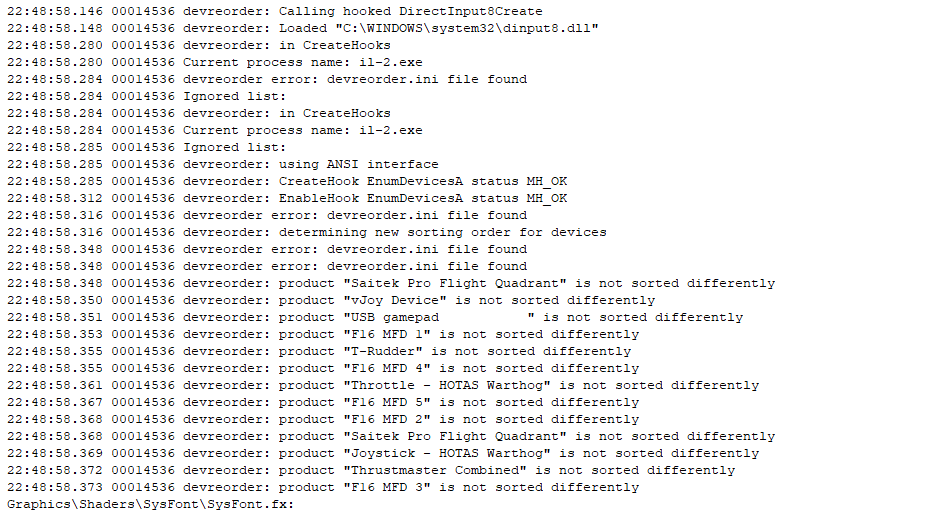
Il-2 supports up to 8 devices. It's possible to exceed that limit, either because you have multiple vjoy devices, have racing gear attached in addition to your flight hardware, or maybe you just went a little wild building your home cockpit. This is a short guide to fixing that problem. If You On...
BOr grab a hub with switches for each device.
 M
MOr use program called "usbdeview" to selectively shut off unneeded USB devices (also works for regular games that insist on treating every piece of your expensive HOTAS as a gamepad)
BThanks for the help guys! I downloaded the Devreorder utility and hid a bunch of controllers I don’t use in Il2. I had already unplugged some of them but apparantly had to put them in the right order. I know have all my my axis working. Thx again.
TYeah if you visit the IL2 forums or the Reddit you’ll see this posted every so often because the whole “it can only see 8 devices” thing is a well known, but under the radar, type of bug.
Glad you’re back flying!
Glad you’re back flying!
 F
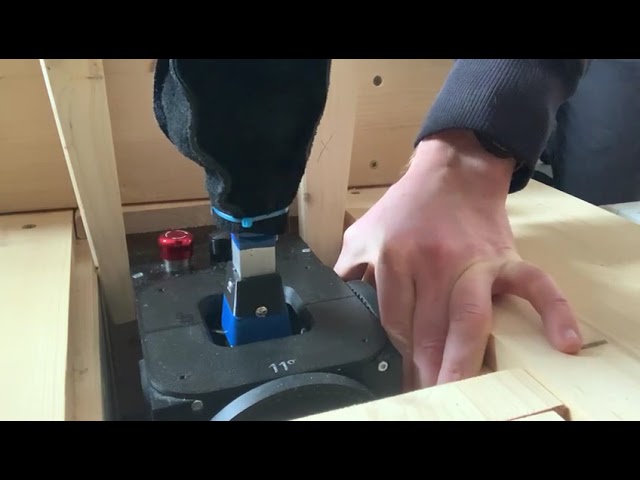
FI do have a cracking noise on the elevator. When holding the outer wheel and moving the stick, there is some play in the system which causes the noise. Is there some screw to tighten? If yes, which one? You can see the effect on this video: https://youtu.be/Z0OZHrEYDCQ
 F
FRemoving the top wall should give you good access to the gimbal screws. Try tightening them and see if that fixes it.
 K
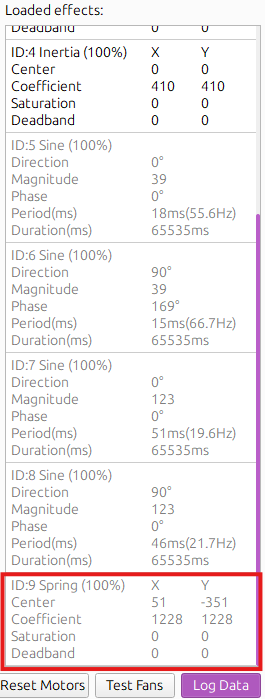
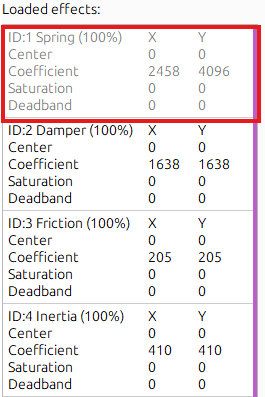
KDCS AH-64 TRIM ISSUE! !HELP!!I had update the newest firmware an telemffb software. When i press the Trim release button, there is a ID9 spring effect with a new center position and the ID1 spring effect with the 00 center is fade .then i release the Trim button and a few second later,the ID9 spring effect is gone and the ID1 spring effect is back .My stick get a force back to the 00 center. It's not the way for a heli Triming. the stick should be stay in the new certer position.
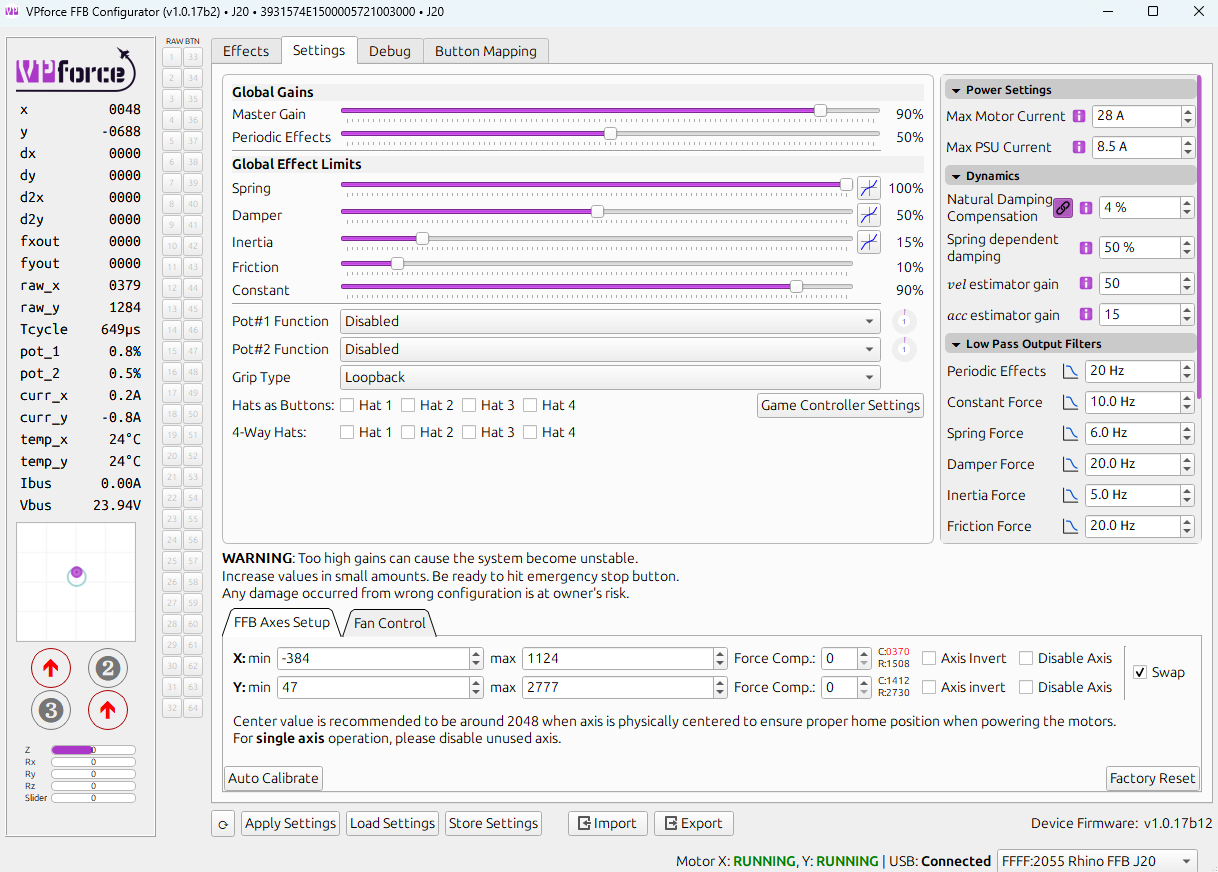
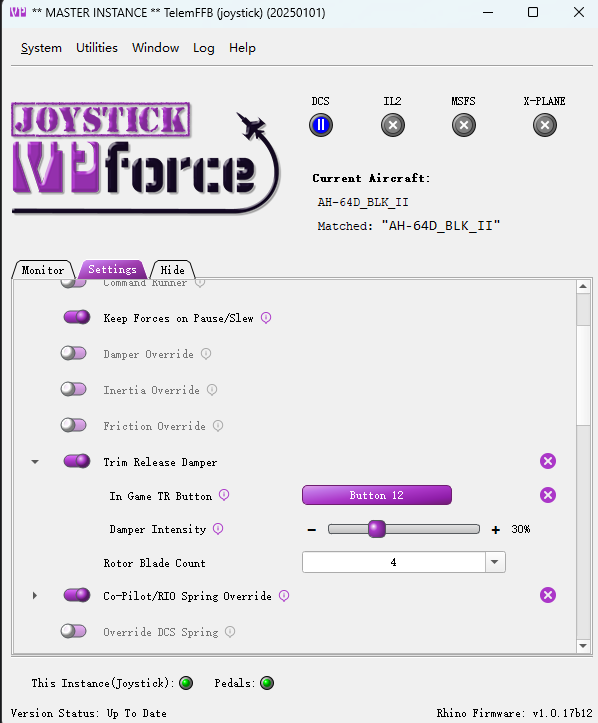 N
N"Trim release Damper" is not "force trim". It is a effect which, temporarily overrides the games spring effect in order to provide a configurable dampening feel while you have trim-release depressed. When you release the button, it hands control of the spring effect back to DCS. DCS itself manages the center position of the primary spring effect.
Disable the trim release damper feature, then troubleshoot why force trim isn't working with DCS (doesn't require telemffb to be running at all).
Disable the trim release damper feature, then troubleshoot why force trim isn't working with DCS (doesn't require telemffb to be running at all).
 K
Kthanks , i will try the dcs force trim tomorrow
 D
DHello, I have a problem with ffb inversion and there is a chance it's because I mounted rhino backwards with usb ports facing back.
After that I disabled inversion for X axis and enabled inversion for Y axis - so pitch and roll control displayed correctly. After that in Il-2 - when I am trimming elevator - it is correct, stick goes into nose heavy or tail heavy according to both button description and cockpit indication if present.
But aileron trim works the opposite way - when I trim left - stick goes to the right, opposing both default keybinding, button desctiption, cockpit indication and visually aileron should be moving the opposit way, it follows the trimmer deflection which is incorrect and should be oppossite, trimmer should push aileron and not make it follow it.
ELP.
After that I disabled inversion for X axis and enabled inversion for Y axis - so pitch and roll control displayed correctly. After that in Il-2 - when I am trimming elevator - it is correct, stick goes into nose heavy or tail heavy according to both button description and cockpit indication if present.
But aileron trim works the opposite way - when I trim left - stick goes to the right, opposing both default keybinding, button desctiption, cockpit indication and visually aileron should be moving the opposit way, it follows the trimmer deflection which is incorrect and should be oppossite, trimmer should push aileron and not make it follow it.
ELP.
DIf I invert X axis - seems ffb works correctly, but axis is now inverted in tester utility and in game (which is not really a problem since game can invert it anyway)
But probably there is some setting I need to do if I want to mount device in backward orientation?
But probably there is some setting I need to do if I want to mount device in backward orientation?
D... ok, seems axis inversion inverts both axis and ffb effect on said axis, because in DCS I have both ffb and axis inverted now. In that case for some reason roll FFB is inverted in Il-2 great battles specifically for some reason.
 B
BYou need to invert in the vpconfigurator not the games.
DYes, I did that initially and I had X and Y behaving normally in tester / windows devices and so on. But FFB in roll channel is inverted in Il-2 great battles with that.
While it works correctly in DCS, stick follows roll trimmer correctly. So the issue is not in ffb (I am also using direct input, not ffb telemetry yet)
While it works correctly in DCS, stick follows roll trimmer correctly. So the issue is not in ffb (I am also using direct input, not ffb telemetry yet)
FBy "removing the top wall" you mean removing 30 screws? I did it, but what now? I don't see how it gave me any more access to screws that I have not been able to access before. Which screws should I check? @walmis ?
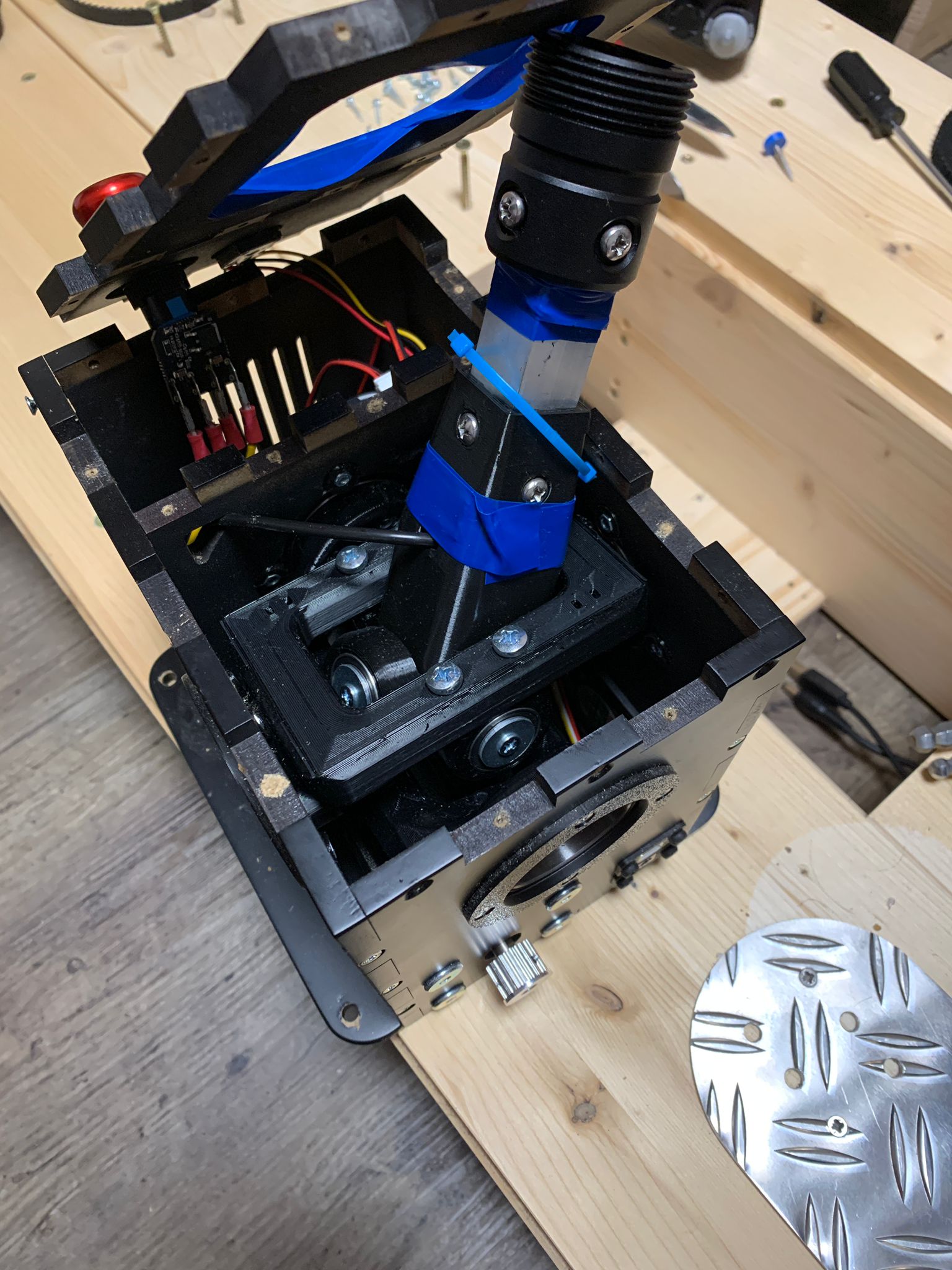
 S
SI think he means those here
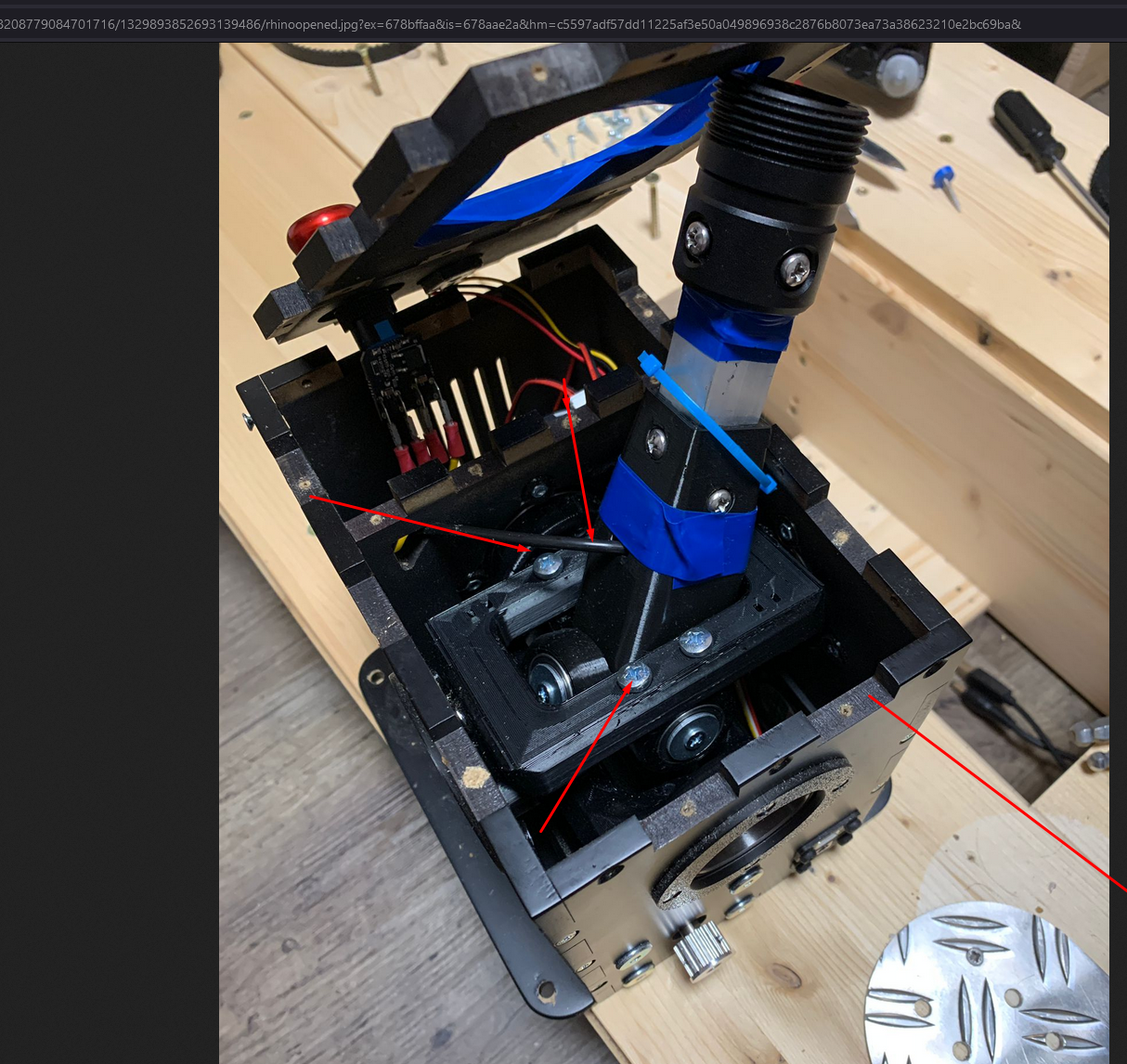 F
FIf those don't help you will probably need to also take the bottom plate out and tighten the ones under the gimbal.
 R
RI just updated my firmware for my DIY pedals. I have an arduino that outputs the Winwing data structure to emulate the brake axes, but the latest firmware update says that the Winwing adapter is not detected and my axes no longer work. Does anyone know what's going on or which grip profile I should use instead?
RAhh I figured it out based on the SPI Slave thread in the KB channel. Looks like the data structure got updated. I updated my arduino code accordingly and it's working now.
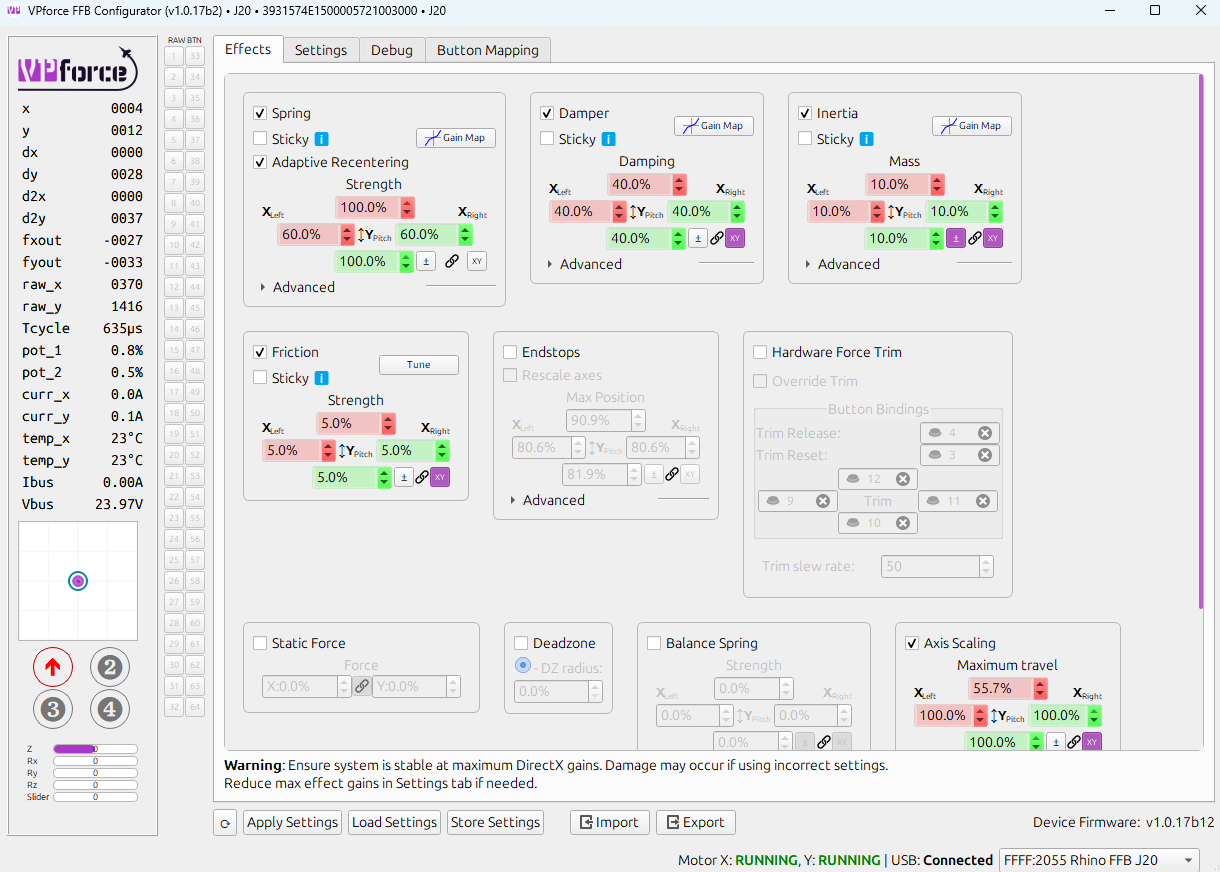
KMy stick's hardware trim in dcs is not working.compare with my pedals,the loaded effect is not the same (without telemffb).My pedals hardware trim work fine.And here is my config setting.
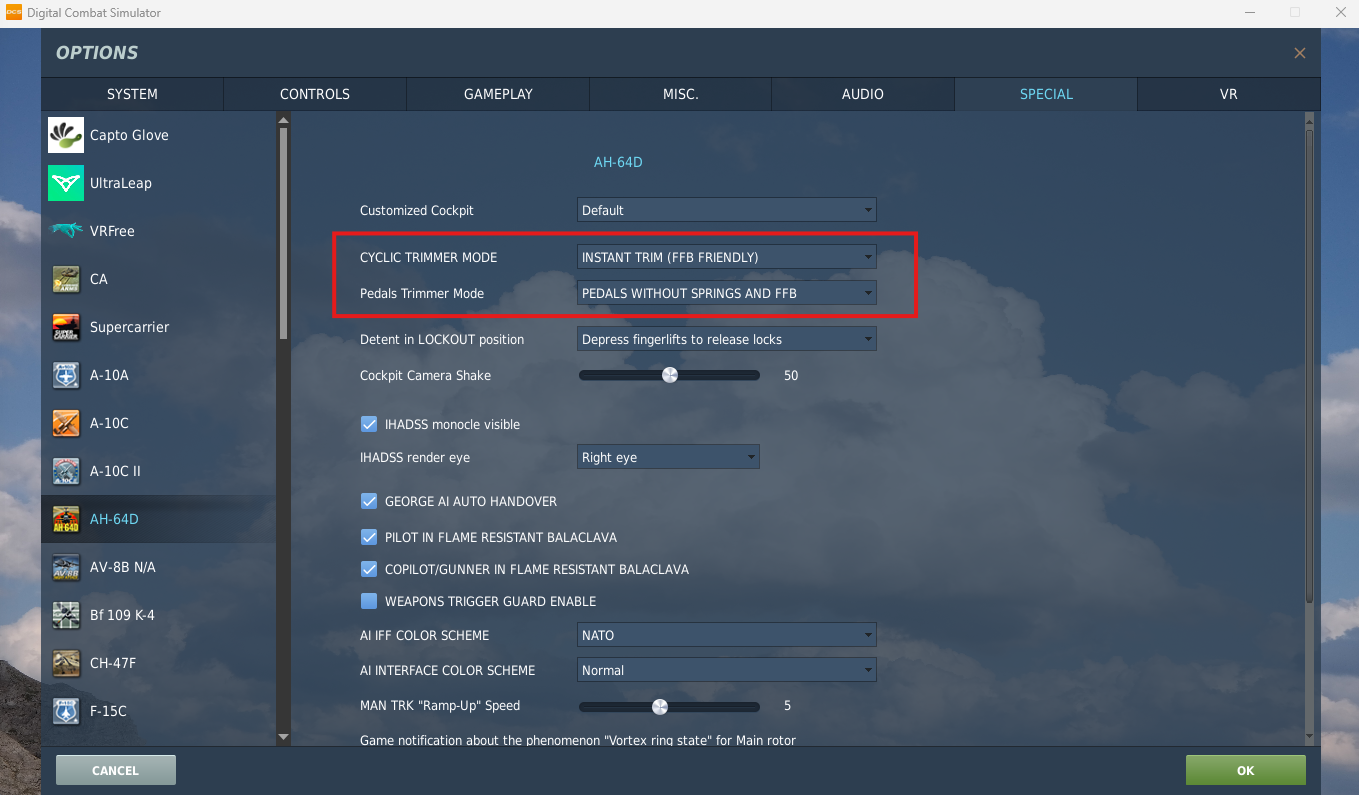
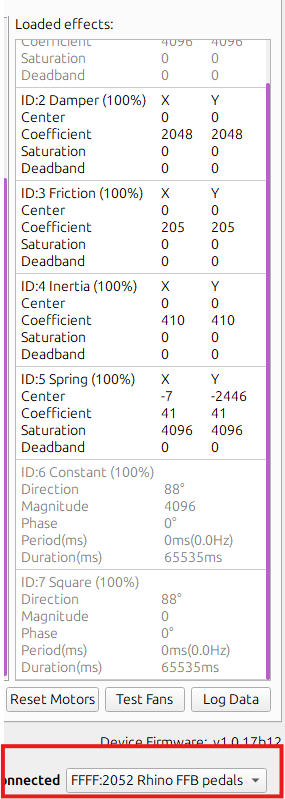
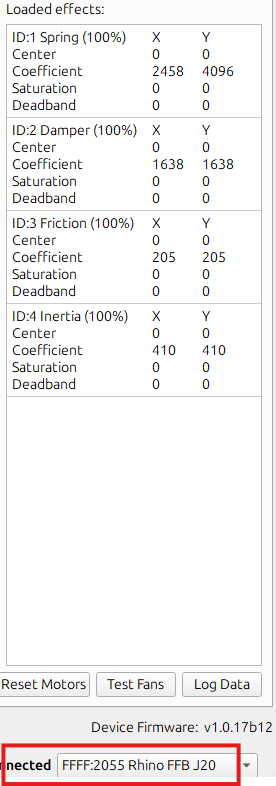
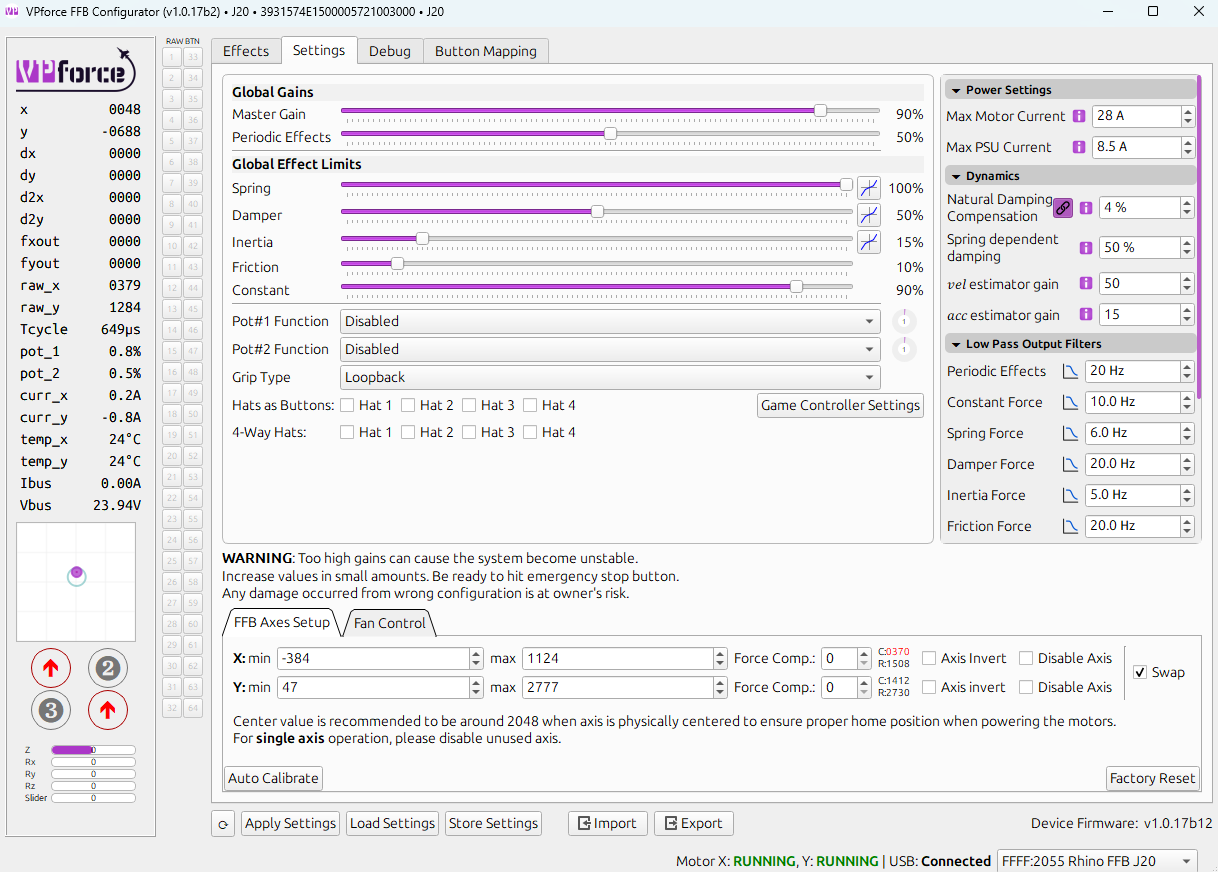
 D
DOk, seems fixed.
There is a file 'data\input\joys.ffp' in game folder, this file describes FFB configuration for different devices.
I've copied "default" section, renamed "default" into "VPforce", while in axis map in all three secions (constant, periodic, condition) I changed "0" to "-0" similar to g940 configuration in this file. Not sure if it is correct way to deal with this problem, but now ffb input on X axis is normal and stick follows the trim.
There is a file 'data\input\joys.ffp' in game folder, this file describes FFB configuration for different devices.
I've copied "default" section, renamed "default" into "VPforce", while in axis map in all three secions (constant, periodic, condition) I changed "0" to "-0" similar to g940 configuration in this file. Not sure if it is correct way to deal with this problem, but now ffb input on X axis is normal and stick follows the trim.
Nif the game isn't even creating its effects when you start it, something more fundamental is wrong. There are no settings in configurator that would prohibit that. When the game starts, just sitting in the menu, you should see the 3 loaded effects (like you do on your pedals screenshot).
Check the DCS log to see what it says about the joystick. You should see something like this:
Also in the same section, look to see if it is loading 'vJoy Device'. If you see that, disable or uninstall vJoy as it can cause problems with FFB.
If all the above is normal, it could be a USB issue. If your using a hub, try connecting your joystick directly to your PC.
Check the DCS log to see what it says about the joystick. You should see something like this:
Also in the same section, look to see if it is loading 'vJoy Device'. If you see that, disable or uninstall vJoy as it can cause problems with FFB.
If all the above is normal, it could be a USB issue. If your using a hub, try connecting your joystick directly to your PC.
NUnless this is a new issue with IL2... you're the first person I've ever seen have this problem, so I think there is something else going on. Is it happening on all aircraft or just some?
To be clear, if your configurator axis inversion settings are set correctly (such that the axis position readout follows your joystick in the correct directions), then the "FFB Direction" and "Axis Direction" will be in sync. In DCS for example, there is only a handful of aircraft that need FFB inverted on an axis ('FFTune', not the axis itself). Almost all will work fine without changing the inversion settings in the game at all.
For IL2, I've never heard of having to invert anything so long as configurator is set correctly.
To be clear, if your configurator axis inversion settings are set correctly (such that the axis position readout follows your joystick in the correct directions), then the "FFB Direction" and "Axis Direction" will be in sync. In DCS for example, there is only a handful of aircraft that need FFB inverted on an axis ('FFTune', not the axis itself). Almost all will work fine without changing the inversion settings in the game at all.
For IL2, I've never heard of having to invert anything so long as configurator is set correctly.
KIt works now. two things i had changed.First ,i use the old version rhino loopback software to enable my diy grip button,the new version will make the ffb not work. Second It should be some usb issue that make my Real Simulator stick have some collision with the Rhino FFB。i change another usb slot to connect RS stick。
DYes, it was on multiple aircrafts, so I would assume on every one with roll trims.
Maybe it's not exactly device issue but il-2 issue, some people had "weird" stuff with ffb and in one case a person deleted everything from input folder to fix it. Additionally it's interesting that g940 "by default" defined by game developers have similar -0 setting, so it's not "their first rodeo" I would assume. Again, I never had issues with g940 in the past.
I believe in configuration utility it is set correctly, by default I had X axis inverted and Y not inverted, both X and Y directions were correct. When I placed joystick the opposite way for gimbal to be closer to the chair - I inverted Y and removed inversion from X, again in configuration utility / windows tester and so on orientation was / is correct. There is a chance that my device is special and by default both axis should not be inverted, but I think I received same settings when I tried default profile downloaded from the rhino webpage, so I doubt that.
Additionally in both Il-2 and DCS when I assign pitch and roll - orientation is also correct, I don't need to invert anything in game. So the only thing that was inverted is FFB in roll / X axis and only in Il-2, no issues with DCS.
Not sure what is that and still looking for comments on Il-2 forum, but at least config is working and I am happy with that. And would definitely not happy to delete everything from input folder, too late for that.
Maybe it's not exactly device issue but il-2 issue, some people had "weird" stuff with ffb and in one case a person deleted everything from input folder to fix it. Additionally it's interesting that g940 "by default" defined by game developers have similar -0 setting, so it's not "their first rodeo" I would assume. Again, I never had issues with g940 in the past.
I believe in configuration utility it is set correctly, by default I had X axis inverted and Y not inverted, both X and Y directions were correct. When I placed joystick the opposite way for gimbal to be closer to the chair - I inverted Y and removed inversion from X, again in configuration utility / windows tester and so on orientation was / is correct. There is a chance that my device is special and by default both axis should not be inverted, but I think I received same settings when I tried default profile downloaded from the rhino webpage, so I doubt that.
Additionally in both Il-2 and DCS when I assign pitch and roll - orientation is also correct, I don't need to invert anything in game. So the only thing that was inverted is FFB in roll / X axis and only in Il-2, no issues with DCS.
Not sure what is that and still looking for comments on Il-2 forum, but at least config is working and I am happy with that. And would definitely not happy to delete everything from input folder, too late for that.
 C
Cwhen im not running ingame, if i move the stick vigorously, i get this fault and have to power it off and on, any ideas? only on the x motor, i can move the y motor as fast and hard as i want and it works fine. Also in the X axis I sometimes feel a "slipping" sensation when the stick is under pressure, like the motor is giving in the direction of the hold but the GUI stick position shows the same. Every effect is turned off except for adaptive recentering and a force trim keybind in telemFFB
50% spring
35% damper
50% spring
35% damper



 W
WBug?: VPC V.F.X. DLC up/down buttons. Periodically when I start VPForce FFB the DLC up/down buttons on my V.F.X. are not recognized, e.g. they do not initialize and are not recognized by OS. I have to stop/restart VPForce FFB Configurator (sometimes multiple times) for the buttons to be eventually recognized. Stoping and restarting VPForce FFB Configurator seems to always fix the issue, but anoying that I have to do a pre-flight on the controller in VPForce FFB Configurator before jumping into a SIM.
 C
CI recently had some play in my pitch similar to yours. I had to tighten these scres
CScrews
C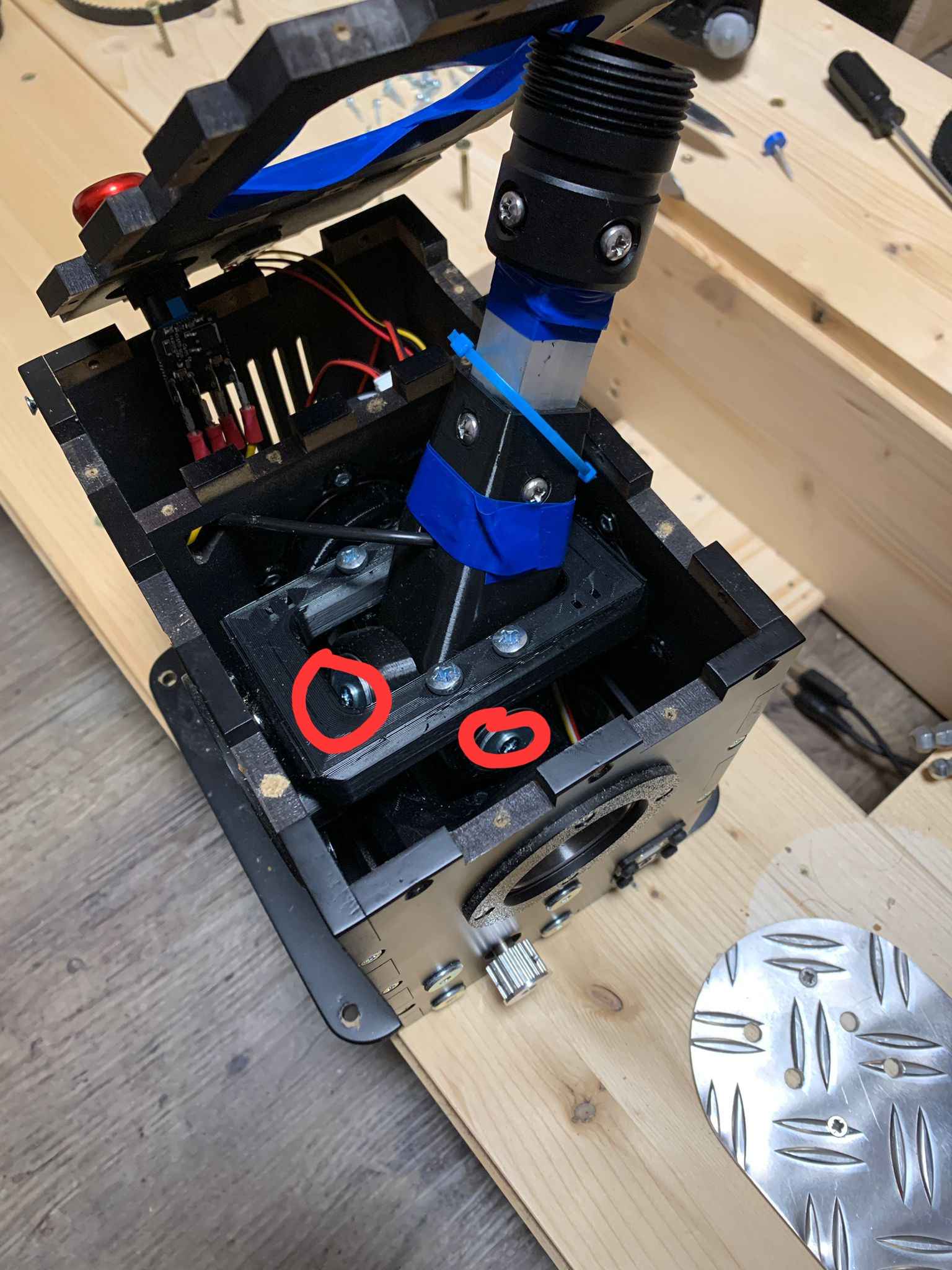 C
CI was able to tighten them without disassembling the gimbal. I just went at it with a screwdriver.