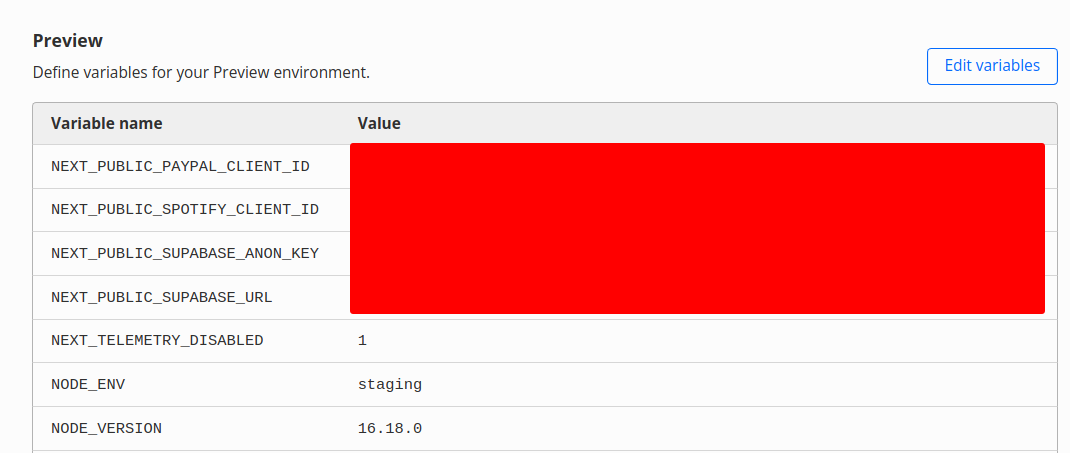
Should work, can you share screenshots of where you are calling it in app and the CF variables page?
Should work, can you share screenshots of where you are calling it in app and the CF variables page?
 R
R M
M B
B CBC
CBC B
B A
A D
D UAA
UAA HDSD
HDSD
 K
K G
G H
Hwrangler pages deploy [directory]GHwrangler.tomlwrangler pages deploynpm run buildnetlify deployGSCDCDD D
D ZZD
ZZDwrangler pages deploy [directory][build]
command = "npm run build"
publish = "dist" --> How can i tell to use dist? is watch_dir?netlify deploy[build]
command = "yarn build"
publish = "dist"const NODE_ENV = process.env.NODE_ENV
export const supabaseUrl =
NODE_ENV === 'production'
? process.env.NEXT_PUBLIC_SUPABASE_URL
: process.env.NEXT_PUBLIC_DEV_SUPABASE_URL
export const supabaseAnonKey =
NODE_ENV === 'production'
? process.env.NEXT_PUBLIC_SUPABASE_ANON_KEY
: process.env.NEXT_PUBLIC_DEV_SUPABASE_ANON_KEY
console.log({ NODE_ENV })
// i then import this client into a react component or something
export const supabasePublicClient = createClient(supabaseUrl!, supabaseAnonKey!)