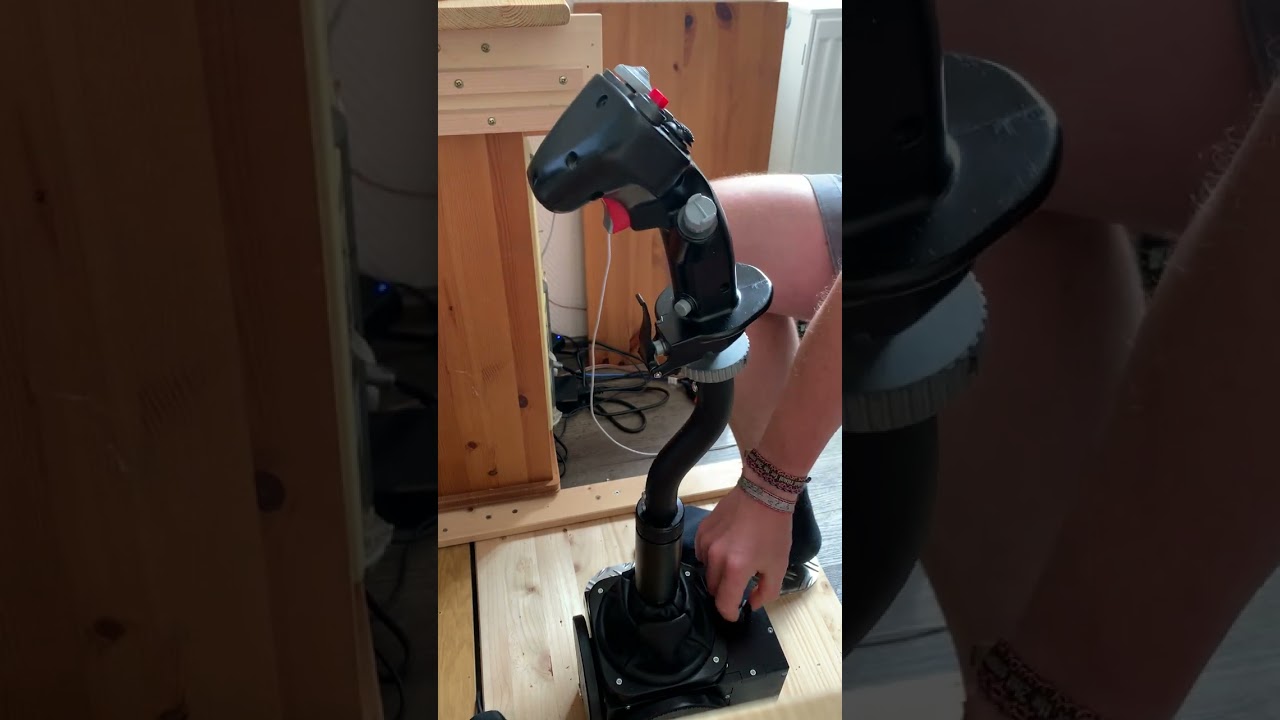
FWIW I had a similar situation which was solved by removing 20 cm extension + VKB adapter and installing a 10 cm extension. Never found out which one caused it. The bump/noise was also only in Y axis like in your case. Could be something completely different though and idk whether you are even using an extension or adapter.
Keep in mind if you wanted to mount the Rhino the other way you can also rotate the stop button this way so itβs still facing you and saying βstopβ or whatever.
All you do after that is Invert the Axis in the Vpconfig software (NOT in games!)
I used the Rhino with the TM F-16/Warthog grip for a while but changed to a Virpil Constellation rather quick. It works but the Warthog isn't just my cup of tea. Way to heavy and stiff feeling. That is just personal preference though. It works well and keeps its balance with decent spring settings.
Anyone know if you can use Virpil Alpha thumb stick as buttons in each direction? There was a way to do that in Virpil Software - any ideas on how to mimic that in the VPForce config?
Check if the motor pulley is firmly tightened on the axis. I forgot to loctide it properly and it came loose. It didnβt slip completely, but it had play which lead to a βcoggingβ feel around the middle position.
Okay thank you! If anything comes up, let me know. Happy to assist however I can, thx you for making these sticks! I've been on the list for almost a year lol
Hi, in relation to the Heatblur Phantom.....I am interested in introducing a bit less sensitivity , to help out in refueling....with a "normal" stick, this is easily done by introducing some curve to teh axis, however, obviously, this is not good practice with an FFB stick. Is there a way within the config file options to emulate this effect at all? Thank you.
I got my parts pre-printed from Winger. He used CF-PETG iirc. However out of curiosity and for DIY test purposes I printed a gimbal half from regular PETG myself and it seems plenty strong enough.
curves and/or saturation in the axis tune in DCS will cause problems because it creates a disconnect between the "FFB X/Y" and the "Axis X/Y"... this is why people find the trimmed centerpoint jumping when they release the force trim button if they have curves set on helis. It is because the FFB axis position is always linear from -1 to 1 for each axis. When that position doesn't match the "axis position".. bad things happen.
On the F-4, the "FFB Center" changes often because of the bobweight effect. I don't imaging it would end will if you tried adding a curve or changing the saturation in the game.
What you could try, if you are willing to sacrifice 10-15% of your total throw (who ever needs full deflection anyway?), would be to create a type of axis scaling by artificially increasing your calibrated range beyond the physical limits of the joystick.
For example, my calibrated limits for my Y axis are 1073<>2831 with a center of 1952. That\s +/- 879. If I were to increase that logical range equally in both directions, it would have the effect of reducing the sensitivity of the axis. I could manually set my limits to 973 and 2931 while leaving the auto calibration untouched. Now the game would think that full deflection is +/- 979, but the full throw of my physical axis would only be +/- 879, making it less sensitive overall.
Disclaimer: I haven't tried this in practice so YMMV.
How normal is cracking anyway? I got my stick since 2 weeks. i slightly tightend all visible screws and the teo big screws under the cover. Still, in the extreme position (11 deg limiter) it's cracking.
I found the throw limiter causing a lot of unwanted noises due to the two halfs connecting in a unfortunate position. I there fore made my own, that is built a little bit different and more firm (I donβt have a adjustable CAD though - thats outside my capabilities)β¦. Another point of cracking on my device is the main stick/gimble connector. Even though all scres are tight, plastic on plastic sometimes makes cracking noisesβ¦ Iβm still thinking about a possible solutionβ¦.
It's on both pitch and roll. Here is a video, the cracking is between second 33 and 37: https://youtu.be/DGEhnrvv-k0... thinking about it, it may be wodden construction that sqeaks. Does anyone else have these sounds too?
Usually when a problem is gimbal related it makes the creaks on a single axis.. Hmm, hard to say. Try maybe holding the base with a downward force and moving the gimbal then, also try it without the extension.
I accidentally downloaded my collective settings to the joystick. I didnβt have any backup of the settings but I tried to restore them. But know in DCS the F4 doesnβt work as it should, it pitches violently up when I activate βforce feedbackβ in DCS settings. I read that this happens if You enable ffb in the F4 without a ffb joystick. It worked great before I messed up. Any tips? Also in the F14 the joystick axis doesnβt follow the trim.
I have a 86BLF04 motor which I am using for my Virpil Collective. My motor axis is 'X' but I understand it should be 'Y' for a collective. Is there firmware available to change the motor to 'Y' axis?
The problem came back again with the bouncing inputs. I added a resistor on the data input and the problem seems solved. I got 60cm wire between the shift register and the board.
You might need to get beta firmware from walmis. There is a "swap axis" checkbox in configurator but I think it is not working for single motor setups in the latest configurator/firmware.