
Can you paste your entire `wrangler.toml`?
Can you paste your entire
wrangler.toml?wrangler.toml?
wrangler.toml G
G#:schema node_modules/wrangler/config-schema.json
name = "secretname"
main = "src/index.js"
compatibility_date = "2024-05-29"
[[durable_objects.bindings]]
name = "roomObject"
class_name = "RoomObject"
#[[migrations]]
#tag = "v2"
#renamed_classes = [{from = "MyDurableObject", to = "RoomObject" }] # Array of rename directives
#deleted_classes = ["MyDurableObject"] # Array of deleted class names
[[kv_namespaces]]
binding = "name"
id = "12345"
GGGwrangler deploy "src/index.js"I get:
The entry-point file at "src\index.js" was not found.So it seems like it somehow can't see my files? Even though my project structure hasn't changed
Gcd srcGives:
Set-Location: Cannot find path 'C:\Data\WranglerProjects\workerProject\src' because it does not exist.
GGG M
M T
T HTH
HTH A
A AA
AAwrangler devA--show-interactive-dev-session=false SS
SS
 JS
JS L
L'sh: wrangler: command not found' when running npx wrangler. I'm on the correct Node version for my project, so not sure what is up C
Cwrangler.tomlenv.vars which is picked and which is overridden?Hmain field D
D V
V E
E C
Croute in its wrangler.toml file. So kind of a two part question...am I even configuring the environments in the correct way and if so, how do I define the environments? S
S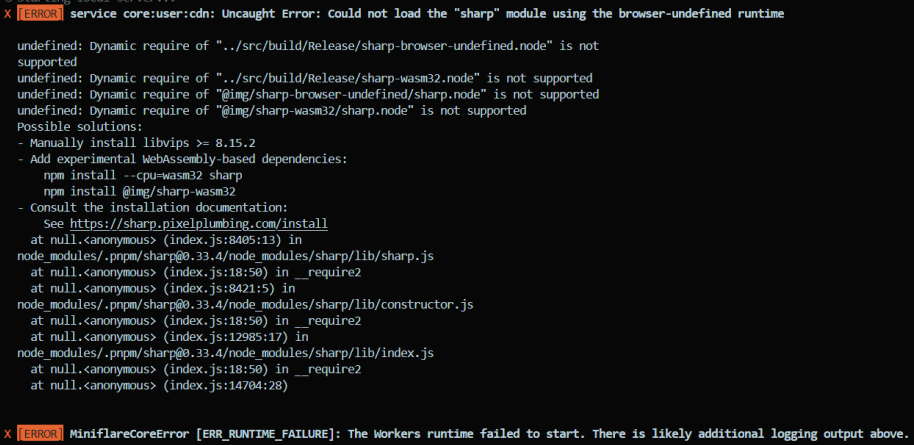 HSHSHSHHS
npm i @webassembly/sharp. There are no other projects in the npm registry using @webassembly/sharp. SHHS
SHHS BSH
BSH
wrangler dev--show-interactive-dev-session=false'sh: wrangler: command not found'npx wranglerenv.varsmain name = "uvuli"
pages_build_output_dir = "./dist"
route = "https://uvuli-esketit.pages.dev/*"
vars = { ENVIRONMENT = "dev" }
kv_namespaces = [
{ binding = "EMAIL_LIST", id = "a16974f824054fb7b2457f7d13c5bfa5" }
]
[env.production]
vars = { ENVIRONMENT = "production" }
routes = [
"uvuli.app/*",
]
kv_namespaces = [
{ binding = "EMAIL_LIST", id = "583b076b601d4dc49e13d8ddf47a574e" }
] route pnpm install --force @img/sharp-darwin-x64@cf-wasm/photonnpm i @webassembly/sharp @cf-wasm/photon  CDCloudflare Developers / workers-and-pages-helpCDCloudflare Developers / workers-and-pages-helpCDCloudflare Developers / pages-helpCDCloudflare Developers / pages-help


