


 P
Pthat's all good m8. I might not be around by then  . Feel free to hit me up when you see me online tomorrow or whenever. I'll be happy to try help out if I can m8. Goodluck in the mean time.
. Feel free to hit me up when you see me online tomorrow or whenever. I'll be happy to try help out if I can m8. Goodluck in the mean time. O
OCheers fella
Pno worries m8.
 M
MI've just started using telemffb yesterday, and when I try to load configurator profiles either on start or per aircraft, I get the following error
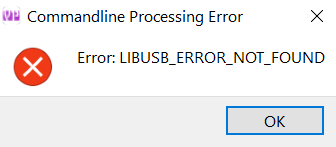 M
MProfiles work fine when imported into the configurator manually
Mis this the library I need to install? (and if so, how would I go about doing that?)
https://github.com/libusb/libusb
https://github.com/libusb/libusb
GitHub
A cross-platform library to access USB devices . Contribute to libusb/libusb development by creating an account on GitHub.

 N
Nthats an error generated by the configurator software, not TelemFFB. I see it from time to time when doing a lot of testing with TelemFFB where I am constantly starting/exiting the app, but its by no means a regular occurence.
You can try this from CLI (assuming you don't have any additional VPforce devices, otherwise you need to specify the serial number)...
in a command prompt From the configurator install directory
You can try this from CLI (assuming you don't have any additional VPforce devices, otherwise you need to specify the serial number)...
in a command prompt From the configurator install directory
VPforce_FFB_Configurator.exe -config path/to/config.vpconfNsee if you see the same error or if it works. (this is the same command TelemFFB uses to push the profile)
MSo just tried, and running that gives me the same error
Mas I run in the CLI
NInteresting... the error message indicates some sort of USB communications error with the device.. Yes, I realize it is working fine with the app, and its otherwise talking fine to TelemFFB. The only suggestion I have off hand would be to try a different USB port.. especially if your on a loaded up USB hub.. cheap answer for support, but thats all I got. Gonna have to wait for walmis to get proper support for the configurator app.
MThank you for the suggestions. The Rhino is on a fairly loaded up powered hub. I've tried different ports on two adjacent hubs with no other ports powered, but still the same issue. I don't have a cable long enough to reach the back of my pc. I also wonder if it may be the cable I'm using, it's the only printer cable I had lying around, and it's very old at this point, I've been meaning to order a new one. Otherwise, I will wait for what Walmis sees.
 W
WHey, I received a similar issue via DM, this appears to have worked:

 M
MThat appears to have done the job! Thanks Walmis!
 R
RHave any of you y'all run into your computer not going to sleep with the rhino plugged in? If so how did you solve it. Ive looked most of the google answers and cannot figure out a solution. Thanks
 M
MI have not had that issue in Windows 11. I do run it through a PCIE addon usb card, but doubt that is the difference.

 B
BSleep, I simply turn it off when not using it.
1: disable quick boot, so you get a fully fresh boot.
2: it shouldn't take more than 30 seconds to start it anyway if you have a sim capable PC.
That said, since I use my pc for other things as well, I have remote triggered AC switches on the sockets for the usb hub and rhino powered so it too is not powered or connected unless in use.
1: disable quick boot, so you get a fully fresh boot.
2: it shouldn't take more than 30 seconds to start it anyway if you have a sim capable PC.
That said, since I use my pc for other things as well, I have remote triggered AC switches on the sockets for the usb hub and rhino powered so it too is not powered or connected unless in use.
 A
Ai've heard it can be related to nvidia overlay thing and having devices plugged in that don't report a stable deadzone
 B
Bif i repeat (FLY AGAIN) an instant action sortie...pitch axis goes limp F4E...going fore ant aft rapidly seems to wake it up again...telemffb running or not makes no dif....no stickys selected...oh yea...yesterday i re-routed the cable that runs from the joystick out of the rhino and into my realsimulator base so that i can use all of my 64 buttons on my realsimulator stick
 R
RI should add. I disconnect power to the motors when not using. But leaving the USB plug in, prevents sleep. I look into turning off quick boot. Thanks
BQuick boot won't help in this case, I just recommend disabling it as it ie a source for a lot of windows rot.
And it doesn't actually make booting up any faster what so ever.
And it doesn't actually make booting up any faster what so ever.

 M
MThis is a bug on Heatblur's side. It affects airstart missions, ffb starts sending correct forces only after you slow down.
 B
Bthank you
 M
M@walmis Hey Walmis, I found a bug in telemffb. If you invert your aileron axis. In the configurator. The lateral force will be in the wrong direction. I changed the sign in the aircrafts_msfs_xp.py (side_accel = -telem_data["AccBody"][0] * self.lateral_force_gain). Now it works for me. But an invert button like the deaceleration force would be nice.
Mregards Moe
WYou shouldn't invert in the configurator, unless the center dot does not correspond to actual stick movement.
Mthats why I inverted the axis. the center point is movin in the opposite direction than the one I move the stick.
WSo assuming the axis moves in the correct direction in the configurator, to verify the effect : the lateral force in telemffb should add some force in the direction of the pull i.e. if you roll left wing down, and hold the plane level using rudder the stick should feel a little pull to the left due to gravity.
Mok I can verify the effect. I assumed I had to feel the stick move to the rigth if I turn left on the ground. But this is wrong?
 H
HJust to clarify: You don't have any axis inverted in DCS? When you have (properly) set the axis in the VP configurator, the axis in DCS should not need inverting.
 W
W@walmis Hi Walmis. What's the chances of getting an auto calibration routine when a device is powered up ? I know almost all joysticks motion probably fall within the one motor rotation so the system knows where centre is. But for some non joystick designs ( like yokes) it is harder to do.
WI'm also working on a pedal design that would also fall into this category. The idea of having to calibrate before every use isn't ideal.
 R
R!status

 V
VHey @Rechs,
So the last Shipped RHINO is #0602 on 2024-06-27
Average waiting time from preorder to shipped is 208 days, median is 209 days, max is 437 days
587 Rhinos are shipped in total
So the last Shipped RHINO is #0602 on 2024-06-27
Average waiting time from preorder to shipped is 208 days, median is 209 days, max is 437 days
587 Rhinos are shipped in total
 M
MHey Hiob, I use MSFS not DCS. but yes everithing is set properly in the VP configurator
Mregards moritz
 W
WHey, I'll research this, but in the meantime you can do something like this:
Let's say you're building a yoke and when powering it you need it to startup in the correct calibration. Now, let's say the simplest the position to startup is the fully forward one (for a stick it would be centered).
Then what you would do is to push it fully forward, reset the motors and check what the "raw" angle is. Adjust the belt/pulley so it's roughly 2000(+-500).
Next do the full auto calibration and store it.
After that, before powering on, move the yoke fully forward and it should start in the correct calibration every time.
Let's say you're building a yoke and when powering it you need it to startup in the correct calibration. Now, let's say the simplest the position to startup is the fully forward one (for a stick it would be centered).
Then what you would do is to push it fully forward, reset the motors and check what the "raw" angle is. Adjust the belt/pulley so it's roughly 2000(+-500).
Next do the full auto calibration and store it.
After that, before powering on, move the yoke fully forward and it should start in the correct calibration every time.
WThanks walmis, I think I understand. But would this process be dependent on being only one rotation out of the middle rotation ? What if there were 4 rotations from one axis end to the other ?
 S
SAh, 4 rotations shouldn’t matter. Because the full forward calibration point will be between 0-4096 and it’ll be happy at startup. Full back will be ~18000 or something.
HAh, ok. Sorry, missed that. I have no idea about MSFS,,,,
 A
AWould it maybe also be possible if the stick calibrates to 3800 full left to 3700 full right that the controller will remember that 3900 is actually a left defection, left of 0? So that exact centering of the physical motor doesn't matter as long is there is no ambiguity in position (because <360 degrees rotation overall)?
AI guess how this would work out is calibrating to find the middle and then the max deflections from the middle.
 S
SAnyone know how to get this message to stop appearing everytime I plug in my Rhino?

 S
SMany of us have this problem
AThere’s a setting in Edge to suppress this, however despite setting this, it does still happen unfortunately. The chrome version of this setting seems to work though, just an edge bug I believe (also, AFK so can’t check the exact setting, but people have posted about it in this server before)
 S
SI hate Edge just a little more now
SI used to be about to disable Internet Explorer.....
 I
IHi guys, I am using ALPS RKJXT1 on my new DIY grip and it has a problem, pushing in one of the 4 directions the center push button is also pressed do you know if there is any way to isolate or filter it using VPForce software?
 E
EHi all, telemffb is still not working for me. dcs log shows this error. can someone help me?
Erelevant log
message.txt49.5KB