I have a new cnc bit to go on so would I be able to just unplug the old cable & remove it all? Or do you mean even replacing that I'd have to cut the cable? Rear panel yes that's right
Iβve played CP/G in the Kiowa in DCS a couple of times now, and with different people in the pilot seat. Every single time, the game has crashed on the pilotβs end.
Other people in the group have played the Kiowa without experiencing this, and AFAIK no one else has a Rhino.
Itβs a long shot and likely caused by the Kiowa just being unstable, but just gotta ask
I assume youβve mapped pilotβs commands, as well as co-pilotβs? Itβs not supposed to let those commands go through if someone is in the other seat, but maybe it is and thatβs breaking something? Only flown SP in the Kiowa so far but itβs fun!
Just finished installing my Rhino, running cables, etc. I noticed that it runs pretty well in DCS just with FFB checked. What do people tend to run for default/basic settings in Rhino configurator?
word, glad you got it sorted -- but yeah -- i assume once you've flashed the firmware, you will require the new configurator software or else it probably won't know how to talk to the rhino
Just tried the new beta firmware and the fan control is a godsend for my ears
Question though - any advice on fan settings to use or avoid? Can we raise the fan start temperature to 40 or 45 or not recommended? Is 25% starting fan ok or again not recommended.
Just some general parameters that the motor should be operating under would be helpful to understand whats ok and not ok with the fan control (I'm pretty sure I didn't see this in the change log - apologies if its there).
And thanks again for implementing this! I personally feel its a really nice QoL upgrade as the fan was very loud before and now its much much quieter (even if it runs for longer now).
The earlier and the more you cool the better. If you NEED all the cooling depends a lot on what you do. When you just fly helicopters you won't need much cooling. When you do a lot of high-G dogfighting (in an F-16 e.g.) You want all the cooling all the time if you ask me.
The problem is, that the temperature that is actually measured is the one of the motor-driver. The motor themselves serve as giant heatsinks. Which is nice for short temp-spikes of the drivers because they cool down again very quickly. Once the motors themselves are heated up though..... A continuous light cooling would be best in my opinion, so that they don't heat up that much in the first place.
I think that's reasonable. My plan as well. Just have them running constantly but almost inaudible and have them ramp up at their usual treshold (50 C I think).
Something went off, I've got joystick and pedal going on but only one of the board can be connected after the firmware update. Any way to fix this? I checked the PID is unique to each joystick(2055) and pedal(2052).
I should have said ''one at a time'. The second one gets detected as USB as beep goes, but it gets ignored on configurator, then USB gets disconnected on second board after a while.
Thank you for looking into this, I have a Sabrent powered USB hub. I'm trying the USBDview now, I see [Rhino FFB Pedal] (Green) while the Rhino FFB Joystick is disconnected and Pedal connected. When I connected the joystick, beep sounds but no [Rhino FFB Joystick] shows up. I noticed that [Port#0004.Hub#0013] is going red when I connected the joystick, and goes gray when disconnected. I disconnected the pedal and connected the joystick, the line [Port#0004.Hub#0013] changes to Rhino FFB Joystick.
The quick device selector dialog is now asking which device to work on, select Joystick...worked, close the configurator and start again, select the Pedal...worked. TelemFFB launched as normal. I think I'm good now. Thank you for helping me on this, I really appreciate!
I believe the Sabrent hub is USB3.0 but I think I connected a USB2.0 hub in between to see if I can get around the USB Endpoint issue. So far I haven't seen 'Not enough resources' message after I did it. I have too many USB devices, the way how resources are being managed are quite complicated.
My brain can understand just little part of the endpoint calculation but yes, that explains! Thank you again for saving my weekend, and introducing me the USBDeview, I was been using Microsoft USB Device Viewer but the USBDeview gives far better idea of what's going on.
Iβve been reading through the old posts about the F4 pitch up issue and checking things list axis conflicts (I have none) and other settings. The only solution Iβve found that works is to disable FFB in DCS but then you donβt get stick trim that stays in place. Was a solution ever found that allowed both to work? Iβm using TelemFFB and VPforce with a Winwing adapter and extension
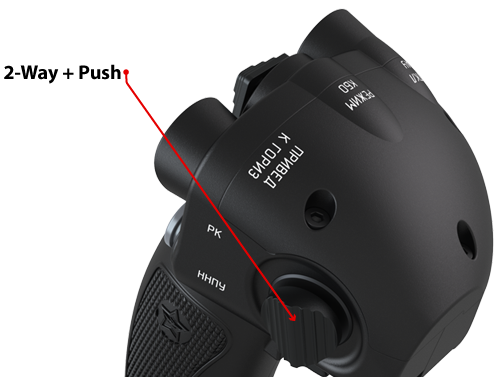
Did anyone have any buttons on their grip stop working after updating to 'v1.0.17b1'? I have a VPC MongoosT-50 CM2 grip connected to my Rhino. The forward and aft inputs of the 2-way+push on the right side have stopped working after the Rhino update yesterday. When connected to my Virpil CM2 base it works normally (confirmed by VPC Configuration Tool and Windows Game Controller), but when connected to the Rhino base, the fore and aft presses aren't detected. Downward press still works. I have VPC T-50 CM2 selected in the Grip Type drop down just as I did before updating. I noticed that the fore and aft presses are detected when I select Generic Grip or most of the other VPC choices, but using those can cause other conflicts. If it helps, the non detected inputs are normally listed in Windows Game Controller as 18 and 19, and 28 and 29 in VPC Configuration Tool.
Hmm. Guess I'll play around with the settings, then. It's just weird that it's only with it on the Rhino, only with the CM2 grip type selected, and only after yesterdays update.
@walmis hey m8, sorry again for ping. Is there a trick to removing the 3d printed grip attachment part? It seems to be on there really tight & I'm worried about damage to the gimbal??
ok got the 3d part off but there is now way to install the new cable without cutting the plug end off & I don't have the tools to redo a plug like that??