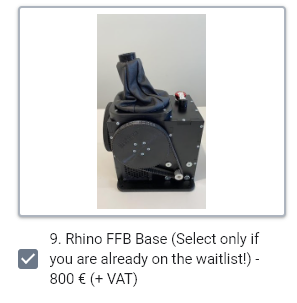
The Big Red Button only disables the motors it does not "SWITCH OFF" the internal electronics. If you are not switching it off at the wall or disconnecting the power cable from the power brick then the internal electrics going to the circuit boards are still powered up! Hitting the Red Button to move the Grip out the way is fine to help you get in and out of your Pit but you should always switch the power to the power brick off as you'll get software issues and bugs showing up as the circuit boards are on all the time! Had this issue after the first week of having it.
Shutting it down completely to reset everything solved issues I was Having!
Oh yeah whenever I stop my session I fully disconnect both the USB and power to the rig, since I then have to wheel it away. This is just for getting in and out more conveniently
I exchanged the grip mount to an aluminum one, just to find the play between the grip mount metal profile coming out of the Rhino increased. The plastic mount was tighter. I could tighten the screws more, but I fear I'll destroy the threads. So I am thinking about glueing the mount to the profile. Is there any significant risk that I am taking? I should still be able to disassemble the Rhino, if needed, or?
My issue was that for the first week I had it, I was just hitting the Big Red Button BRB from now on. and after a week FFB was just not working as it should. Realised the BRB was just cutting the power to the motors but leaving everything else fully powered. Unplugged for a minute and all went back to normal and have unplugged from power brick ever since. USB still connected to PC but I do shut it down at night. Been good ever since until recently and the F-5E in DCS has no trim effects anymore but all the other modules seem fine?
I've managed to get my settings dialed in after a couple of test flights. 2 questions remain. How do I disconnect the standard spring effect from the spring dynamic effect? I would like to have no spring effect at all when standing still and as air speed increases have more and more spring like effect. Second question, how do I decrease the inertia effect time. Now it feels a bit sluggish. I would like to have the inertia kick immediately when stopping the stick from moving. Now there is a bit of a delay, when the stick is stopped until I feel the 'inertia kick/effect.
HI I can confirm that the F-5E trim both stick and Rudder used to work fully without issues, The Stick and Rudders would both move and react to trim inputs. But since ED updated DCS on the 24th of Dec I could not fly as they buggered something up for me! They seem to have fixed the issue I had with the latest update but now the F-5E cannot be trimmed out and is basically unflyable with the Rhino! All other modules that I have tried and I have most seem to be absolutely fine!
Hey all, I got 1h40m into a DCS campaign mission yesterday when my Rhino suddenly disconnected in the middle of a Case III approach. The stick went limp and there were no inputs reaching the game. I pressed and reset the emergency stop and unplugged and reconnected the USB cable on the base and it reconnected, but there was no longer any FFB. I restarted TelemFFB and got the periodic effects back, but there were no spring forces. I managed to trap, but wondering if there's anything else I can do to recover from a disconnect and restore all forces in the future. I'm worried about this happening during a multiplayer squadron mission as those often run over 2 hours. Thanks!
I have never had an issue but someone the other day said that they experienced “random FFB disconnects” similar to what you’re describing.
The issue and fix for this person was Vjoy or joystick gremlin virtual joystick? (One of those) was causing a dual input.
To fix the issue they just disabled “ FFB” check box in the virtual joystick or the Vjoy.
Maybe it was under the support channel so see if you can find it AND double check yourself (if your running any virtual joystick) that the “FFB” is unchecked.
That’s the only thing recently I’ve seen so maybe that’s a start for troubleshooting
Thanks, I appreciate the response. I am using vJoy and Joystick Gremlin, but I just double checked and "Enable Effects" is already disabled in vJoy. I don't see any FFB related options in Joystick Gremlin. I will search the channel for the history though. Thanks again.
I use vjoy for my pedals, but ffb effects are all disabled there. Two weeks ago I thought I found the solution, in disabling MSFS support in TelemFFB ... then one full week no ffb loss/disconnect. But this week it returned. What a nasty "bug".
Hello a question: if I set the spring to 100% in the ffb configurator, then the maximum stroke distance in y is only half as long. What am I doing wrong or how can I adjust this?
When I send spring off, it's 100% of the total length again
For me it's a hid disconnect that gets DCS to stop sending FFB effects (spring). Only a DCS restart fixes that. In my case it is PointCTRL, which I painstakingly have to make sure not to reset while dcs is running.
Could I request views for and against mounting the Rhino on a LONG Monstertech mount on an IKEA desk, with vibration settings turned down very low to avoid it shaking the desk to bits - thanks.
(NB: My personal interest is in the Rhinos realistic trimming and aerofoil pressure NOT sensations of gear or airbrake travelling etc.)
Everthing was working fine. I've open the case to tighten main gimbal screw and remount. The stick center wasn't correct any longer. So tried a calibration.
But now I'm unable to have motor provide force any longer. TM warthog buttons works. I can see stick moves in windows game controller window.
I have try Reset Firmware defaults. Auto calibrate. Master Gain Main 100% Effects Springs 100%
Everything works, except there is no force, stick can move freely. Motors have a green light. There is 24V on all pins with screws. Firware update button cannot be activated even if connected, may be because FW version is latest one.
I'm lost. Except return the DIY kit 57BLF03x2 for check I have no idea what to do.